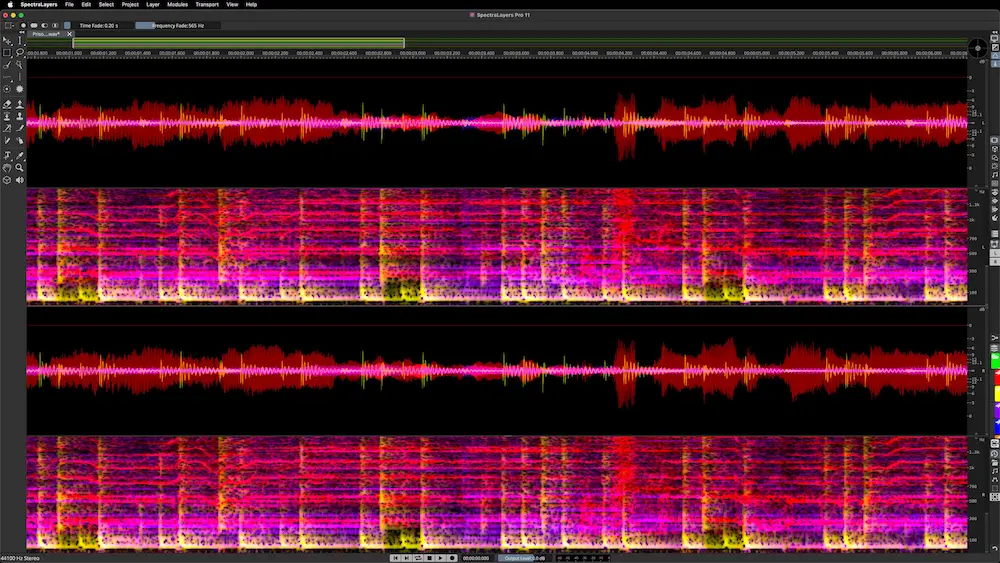
Steinberg SpectraLayers 13 Review: AI Spectral Editing for Professional Audio Production
Spectral editing is no longer confined to restoration. It has become part of everyday production workflows for engineers dealing with imperfect recordings, inherited sessions, and modern AI-assisted editing. As AI-driven source separation and frequency-domain processing have improved, engineers are using spectral editors far beyond dialogue cleanup and forensic repair. Steinberg SpectraLayers 13 reflects that shift, combining advanced spectral editing with AI-assisted analysis to tackle problems that are difficult—or impossible—to solve with conventional DAWs and plugins alone.
For professional mixing and mastering engineers, the real question isn’t how many AI features Steinberg has added. It’s whether those features produce cleaner source material, reduce manual editing, and preserve musical integrity without slowing down the workflow. Marketing claims are easy to make; consistent results on commercial sessions are what determine whether software earns a permanent place in a production environment.
This review approaches SpectraLayers 13 from that perspective. Rather than walking through its feature list, we’ll examine where it provides measurable advantages in real-world production, where its limitations become apparent, and how it compares with the spectral editing and restoration tools most commonly found in professional studios.
Contents
What’s New in Steinberg SpectraLayers 13?
SpectraLayers 13 is an evolutionary update rather than a complete redesign. Version 13 focuses less on introducing an entirely new editing philosophy and more on refining the AI-assisted workflow that has become central to modern spectral editing.
The improvements also reflect the rapid evolution of AI audio restoration, where machine learning increasingly assists engineers without replacing manual editing decisions.
The most significant improvements revolve around smarter source separation, faster analysis, more reliable layer generation, and a smoother editing experience inside supported ARA workflows. Rather than treating AI as a one-click solution, Steinberg continues to build around the idea that automated analysis should accelerate manual decision-making instead of replacing it. That approach makes version 13 particularly relevant for engineers who already incorporate spectral editing into commercial mixing, mastering, dialogue restoration, or audio repair workflows.
Existing SpectraLayers users will also notice numerous quality-of-life improvements. Layer handling feels more fluid, several restoration processes have become faster, and interaction between AI-generated layers and manual editing requires fewer corrective steps than in previous versions. None of these changes completely redefine the software, but together they reduce friction during long editing sessions.
For new users, the value proposition remains largely unchanged. SpectraLayers is still a professional spectral editor rather than an automatic repair utility. Version 13 simply makes that spectral editor workflow more efficient, more predictable, and better suited to modern production environments where AI-assisted source separation has become part of everyday audio production.
That evolution also reflects the broader shift toward AI audio repair, where machine learning accelerates repetitive editing tasks while leaving critical production decisions to the engineer.
System Requirements and Performance
Spectral editing is considerably more demanding than conventional audio editing because AI-assisted analysis processes large amounts of frequency-domain data. Fortunately, SpectraLayers 13 remains well optimized for modern production workstations, with most computationally intensive tasks occurring during analysis rather than continuous playback.
| Requirement | Recommendation |
|---|---|
| Operating System | Windows 11 or recent macOS versions |
| CPU | Modern multi-core processor recommended |
| RAM | 16 GB minimum, 32 GB recommended for large projects |
| Storage | SSD strongly recommended for faster analysis |
| GPU | Not required, CPU performance has greater impact |
| Best Use Case | Professional mixing, mastering, restoration and dialogue editing |
Unlike virtual instruments or oversampled mastering processors, SpectraLayers rarely consumes significant CPU resources during playback. Engineers working with large multichannel projects or extensive AI source separation will benefit more from fast storage and sufficient RAM than from extreme processor performance alone.
Why Spectral Editing Has Become an Essential Production Tool
 Not long ago, spectral editing was considered a specialist discipline. Most engineers opened a dedicated restoration application only when conventional tools had reached their limits. Removing clicks, repairing clipped recordings, or cleaning dialogue were isolated tasks rather than part of a typical music production workflow.
That has changed. AI-assisted source separation has expanded the role of spectral editing well beyond restoration. Today’s sessions frequently include damaged vocal tracks, incomplete stems, noisy home recordings, archival material, or stereo mixes that require surgical correction. These problems cannot always be solved with EQ, multiband compression, or automation because those processors affect an entire frequency range or time segment instead of a single event within both dimensions.
Spectral editing approaches audio from a different perspective. Instead of viewing a recording as a waveform, it represents sound as a spectrogram, displaying energy across both time and frequency simultaneously. Harmonics, transient energy, room ambience, clipping, mechanical noise, and unwanted resonances become visually identifiable components that can often be edited independently of the surrounding performance.
Consider a chair squeak beneath a sustained piano note. A conventional equalizer cannot remove it without damaging the instrument because both occupy much of the same frequency range. In a spectral editor, however, the squeak typically appears as a distinct visual event that can be reduced with minimal impact on the piano itself. The same principle applies to headphone bleed, lip noises, camera clicks, handling noise, coughs, and countless small distractions that become obvious once compression and limiting are applied later in the mix.
This capability has moved spectral editing upstream in the production process. Engineers now use it to repair vocal takes before compression, recover partially usable stems, reduce cymbal buildup, clean sampled material, prepare remix assets, and correct isolated problems inside stereo mixes. It does not replace conventional mixing techniques, but it often removes problems that previously required either destructive processing or a request for new source files.
As a result, software like SpectraLayers is no longer aimed solely at restoration engineers. Mixing engineers, mastering engineers, producers, and remixers increasingly rely on spectral editing because modern production rarely begins with perfectly recorded source material. Correcting defects before creative processing usually produces cleaner and more predictable results throughout the rest of the signal chain.
Steinberg has adapted SpectraLayers accordingly. Rather than treating it as a standalone repair utility, recent development has focused on making spectral editing part of the production workflow through tighter DAW integration, including ARA support and deeper Cubase interoperability. The objective is practical: spend less time exporting files and more time solving problems without leaving the session.
That workflow matters as much as algorithm quality. Professional engineers rarely judge software by processing alone. They evaluate how quickly problems can be identified, whether edits remain reversible, how often rendering interrupts the session, and whether the application helps maintain creative momentum instead of breaking it.
The demand for cleaner source material has also grown with immersive audio production. Dolby Atmos exposes low-level noises, edit points, and recording defects that often disappear inside dense stereo mixes. Small imperfections become more noticeable when individual elements occupy discrete positions within a three-dimensional mix, making targeted spectral repair valuable long before the mastering stage.
Streaming has reinforced the same trend. Since loudness normalization reduced the incentive for aggressive level maximization, production quality has shifted toward clarity, intelligibility, and the absence of technical distractions. Listeners may never notice a repaired click or subtle resonance removal, but they quickly notice artifacts that survive compression, codec encoding, and playback across headphones, cars, and smart speakers.
That broader shift explains why spectral editing has become part of mainstream audio production rather than a specialist repair process. For software like SpectraLayers 13, the question is no longer whether AI can separate audio. The real value lies in how efficiently those tools integrate into professional mixing and mastering workflows while preserving the integrity of the original performance.
Beyond AI Marketing: How SpectraLayers 13 Fits into Professional Mixing and Mastering Workflows
AI is the headline feature in SpectraLayers 13, but it’s not the reason the software matters. Source separation, dialogue isolation, ambience extraction, and layer generation have all improved, yet the real advantage lies elsewhere. Unlike many AI-powered separation tools that deliver fixed results, SpectraLayers keeps every extracted element editable inside a spectral workspace, allowing engineers to refine the outcome instead of accepting whatever the algorithm produces.
That difference becomes obvious in commercial sessions. Most engineers have already tested online stem separation software, cloud-based AI services, or standalone separation applications. They can generate usable stems surprisingly quickly, but correcting leakage, restoring missing harmonics, or cleaning separation artifacts usually requires switching to another editor—or starting over. SpectraLayers keeps those corrections inside the same environment, making AI-assisted editing part of the workflow instead of the final step.
This approach is particularly valuable when dealing with problematic recordings. AI does not truly reconstruct missing information; it predicts the most likely result based on learned patterns. Dense arrangements, distorted guitars, layered synthesizers, aggressive limiting, and complex ambience still confuse even the best separation models. SpectraLayers acknowledges those limitations by giving engineers direct control over the extracted layers rather than treating AI output as a finished product.
That level of control extends well beyond vocal extraction. Localized spectral selections, harmonic repair, adaptive processing, and layer-specific editing make it possible to remove defects that would be impractical to address with conventional DAW tools. Instead of replacing equalizers, compressors, or other mixing plugins, SpectraLayers expands what can be repaired before creative processing begins. That philosophy aligns with modern hardware-assisted workflows built around dedicated mixing systems such as the Softube Console 1 Compact, where cleaner source material allows engineers to focus on balance, tone, and dynamics instead of corrective editing.
How SpectraLayers 13 Changes Everyday Production Workflow
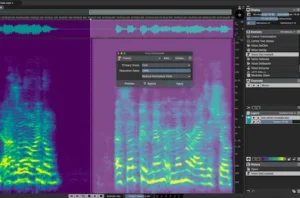
The biggest benefit of SpectraLayers 13 isn’t that it introduces new editing tools. It’s that it changes when engineers solve problems. Instead of waiting until technical issues become obvious during mixing or mastering, many of them can now be addressed much earlier, while the source material is still being prepared.
That shift has practical consequences throughout the production chain. A vocal cleaned before compression behaves differently from one repaired after multiple processing stages. An acoustic guitar with isolated squeaks removed before EQ requires fewer corrective decisions later. A repaired stereo mix often reaches mastering with fewer technical compromises already embedded into the material.
Across commercial sessions, one pattern becomes clear: the earlier localized problems are removed, the less corrective processing is required later. Compressors respond more predictably, saturation emphasizes musical harmonics instead of unwanted noises, and automation focuses on creative balance rather than damage control.
SpectraLayers also changes how engineers approach client revisions. Instead of requesting replacement stems for every technical problem, it often becomes possible to repair isolated issues directly inside the existing files. That can significantly reduce turnaround time when musicians, studios, or recording locations are no longer available.
Another noticeable advantage is the speed of quality control. Spectral displays make clipped edits, hidden distortion, intermittent background noises, digital glitches, and unexpected recording artifacts much easier to identify before they create larger problems further down the production process. During testing, several issues that were barely noticeable during casual listening became immediately obvious once viewed spectrally, allowing them to be corrected before mixing decisions were finalized.
This doesn’t mean engineers begin relying on visual editing instead of critical listening. In practice, the opposite usually happens. Audible problems are identified first, while the spectral display simply makes them faster to locate and more precise to repair. The software supports engineering judgment rather than replacing it.
ARA integration strengthens this workflow even further. Instead of repeatedly exporting files, rendering repairs, importing replacements, and checking synchronization, engineers can move between mixing and spectral editing with far fewer interruptions. That reduction in workflow friction encourages smaller corrective edits that previously would have been postponed—or ignored entirely because the process wasn’t worth interrupting.
The biggest workflow improvement becomes apparent over dozens of projects rather than a single session. SpectraLayers gradually shifts from being an emergency restoration utility to becoming part of routine production preparation. Engineers begin opening it proactively to eliminate technical distractions before they influence compression, limiting, spatial processing, or mastering decisions.
Perhaps the most important change is psychological rather than technical. Knowing that highly localized repairs remain available allows engineers to make production decisions with greater confidence. Instead of compromising because a defect seems impossible to remove, they have another level of precision available when conventional DAW editing reaches its limits.
Viewed from that perspective, SpectraLayers is less about AI and more about workflow efficiency. Its greatest contribution isn’t replacing existing mixing techniques—it’s reducing the number of technical obstacles that interfere with them in the first place.
Separating Innovation from Marketing: The Practical Limits of SpectraLayers 13
Steinberg understandably emphasizes AI when promoting SpectraLayers 13, but engineers should separate marketing from workflow reality. AI-assisted analysis and source separation have improved substantially, yet faster processing should not be confused with perfect results. The software expands what can be repaired—it does not eliminate the physical limits of the original recording.
No spectral editor can recover information that was never captured. When multiple instruments occupy the same spectral space, AI estimates what belongs to each source based on statistical models rather than reconstructing hidden audio. The results can be remarkably convincing, but they remain predictions rather than exact recoveries.
Those limitations become obvious in demanding productions. Dense orchestration, heavily distorted guitars, saturated vocals, layered synthesizers, aggressive limiting, and complex ambience still challenge every modern separation engine. Leakage between layers is common, and pushing artifact reduction too aggressively often creates problems that are more distracting than the original bleed.
Source quality remains just as important as software quality. Clean recordings with controlled microphone placement, consistent gain staging, and well-managed room acoustics separate more accurately and require less corrective editing. SpectraLayers can recover surprisingly difficult material, but it cannot compensate for fundamentally poor recording practices.
The workflow itself also requires a shift in mindset. Spectral editing is not simply waveform editing with additional tools. Effective use depends on recognizing harmonic structures, transient patterns, and frequency relationships quickly enough that editing becomes intuitive rather than analytical. Like critical listening, that skill develops through repetition rather than tutorials.
Another trap is over-editing. Spectral displays reveal details that may never become audible in a finished mix. Engineers new to frequency-domain editing often spend considerable time removing visual imperfections that have little or no impact on playback. Experienced users learn to fix audible problems—not everything visible on the screen.
Just as importantly, SpectraLayers is not the answer to every production problem. A poorly balanced arrangement, excessive compression, inconsistent automation, or an uninspiring performance cannot be repaired spectrally. In many situations, conventional mixing techniques—or a better recording—remain the more effective solution.
That is ultimately where SpectraLayers 13 finds its place. It is not a replacement for traditional production tools, nor is it limited to restoration work. Used selectively, it extends what experienced engineers can repair while leaving the musical and creative decisions exactly where they belong: in the mix, not inside the algorithm.
Where SpectraLayers 13 Fits in Today’s Audio Production Ecosystem
The question isn’t whether SpectraLayers 13 is the best spectral editor on the market. It’s where it delivers a clear advantage within a professional production workflow. Most commercial studios already rely on multiple repair tools, each optimized for different tasks. Choosing the right application is usually a workflow decision rather than a feature comparison.
The most obvious alternative is iZotope RX. Although both applications operate in the spectral editing space, they evolved with different priorities. RX became the industry standard among professional audio restoration software platforms for dialogue restoration, post-production repair, and high-volume restoration workflows, while SpectraLayers has increasingly focused on interactive spectral editing, AI-assisted layer manipulation, and tighter integration with music production environments.
One reason RX remains so widely adopted is the maturity of its Spectral Repair module, which has become a reference point for many restoration engineers. SpectraLayers approaches the same category of problems differently by encouraging more interactive layer-based editing rather than relying primarily on dedicated repair modules.
That distinction matters in practice. RX often excels when an engineer needs fast, repeatable restoration across large numbers of files. SpectraLayers becomes more compelling when individual repairs require manual refinement. Instead of accepting AI-generated separation as a finished result, engineers can continue repairing leakage, rebuilding damaged harmonics, and refining individual layers without leaving the same workspace.
In practice, the goal is rarely to eliminate every artifact. Instead, experienced engineers focus on reducing distractions until they disappear within the musical context rather than under visual inspection alone.
For that reason, many commercial facilities treat the two applications as complementary rather than competing products. RX frequently handles routine restoration, while SpectraLayers is opened when automatic processing reaches its limits and detailed manual editing becomes necessary.
Adobe Audition occupies a different segment altogether. Its spectral editing tools remain useful for everyday cleanup, particularly in video production and content creation, but they lack the depth and flexibility expected from dedicated spectral editing software. For occasional repairs, Audition is perfectly adequate. For demanding music restoration, stem refinement, or detailed spectral manipulation, it is considerably less capable.
Among dedicated music restoration software, SpectraLayers has become one of the strongest choices for projects that combine restoration with modern music production rather than dialogue alone.
Cloud-based AI separation platforms such as Lalal.ai and Moises have also become part of modern production workflows. Their appeal is obvious: upload a file, wait a few minutes, and download separated stems. That speed makes them attractive for quick demos, remix preparation, and content creation. The trade-off is limited editability. Once artifacts appear, engineers often have little control beyond generating another separation.
Even the best audio repair software cannot replace careful editing, but specialized spectral tools become invaluable once conventional processing reaches its limits. Clip gain, automation, dynamic EQ, multiband compression, crossfades, and careful editing should always remain the first line of correction. SpectraLayers becomes valuable when those tools are no longer precise enough to solve the problem without affecting surrounding audio.
Viewed in that context, SpectraLayers fills a niche that few applications address particularly well. It combines automated analysis with detailed manual editing, making it as useful for preparing difficult source material as it is for repairing recordings that would otherwise require destructive processing or complete replacement.
| Feature | SpectraLayers 13 | iZotope RX | RipX | LALAL.AI / Moises |
|---|---|---|---|---|
| Manual Spectral Editing | Excellent | Very Good | Good | Limited |
| AI Stem Separation | Excellent | Very Good | Excellent | Good |
| Music Production Workflow | Excellent | Very Good | Good | Basic |
| Dialogue Restoration | Very Good | Excellent | Basic | Limited |
| ARA Integration | Yes | Limited | No | No |
| Batch Processing | Basic | Excellent | Limited | No |
| Learning Curve | Moderate | Moderate | Moderate | Very Easy |
| Best For | Mixing, mastering, restoration | Post-production, restoration | Stem extraction | Quick separation |
Rather than replacing these alternatives, SpectraLayers fills the gap between automated AI separation and traditional restoration. For engineers working with inconsistent source material, inherited sessions, or complex client revisions, that combination of automation and manual control is what gives the software its strongest competitive advantage.
Whether it is the best spectral editor depends on the workflow. For engineers focused on music production and detailed manual refinement, SpectraLayers 13 is among the strongest options currently available.
SpectraLayers Pro vs Elements: Which Edition Is Worth Buying?
Choosing the right edition is often more important than deciding whether to use SpectraLayers at all. Steinberg offers multiple versions aimed at different types of users, but the practical gap between them becomes obvious once projects move beyond basic cleanup.
Elements is designed for occasional repair work, entry-level spectral editing, and users who only need fundamental restoration tools. It is perfectly adequate for simple noise removal, basic dialogue cleanup, and learning the fundamentals of spectral editing without investing in the full professional workflow.
Professional engineers typically outgrow Elements much faster. Sessions involving stem repair, complex AI source separation, advanced layer editing, archival restoration, or mastering preparation benefit from the additional tools available in the Pro edition. Those capabilities become increasingly valuable as project complexity grows.
| Feature | Elements | Pro |
|---|---|---|
| Basic spectral editing | ✔ | ✔ |
| Advanced AI source separation | Limited | ✔ |
| Professional restoration workflow | Basic | ✔ |
| Layer-based editing | Limited | ✔ |
| Best suited for | Occasional repair, beginners | Professional music production, restoration, mixing and mastering |
If your work regularly involves commercial mixing, mastering, dialogue restoration, or recovering difficult recordings, the Pro edition is the clear long-term investment. Elements remains a sensible choice for learning spectral editing or handling occasional repair tasks, but its limitations become increasingly noticeable in demanding production environments.
What Spectral Editing Means for Mix Translation and Mastering Decisions
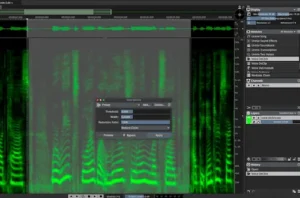 Spectral editing does more than remove unwanted noises. It improves the quality of the material entering the mix, which directly affects compression, automation, tonal balance, and ultimately how reliably a production translates across different playback systems. The fewer technical distractions embedded in the source files, the fewer corrective decisions are required later.
Vocals provide the clearest example. Mouth clicks, headphone bleed, clipped consonants, or subtle background noises often become far more obvious after compression, saturation, parallel processing, or limiting. Removing those defects before mixing produces a cleaner signal that responds more predictably throughout the entire processing chain.
The same applies to localized resonances and transient problems. Engineers often rely on narrow EQ cuts or dynamic equalizers to suppress isolated events, but those processors inevitably affect surrounding musical content because they operate continuously over time. Spectral editing allows corrections to exist only where the problem actually occurs, preserving the rest of the performance.
Those seemingly minor repairs can improve mix translation in subtle but measurable ways. Modern playback systems—particularly high-end headphones, true wireless earbuds, automotive sound systems, and compact smart speakers—tend to expose clicks, resonances, edit artifacts, and intermittent noises that are easily overlooked in the studio. Removing those distractions rarely changes the artistic balance of a mix, but it noticeably improves its perceived polish across a wider range of listening environments.
The benefits extend into mastering as well. Once a project has been reduced to a stereo file, opportunities for precise correction become limited. This is one reason why preparing a mix for mastering is so important—technical issues are far easier to address before final processing than after a stereo master has been created. Broadband restoration, dynamic equalization, or multiband processing can address isolated defects, but they inevitably influence neighboring material. Correcting those problems earlier at the spectral level usually preserves more of the original mix while reducing the need for transparent but still audible corrective processing during mastering.
Streaming delivery reinforces that advantage. Loudness normalization has shifted attention away from maximum level and toward consistency, clarity, and low listening fatigue. Understanding how platforms normalize music is just as important as repairing the source material, especially when preparing a release for Spotify mastering.
Just as important is the relationship between visual analysis and critical listening. Spectral displays should confirm what engineers hear—not dictate what they edit. Every recording contains visual anomalies that never become audible in context. Chasing every artifact visible on the screen quickly becomes counterproductive. Successful spectral editing starts with identifying an audible problem, then using the visual display to locate it with greater precision.
From a workflow standpoint, SpectraLayers integrates surprisingly well into commercial production. Most computationally intensive processes occur during analysis rather than continuous playback, allowing engineers to perform detailed repairs without turning the software into another CPU-heavy processor running throughout the session.
Ultimately, SpectraLayers has less influence on creative mixing decisions than on the technical quality of the material feeding those decisions. Cleaner recordings require less corrective processing, translate more consistently across playback systems, and give mastering engineers greater confidence that they are enhancing the mix rather than compensating for avoidable problems.
Real-World Production Scenarios
Feature lists rarely answer the question engineers actually care about: when does spectral editing save enough time to justify opening another application? The answer depends almost entirely on the type of project. SpectraLayers 13 delivers its greatest value on sessions where conventional editing becomes inefficient rather than impossible.
Vocal repair — Excellent. Modern vocal production often involves multiple stages of compression, saturation, parallel processing, and limiting. Small defects that remain almost inaudible in a raw recording can become distracting by the end of the mix. Mouth clicks, headphone bleed, clipped consonants, clothing noise, and isolated background sounds are all well suited to spectral editing because they can often be reduced without affecting the surrounding performance.
Removing bleed from vocals is another situation where localized spectral editing frequently outperforms broadband processing, particularly when headphone leakage overlaps sustained vocal phrases.
Acoustic instruments — Excellent. Acoustic guitar squeaks, chair movement, page turns, stick clicks, and mechanical noises frequently overlap musical content in ways that make broadband processing impractical. SpectraLayers allows engineers to isolate these events with far greater precision than conventional EQ or multiband processing, preserving the natural tone of the instrument.
Dense modern productions — Very Good. Layered electronic music, distorted guitars, stacked vocals, and heavily limited mixes remain challenging for every AI-assisted separation engine currently available. SpectraLayers cannot perfectly isolate overlapping sources, but it provides considerably more control over refinement than automated stem separation services. Engineers willing to spend additional time on manual cleanup will generally achieve better results than relying on fully automatic processing.
Podcast and dialogue production — Excellent. Dialogue remains one of the software’s strongest applications. Background distractions, intermittent noises, lip sounds, room artifacts, and localized defects can often be repaired with minimal impact on speech intelligibility, making SpectraLayers equally relevant for podcast editing, interviews, audiobook production, and video post-production.
Stereo mix preparation before mastering — Very Good. Spectral editing should never become an excuse to rewrite a finished mix, but isolated clicks, clipped consonants, transient glitches, and localized noises are often easier to correct before mastering than afterwards. Used conservatively, SpectraLayers reduces the need for broader corrective processing while preserving the original balance of the mix.
Across all of these scenarios, the same pattern emerges. SpectraLayers is most valuable when it removes isolated technical distractions that would otherwise require compromises elsewhere in the production chain. It is considerably less useful for solving arrangement problems, tonal imbalance, poor performances, or creative mix decisions. Those remain the responsibility of the engineer—not the software.
Who Should Choose SpectraLayers 13?
Like most professional audio tools, SpectraLayers 13 delivers the greatest value when its capabilities match the demands of the workflow. Engineers dealing with complex recordings every week will benefit far more than users who only need occasional audio cleanup.
Best Suited For
- Professional mixing engineers working with client sessions.
- Mastering engineers preparing difficult stereo mixes.
- Audio restoration and archival transfer projects.
- Dialogue editors for podcasts, film, and broadcast.
- Podcast producers handling inconsistent recordings.
- Engineers restoring damaged or incomplete source material.
Probably Not Necessary For
- Beginner producers learning basic mixing techniques.
- Users who only need quick one-click stem separation.
- Occasional hobbyists working on simple personal projects.
- Studios consistently receiving clean, well-prepared recordings.
SpectraLayers 13 is at its best when precision matters more than speed. If your work regularly involves client revisions, difficult recordings, or detailed spectral repair, it can become one of the most valuable tools in the production chain. If your sessions rarely require corrective editing, a conventional DAW workflow—or a simpler AI separation service—may be sufficient.
Verdict
Steinberg SpectraLayers 13 succeeds because it solves problems that conventional production tools were never designed to address. Rather than competing with EQs, dynamics processors, or restoration plugins, it fills the gap between automated AI separation and precise manual repair, giving engineers far greater control over difficult source material.
That does not make it a one-click solution. AI-assisted separation still struggles with dense arrangements, aggressive mastering, overlapping harmonics, and heavily processed recordings. Engineers expecting flawless extraction from every source will quickly encounter the current limitations of machine learning. SpectraLayers works best when AI accelerates the workflow, while critical decisions remain in human hands.
Its greatest value is practical rather than technological. Recovering a damaged vocal, refining imperfect stems, repairing localized artifacts and performing detailed audio cleanup, or preparing difficult mixes before mastering often saves considerably more time than attempting to solve the same problems later with broadband processing or repeated client revisions. That workflow closely reflects how professional mastering actually works, where technical problems are addressed before tonal enhancement and final loudness decisions.
For professional mix and mastering engineers, SpectraLayers is best viewed as a precision editing environment rather than another audio plugin. Used selectively, it reduces corrective processing, improves workflow efficiency, and helps preserve musical detail that would otherwise be lost. In professional production, the biggest advantage of SpectraLayers isn’t repairing damaged recordings—it’s preventing technical compromises from reaching the mix and mastering stages in the first place.
Overall Rating
| Category | Rating |
|---|---|
| Spectral Editing Precision | 9.8/10 |
| AI Source Separation | 9.2/10 |
| Mixing Workflow Integration | 9.5/10 |
| Mastering Workflow | 9.3/10 |
| CPU & Workflow Efficiency | 9.0/10 |
| Ease of Learning | 7.8/10 |
| Value for Professional Studios | 9.4/10 |
| Overall | 9.3/10 |
Steinberg SpectraLayers 13 stands out not because it replaces traditional mixing or mastering tools, but because it solves problems they were never designed to handle. Its combination of AI-assisted analysis and highly precise manual spectral editing makes it one of the strongest production utilities currently available for engineers working with imperfect recordings. While the learning curve is steeper than most conventional audio software, the workflow advantages become increasingly valuable as project complexity grows.
Pros & Cons
Pros
- Exceptionally precise spectral editing tools.
- One of the most flexible AI-assisted stem separation workflows available.
- Excellent ARA integration for supported DAWs.
- Manual refinement delivers better results than most cloud-based AI services.
- Strong value for professional mixing, mastering, and restoration work.
Cons
- Requires practice before the workflow becomes intuitive.
- AI separation still produces artifacts on dense productions.
- Can be excessive for users who only need occasional audio cleanup.
- Professional pricing may discourage casual creators.
- Does not replace traditional mixing or restoration techniques.

Yurii Ariefiev is a mastering engineer and audio production editor specializing in mix translation, spectral problem-solving, and mastering workflows for commercial releases. His editorial reviews focus on how production tools perform in real engineering environments—not how they are presented in marketing materials.
This SpectraLayers 13 review was written from the perspective of practical studio work, evaluating where spectral editing improves mixing and mastering workflows, where its limitations remain, and how it compares with the tools commonly used in professional production.
Frequently Asked Questions
Is SpectraLayers 13 better than iZotope RX for music production?
It depends on the workflow. RX remains the standard for dialogue restoration, broadcast, and large-scale repair projects, while SpectraLayers offers greater flexibility when engineers need to refine AI-generated separations or perform detailed spectral editing inside music productions.
Can SpectraLayers 13 repair a stereo mix without the original stems?
In many cases, yes. It can reduce clicks, localized distortion, unwanted noises, and some resonances directly in a stereo file. Results depend on the severity of the problem, but spectral editing is often more precise than broadband corrective processing.
How accurate is SpectraLayers 13 AI stem separation?
Performance varies with the source material. Acoustic recordings, dialogue, podcasts, and moderately layered mixes usually separate more cleanly than dense electronic productions, heavily limited masters, or distorted rock recordings. Manual refinement is still an important part of the workflow.
Can SpectraLayers replace EQ, compression, or other mixing plugins?
No. Spectral editing solves highly localized problems that conventional processors cannot address efficiently. It complements a mixing workflow rather than replacing traditional tools.
Is SpectraLayers useful during mastering?
Yes, particularly for repairing isolated defects before final processing. It allows mastering engineers to address clicks, clipping artifacts, or localized noises without applying broader processing that may alter the overall tonal balance.
Does SpectraLayers support ARA integration?
Yes. ARA-compatible DAWs allow engineers to edit audio without repeated exporting and importing, making spectral repair significantly faster during mixing and editing sessions.
How demanding is SpectraLayers 13 on CPU resources?
Most AI-intensive tasks occur during analysis rather than continuous playback. Large source separation projects naturally require additional processing time, but routine repair work is generally manageable on modern production systems.
Is SpectraLayers suitable for dialogue restoration and podcast editing?
Yes. Dialogue restoration remains one of SpectraLayers’ strongest applications. The software is equally effective for podcasts, interviews, spoken-word production, and music projects that require precise spectral cleanup without affecting surrounding audio. Many engineers also consider SpectraLayers among the most capable dialogue cleanup software solutions currently available for professional spoken-word production.
Should existing SpectraLayers users upgrade to version 13?
If spectral editing is part of your daily workflow, the improvements in AI-assisted processing, editing efficiency, and workflow integration make the upgrade easier to justify. Occasional users focused on basic restoration may see less immediate benefit.
Who benefits most from SpectraLayers 13?
Professional mixing engineers, mastering engineers, restoration specialists, post-production editors, and producers working with imperfect recordings will gain the most value. It is less compelling for users looking only for fast automatic stem extraction with no intention of refining the results.