Softube Console 1 Compact Review: Does a Smaller Mixing Controller Deliver a Better Workflow?
Mouse-driven mixing has become remarkably efficient, but efficiency isn’t the same as speed. Most experienced engineers don’t lose time because a DAW is slow—they lose it by repeating thousands of small actions across 80–150 track sessions. Opening plug-ins, switching windows, adjusting parameters, and constantly shifting attention between the screen and the speakers introduces friction that compounds over an eight-hour mix.
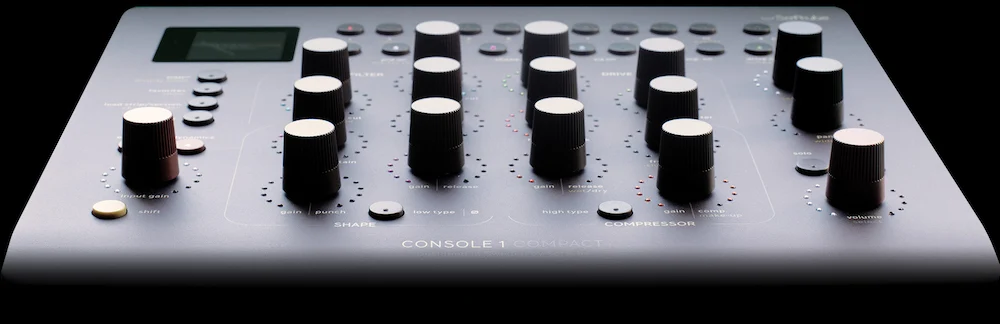
The Softube Console 1 Compact is designed to reduce that friction rather than expand a DAW’s feature set. Instead of replacing the larger Console 1 Channel Mk III, it distills Softube’s channel-strip workflow into a smaller control surface while preserving integration with its own processors and an expanding list of supported third-party plug-ins. The question isn’t whether the hardware works—Softube’s ecosystem is already well established—but whether a compact controller can deliver measurable gains in mixing, mastering, and professional audio production without sacrificing speed or flexibility.
That’s difficult to answer from a specification sheet alone. Encoder count, display resolution, and bundled software reveal very little about day-to-day usability. Workflow hardware proves its value only after hundreds of repetitive adjustments—balancing channels, refining EQ moves, dialing in compression, and making fast decisions across complex sessions where consistency matters more than feature count.
Console 1 Compact enters a market where many engineers are rethinking how they interact with software. Plug-ins continue to improve, but the bottleneck has shifted from processing power to decision-making. This review examines where Console 1 Compact fits into that evolution, how it changes real-world production workflows, and which engineers are most likely to benefit from adding dedicated tactile control to an otherwise software-centric studio.
Technical Specifications
| Specification | Details |
|---|---|
| Controls | 16 touch-sensitive Analog Feel rotary encoders |
| Display | High-resolution smart display |
| Connectivity | USB-C |
| Supported Plug-in Formats | VST3, AU, AAX (via Console 1 integration) |
| Compatible DAWs | Pro Tools, Logic Pro, Cubase, Studio One, Ableton Live, Reaper and others |
| Included Software | Softube Core Mixing Suite |
| Expandability | Compatible with Console 1 ecosystem and Flow Studio |
| Primary Application | Dedicated tactile control for channel-strip processing |
Why Compact Hardware Mixing Controllers Matter More Than Ever
 Processing power is no longer the limiting factor in modern music production. Even mid-range studio computers can handle large multitrack sessions filled with virtual instruments, oversampled processors, advanced routing, and complex automation. What slows experienced engineers today isn’t CPU performance—it’s the cumulative cost of thousands of repetitive interactions with software.
A typical mix involves far more than setting balances and inserting plug-ins. Engineers constantly revisit EQ curves, compressor thresholds, attack and release times, gain staging, saturation levels, stereo placement, and automation across dozens or even hundreds of tracks. Individually, these adjustments take seconds. Across an entire project, they consume hours.
That’s why dedicated mixing controllers have quietly regained relevance. Their purpose isn’t to replace the mouse or keyboard, but to reduce context switching. Keeping one hand on physical controls while listening to the monitors allows engineers to stay focused on the mix instead of navigating graphical interfaces.
The distinction becomes even more important as plug-in collections continue to grow. Every developer organizes parameters differently, requiring users to constantly adapt to new interfaces. Switching from one compressor to another often means relearning the layout before making a single adjustment.
The Console 1 platform approaches the problem differently. Instead of exposing every plug-in exactly as it appears on screen, it standardizes channel-strip control. EQ, dynamics, saturation, filtering, and utility functions remain in predictable locations regardless of the compatible processor loaded underneath. That consistency encourages muscle memory and reduces the mental overhead associated with jumping between different plug-in designs.
For experienced mix engineers, this isn’t just an ergonomic advantage. Faster access to familiar controls encourages incremental adjustments instead of broad corrective moves. Small changes made quickly—and evaluated by ear rather than by watching a graphical interface—often produce more natural balances over the course of a session.
Console 1 Compact reflects another shift in professional studios: hardware no longer has to replace software to justify its place on the desk. Instead, it complements software by removing one of its biggest workflow limitations. The benefit isn’t another processing algorithm. It’s a workspace where routine channel-strip adjustments interrupt critical listening less often.
The same trend can be seen throughout modern production workflows. Dedicated hardware is increasingly designed to optimize a specific stage of music production rather than replace the DAW altogether, whether it’s channel processing or MIDI composition. Our Novation FLkey 2 review examines the same design philosophy from the production side of the workflow.
That philosophy explains why compact controllers continue gaining traction among freelance engineers, hybrid studios, and producers working entirely in the box. As sessions become larger and plug-in chains more sophisticated, reducing operational friction can deliver a greater productivity gain than adding yet another processor to the signal chain.
Beyond Knobs and Screens: How Console 1 Compact Changes the Mixing Workflow
Looking at Console 1 Compact as a collection of encoders, a display, and USB-C connectivity misses the reason products like this exist. Hardware controllers don’t compete with plug-ins—they compete with workflow inefficiencies. The value isn’t measured by the number of controls on the surface but by how often an engineer can stay focused on the mix instead of interacting with software.
Most professional sessions involve surprisingly little experimentation. Once the processing chain is established, the work becomes iterative: adjusting compressor thresholds, refining EQ curves, balancing saturation, correcting gain staging, and revisiting those decisions repeatedly as the mix evolves. The interruption isn’t the adjustment itself—it’s breaking concentration to locate the right plug-in window or parameter.
Console 1 Compact addresses that problem by standardizing channel-strip control across compatible processors. Whether the session uses Softube plug-ins or supported models from developers such as FabFilter, UAD, or Plugin Alliance, the engineer interacts with familiar processing sections instead of adapting to a different graphical interface every few minutes. That consistency matters far more during a three-hour mix than during a five-minute demonstration.
The effect becomes increasingly noticeable as track counts grow. On productions with 80 or more channels, hundreds of minor adjustments accumulate throughout the day. Saving a second on each interaction sounds insignificant until those seconds become several minutes every hour. Over the course of an album project, workflow efficiency becomes measurable rather than theoretical.
During extended mixing sessions, the biggest workflow change isn’t that individual adjustments become dramatically faster. It’s that parameter hunting almost disappears. Once the control layout becomes familiar, attention stays on the monitors instead of repeatedly locating plug-in windows, making long sessions feel noticeably less fragmented.
Softube’s Core Mixing Suite complements this philosophy by organizing processing as a complete channel strip instead of a collection of unrelated plug-ins. Preamp coloration, tape saturation, transient shaping, EQ, dynamics, filtering, and drive are treated as interconnected stages of a signal path. That mirrors how experienced engineers typically think about channel processing: not as isolated effects, but as cumulative decisions that shape a source from input to output.
A similar principle applies during mastering, where every processor influences the next stage in the signal path rather than working in isolation. We break that process down in our guide to the mastering chain.
The ability to run multiple EQ, Shape, and Compressor sections inside a single channel extends that flexibility without complicating the workflow. Modern mixes rarely rely on one processor doing all the work. It’s common to combine fast peak control with slower bus-style compression, split tonal shaping across several EQ stages, or use transient processing before dynamic control. Console 1 Compact accommodates those techniques without forcing engineers to rebuild routing for every variation.
Another advantage is less obvious but arguably more important: attention stays on monitoring instead of graphics. Modern plug-ins provide detailed visual feedback, yet experienced mixers know that animated gain-reduction meters and spectrum displays can become distractions when every decision should ultimately be judged by translation. Physical controls encourage listening first and confirming visually only when necessary.
After working through several large multitrack sessions, another pattern becomes clear: the controller encourages smaller, more frequent adjustments rather than occasional dramatic moves. That naturally fits the way experienced engineers refine balances over time instead of trying to solve everything with one processor.
That doesn’t mean hardware produces better mixes on its own. Monitoring quality, room acoustics, source material, and engineering experience remain far more important. What Console 1 Compact changes is the speed at which experienced users can execute decisions they already know they want to make. For professionals mixing every day, reducing operational friction often delivers a greater productivity gain than adding another processor to an already mature plug-in collection.
Real-World Mixing Workflow: Where Console 1 Compact Actually Saves Time
The controller delivers the greatest benefit during repetitive channel-strip work rather than isolated processing tasks. On a typical multitrack production, tactile control becomes increasingly valuable as similar adjustments are repeated across dozens of channels.
| Source | Typical Workflow |
|---|---|
| Kick | Input gain, transient shaping, EQ, compression |
| Snare | EQ refinement, transient control, saturation |
| Bass | Compression, harmonic drive, tonal balancing |
| Vocals | Multiple compression stages, EQ automation, gain staging |
| Mix Bus | Bus compression, tonal shaping, drive adjustments |
In practice, Console 1 Compact delivers the greatest efficiency gains during repetitive channel-strip processing rather than occasional creative sound design. The more frequently similar adjustments are repeated across a session, the more valuable tactile control becomes.
Individually, none of these adjustments takes long. Across an entire session, however, repeating the same operations hundreds of times makes workflow consistency more valuable than additional processing options. That’s where Console 1 Compact provides its biggest practical advantage.
Where Console 1 Compact Falls Short: Practical Limitations Behind the Marketing
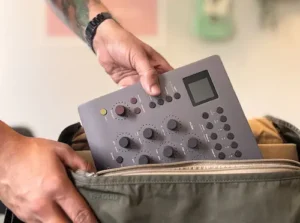 Softube positions Console 1 Compact as a faster way to interact with a software-based mixing environment, and for many engineers that claim holds up. Still, workflow hardware is rarely a universal upgrade. Whether the controller improves a session depends largely on how the studio already operates and how much of the existing workflow fits inside the Console 1 ecosystem.
The most obvious limitation is scope. Console 1 Compact isn’t designed to replace a full DAW controller. It offers no meaningful solution for timeline navigation, transport control, marker management, editing, or large-scale automation workflows. Engineers handling complex editing sessions will continue switching between the controller, keyboard, and mouse throughout the day.
Compatibility is another practical consideration. Softube has expanded support for third-party processors, but no hardware controller can expose every function of every plug-in with the same level of integration. Studios built around highly specialized processors or custom signal chains should expect occasional transitions back to native plug-in interfaces. That’s not a flaw in the platform—it’s an unavoidable consequence of working across multiple software ecosystems.
The compact form factor also introduces compromises. Compared with the larger Console 1 Channel Mk III, fewer dedicated controls mean more reliance on switching between processing layers. In smaller sessions that additional button press is almost invisible. During large mix projects where engineers constantly move between EQ, dynamics, saturation, and utility functions, those extra interactions become more noticeable.
There’s also a tendency to overestimate what tactile control can achieve. Hardware encourages a more focused workflow, but it doesn’t eliminate the need to interact with software. Automation editing, spectrum analysis, stereo imaging, loudness verification, routing, and detailed session management remain screen-based tasks regardless of which controller sits on the desk.
Speed is another area where expectations should remain realistic. Engineers already working efficiently with keyboard shortcuts, macros, and well-designed templates may not see immediate gains. Like any professional tool, Console 1 Compact requires repetition before muscle memory replaces conscious navigation. The productivity improvements become apparent over weeks of daily use rather than during a single afternoon demo.
Most productivity gains appear gradually. The first few sessions often feel similar to a traditional mouse-and-keyboard workflow because muscle memory hasn’t developed yet. After several weeks of regular use, switching between processing sections becomes largely automatic and the controller starts delivering the efficiency it was designed for.
Perhaps the biggest misconception is that workflow hardware somehow improves engineering decisions. It doesn’t. Better monitoring, stronger critical listening skills, and experience still determine the quality of a mix. Console 1 Compact simply shortens the distance between identifying a problem and making an adjustment. For experienced engineers, that reduction in operational friction can be significant. For less experienced users, it won’t compensate for weak fundamentals.
How the Console 1 Platform Has Evolved
| Generation | Focus |
|---|---|
| Console 1 (Original) | Hardware channel-strip control for software mixing |
| Console 1 Mk II | Refined workflow and expanded software integration |
| Console 1 Channel Mk III | Larger control surface with faster direct access |
| Console 1 Compact | Smaller footprint while preserving the Console 1 workflow |
| Flow Studio Ecosystem | Modular expansion through a broader Softube hardware ecosystem |
Competitive Positioning: Where Console 1 Compact Fits in Today’s Hardware Mixing Market
Console 1 Compact occupies a category that remains surprisingly small. It isn’t competing with generic MIDI controllers, nor is it trying to replace a full-scale DAW control surface. Instead, it targets engineers who spend most of their time adjusting channel processing and want faster access to those controls without committing to a large-format console workflow.
Its closest competitor is the larger Console 1 Channel Mk III. The two products share the same software ecosystem, supported plug-ins, and overall operating philosophy. The difference isn’t sound quality—it’s workflow density. The Mk III provides immediate access to more processing sections, reducing the need to switch layers during complex mixes. Console 1 Compact sacrifices some of that immediacy in exchange for a smaller footprint and a lower entry cost.
SSL UC1 addresses a different audience. It is built around SSL’s own processing ecosystem and intentionally recreates the feel of an SSL channel strip. Engineers already invested in SSL Native plug-ins will appreciate that integration, while studios using processors from multiple developers may find Softube’s broader compatibility more practical over the long term.
Products such as the SSL UF1, PreSonus FaderPort, or other DAW controllers solve a different problem altogether. They focus on transport, automation, editing, and session navigation rather than detailed channel processing. For many commercial studios, those devices aren’t alternatives to Console 1 Compact—they’re complementary tools serving different stages of a production session.
Generic MIDI controllers remain the most affordable option, but they rarely scale well in professional environments. Manual mapping, inconsistent parameter layouts, and maintaining templates across multiple plug-in manufacturers quickly become part of the daily workload. Console 1 Compact avoids that maintenance by presenting supported processors through a standardized control layout instead of relying on user-created mappings.
| Controller | Primary Workflow | Best Choice If… | Less Suitable If… |
|---|---|---|---|
| Softube Console 1 Compact | Channel-strip processing | You mix primarily in the box and want faster tactile access to EQ, compression, saturation, and dynamics. | You expect complete DAW control from a single device. |
| Softube Console 1 Channel Mk III | High-speed channel processing | You work on large commercial sessions and prefer immediate access to every processing section. | Desk space or budget is limited. |
| SSL UC1 | SSL-centric workflow | Your studio is already built around SSL Native plug-ins. | You rely on processors from multiple software developers. |
| SSL UF1 / FaderPort | DAW operation | You spend more time editing, automating, and navigating sessions than adjusting plug-in parameters. | Your priority is hands-on channel processing. |
| Generic MIDI Controller | Custom control mapping | You need an inexpensive, flexible solution for a small plug-in collection. | You want a standardized workflow across large professional projects. |
The buying decision ultimately comes down to workflow rather than features. Engineers looking for a single device to control an entire DAW will likely find Console 1 Compact too specialized. Engineers who spend most of the day balancing channels, refining dynamics, and shaping tone are far more likely to appreciate its focused design.
That specialization reflects a broader shift in professional studios. Instead of relying on one controller to do everything, many engineers now build modular workstations where each piece of hardware serves a specific role. Console 1 Compact fits naturally into that approach by focusing almost exclusively on one of the most repetitive parts of modern mixing: channel processing.
Who Should Skip Console 1 Compact?
Console 1 Compact isn’t a universal upgrade, and that’s part of its appeal. Engineers whose work revolves around editing, dialogue cleanup, sound design, or post-production will likely gain more from a dedicated DAW controller with transport, automation, and navigation features.
It’s also a difficult recommendation for producers who constantly build custom plug-in chains from unsupported processors. While Softube continues expanding compatibility, the controller delivers its greatest value when most day-to-day channel processing happens inside the Console 1 ecosystem.
Home studio users still investing in monitoring, room treatment, or core mixing skills should also prioritize those improvements first. Workflow hardware can accelerate good engineering decisions, but it cannot replace accurate monitoring or critical listening.
Looking Beyond the Controller: Does Better Workflow Translate Into Better Mixes?
 Console 1 Compact isn’t designed to change the sound of a mix directly. Its role is reducing the time between hearing a problem and correcting it. The quality of the final mix still depends on monitoring, engineering decisions, and experience.
The quality of the original recording also sets hard limits on what any mixing workflow can achieve. That’s something we explored in our JZ MU-1 review, where microphone design influences the amount of corrective processing required later in the mix.
Many producers confuse workflow improvements with improvements in the finished master, but they’re fundamentally different stages of production. If you’re unsure where one process ends and the other begins, our guide on Mixing vs Mastering explains the distinction in practical terms.
Where the controller can make a measurable difference is in how consistently those decisions are executed. Mixing is rarely defined by one dramatic move. It’s the accumulation of hundreds of small adjustments—compressor thresholds, EQ refinements, gain staging, automation rides, transient control, and subtle saturation—that gradually shape a production into something that translates reliably across different playback systems.
On large sessions, even brief interruptions accumulate surprisingly quickly. Reaching for the mouse, locating another plug-in window, or searching for a parameter may take only a few seconds, but repeated hundreds of times throughout a session those interruptions break concentration and slow decision-making. Hardware doesn’t eliminate those tasks entirely, but it reduces how often they interrupt critical listening.
That distinction becomes more important during long mixing sessions. Ear fatigue affects every engineer, and once concentration begins to decline, small tonal or dynamic decisions become less consistent. A workflow that keeps attention on the monitors instead of constantly shifting toward the screen helps preserve focus when the session stretches into several hours.
The benefits also extend beyond the mix itself. Projects that arrive at mastering with controlled dynamics, balanced tonal relationships, and consistent gain staging typically require fewer corrective processes. That’s also why properly preparing a mix for mastering has a greater impact on the final result than adding another piece of workflow hardware. Console 1 Compact doesn’t influence streaming normalization, codec performance, or loudness standards directly, but an efficient mixing workflow can produce material that reaches the mastering stage in better condition.
None of this reduces the importance of monitoring. Accurate speakers, a well-treated room, and reliable headphones remain far more influential than any workflow controller. Console 1 Compact should be viewed as an efficiency tool layered on top of a capable monitoring environment—not as a substitute for one.
CPU performance is largely unaffected. The controller functions as a hardware interface for compatible plug-ins, so overall system load continues to depend on session complexity, oversampling settings, virtual instruments, and processor choice rather than the controller itself.
Ultimately, the strongest argument for Console 1 Compact isn’t speed alone—it’s repeatability. Engineers who work across multiple clients and large session templates benefit from a consistent control layout that minimizes unnecessary adaptation between projects. Over time, that consistency contributes to a smoother workflow, more predictable decision-making, and a production environment where attention stays focused on the music instead of the software.
Verdict: A Workflow Investment Rather Than a Feature Upgrade
Softube Console 1 Compact isn’t designed to replace a DAW, a control surface, or an existing plug-in collection. Its purpose is much narrower: making repetitive channel-strip adjustments faster and more consistent. Whether that justifies the investment depends almost entirely on how you spend your time during a mix.
Perhaps the most noticeable difference over time isn’t speed itself but reduced mental fatigue. Spending less time navigating software leaves more attention available for evaluating balance, dynamics, and tonal relationships throughout long mixing sessions.
For engineers working primarily with EQ, compression, saturation, and dynamics across large multitrack sessions, Console 1 Compact offers a clear workflow advantage. The standardized control layout reduces unnecessary interaction with plug-in interfaces and encourages a more continuous mixing process without forcing users into a closed software ecosystem.
That doesn’t make it the right choice for every studio. Editors, post-production facilities, and producers looking for comprehensive DAW control will still need dedicated hardware for navigation, automation, and transport functions. Likewise, engineers whose workflow revolves around unsupported or highly customized plug-in chains may never realize the controller’s full potential.
The value of Console 1 Compact becomes most apparent after weeks of regular use rather than during a short product demonstration. As muscle memory develops, repetitive adjustments require less visual attention, allowing experienced engineers to spend more time evaluating the mix and less time managing software.
Returning to older projects also becomes more comfortable because channel processing remains organized around a consistent physical layout instead of dozens of different plug-in interfaces.
Viewed in isolation, the controller doesn’t make mixes sound better. Better monitoring, stronger engineering decisions, and experience remain the factors that determine translation, balance, and overall production quality. What Console 1 Compact improves is the speed and consistency with which those decisions are executed.
For studios already committed to an in-the-box workflow, that may be reason enough to consider it. Not because it introduces new processing capabilities, but because it removes friction from one of the most repetitive parts of professional mixing.
Overall Rating
| Category | Rating |
|---|---|
| Workflow Efficiency | 9.8/10 |
| Build Quality | 9.5/10 |
| Software Integration | 9.3/10 |
| Professional Mixing Value | 9.6/10 |
| Flexibility Outside the Console 1 Ecosystem | 8.3/10 |
| Value for Money | 9.2/10 |
| Overall | 9.3/10 |
Rather than introducing new processing capabilities, Softube Console 1 Compact focuses on reducing friction inside everyday mixing sessions. Its strongest advantage isn’t sound quality—modern plug-ins already deliver that—but the ability to make repetitive engineering decisions faster and with greater consistency. For producers and mix engineers who spend hours refining channel balances, dynamics, and tonal relationships, the workflow gains are substantial. The only significant limitation is that much of its value depends on working within the Console 1 ecosystem, making it a focused professional tool rather than a universal studio controller.

Yurii Ariefiev is a mastering engineer and audio production editor focused on mix translation, mastering workflow, and commercial release preparation. His reviews evaluate studio hardware and software from the perspective of real production environments, emphasizing workflow efficiency, monitoring accuracy, and how engineering decisions affect the final master.
Every product analysis is written independently from marketing materials and assessed within the context of professional mixing and mastering workflows, helping producers understand not only what a tool does, but where it delivers measurable value in everyday studio work.
Frequently Asked Questions
Can Softube Console 1 Compact control third-party plug-ins?
Yes, but only supported plug-ins. Softube continues expanding compatibility with developers such as FabFilter, UAD, and Plugin Alliance, although the level of hardware integration varies between processors. Unsupported plug-ins still require their native interfaces.
Do I need Softube plug-ins to use Console 1 Compact?
No. The controller ships with the Core Mixing Suite and supports a growing number of compatible third-party processors. However, the overall experience is strongest when your workflow already fits within the Console 1 ecosystem.
Is Console 1 Compact faster than mixing with a mouse?
For experienced engineers, it often is. The advantage comes from reducing repetitive interface navigation rather than making individual adjustments faster. The difference becomes more noticeable in large multitrack sessions than in small editing projects.
Does Console 1 Compact improve mix translation?
Not directly. Translation depends on monitoring, engineering decisions, and the quality of the mix itself. A more efficient workflow can help engineers make consistent decisions, but the controller doesn’t change how audio translates across playback systems.
Can Console 1 Compact replace a control surface like the SSL UF1 or FaderPort?
No. Those products are designed for DAW navigation, transport, automation, and editing. Console 1 Compact focuses almost exclusively on channel-strip processing, making the two categories complementary rather than interchangeable.
Is Console 1 Compact suitable for mastering engineers?
It can be useful for engineers who perform mastering with compatible Console 1 processors, but its workflow is clearly optimized for mixing. Most mastering sessions involve fewer simultaneous processing decisions than large multitrack mixes.
Will Console 1 Compact reduce CPU load?
No. The controller performs no audio processing on its own. CPU usage continues to depend on the plug-ins, oversampling settings, virtual instruments, and overall session complexity.
Is Console 1 Compact worth buying for a home studio?
It depends on your priorities. If your room acoustics, monitoring, and core mixing skills are already established, improving workflow can be a worthwhile investment. If you’re still building the fundamentals of your studio, those upgrades will usually have a greater impact on mix quality.
Who should skip Console 1 Compact?
Editors, composers, and producers who spend most of their time arranging, programming MIDI, or navigating large DAW projects may see limited benefit. The controller delivers its greatest value during channel processing rather than editing or production tasks.
Is Console 1 Compact a good long-term investment?
For engineers who mix regularly, it can be. For engineers who mix every day, the return becomes noticeable after months of regular use rather than during the first week of ownership. Occasional users are less likely to see the same productivity gains.
A Better Workflow Doesn’t Replace an Experienced Mix Engineer
Console 1 Compact can streamline channel processing, reduce repetitive tasks, and make complex sessions easier to manage. What it can’t do is determine whether a vocal sits correctly in the mix, whether the low end translates across playback systems, or whether dynamic balance will hold up after mastering and streaming normalization.
If you’re preparing music for a commercial release, an experienced engineer can identify issues that remain invisible regardless of the hardware or plug-ins used during production. Translation, tonal balance, stereo imaging, dynamics, and mix consistency are still the factors that determine how a record performs outside the studio. Before releasing a track, it’s also worth running through a structured mastering checklist to catch issues that are easy to miss during long mixing sessions.
If you’d like an objective evaluation before release, you can submit your mix for professional mixing or mastering and receive an independent evaluation focused on translation, tonal balance, dynamics, stereo imaging, and release readiness rather than on the equipment used during production.