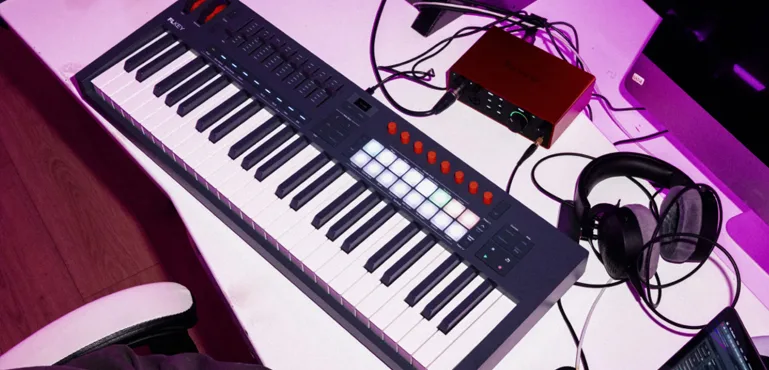
Novation FLkey 2 Review: Does Dedicated FL Studio Hardware Actually Improve Music Production Workflow?
Most MIDI keyboards promise faster workflows, deeper DAW integration, and a more direct connection between ideas and execution. In practice, many controllers add little beyond transport controls, pad triggering, and a handful of assignable knobs. Once the initial excitement fades, producers often return to the keyboard and mouse workflow they already know.
Novation’s FLkey series takes a different approach. Rather than targeting every DAW on the market, it was designed specifically around FL Studio. The second-generation FLkey 2 expands that concept with updated hardware, deeper access to core FL Studio functions, and tighter integration with the workflows that define the platform. This FLkey 2 review focuses on real production workflow, long-term usability, and whether the controller delivers measurable advantages inside modern FL Studio sessions.
That raises a more important question than whether FLkey 2 improves on the original model. The real issue is whether dedicated hardware still delivers a measurable workflow advantage in a production environment where modern DAWs already offer extensive customization, controller mapping, and shortcut-based navigation.
For FL Studio users, the answer extends beyond convenience. Workflow influences how quickly ideas become finished arrangements, how often projects reach completion, and how effectively creative decisions survive the transition into mixing and mastering. A controller that genuinely reduces friction can have a larger impact on production output than another instrument, plugin, or sound library.
FLkey 2 Key Features at a Glance
- Semi-weighted keybeds on 49- and 61-key models
- 16 velocity-sensitive RGB pads
- OLED display for project feedback
- Dedicated FL Studio Pattern controls
- Mixer and Channel Rack integration
- Endless rotary encoders
- Scale Mode and Chord Mode
- Built-in arpeggiator
- Mackie HUI support
- NKS compatibility
FLkey 2 Specifications
| Available Models | Mini, 37, 49, 61 |
| Pads | 16 RGB velocity-sensitive pads |
| Encoders | Endless rotary encoders |
| Display | OLED screen |
| Connectivity | USB-C, MIDI Out |
| DAW Integration | FL Studio, Mackie HUI, NKS |
Why Dedicated FL Studio Controllers Matter More Than They Did Five Years Ago
 MIDI controllers are not new. What has changed is the amount of project management required inside modern production sessions. A decade ago, most controller integration focused on note input, transport functions, and basic parameter control. Today, production workflows involve significantly more navigation than performance.
A modern FL Studio project can contain dozens of instruments, extensive automation, multiple pattern variations, layered drum programming, complex routing, and hundreds of editable parameters. What would have been considered a large session ten years ago is now routine for independent producers working from a home studio.
As projects become more sophisticated, navigation often becomes a larger workflow constraint than sound creation itself. Switching between patterns, opening plugins, adjusting mixer channels, editing arrangements, and managing routing can consume a surprising amount of production time. The bottleneck is no longer access to sounds. It’s access to decisions.
That shift has changed how many producers evaluate hardware. Keyboard feel still matters, but workflow efficiency has become a primary consideration. The most successful production hardware of recent years has focused less on generating new sounds and more on reducing dependence on menus, mouse clicks, and repetitive navigation.
Products such as Ableton Push and Native Instruments Maschine demonstrated that producers are willing to invest in hardware when it removes friction from everyday tasks rather than simply adding more features. FLkey 2 follows a similar philosophy but applies it to a different ecosystem.
Instead of functioning as a standalone production environment, FLkey 2 is designed to provide faster access to the parts of FL Studio producers interact with most frequently. That distinction is important because FL Studio itself has evolved far beyond its early reputation as a beatmaking platform.
Today, FL Studio is used across commercial electronic music, hip-hop, pop production, content creation, and increasingly complex hybrid production workflows. As the platform has matured, so have the expectations of its user base. Many FL Studio users are no longer looking for a generic MIDI keyboard. They are looking for hardware that integrates directly into an established workflow and removes unnecessary interruptions from the production process.
Viewed through that lens, FLkey 2 is less about keyboard control and more about workflow optimization. The value proposition is not additional functionality. It is reducing the number of steps required to execute ideas while they are still fresh.
The Real Purpose of FLkey 2 Isn’t Playing Notes
A feature list does not explain why FLkey 2 exists.
Semi-weighted keys, RGB pads, endless encoders, an OLED display, Scale Mode, Chord Mode, and an onboard arpeggiator are all useful additions. None of them, however, are unique selling points in today’s MIDI controller market. Similar functionality is available across multiple competing products at nearly every price level.
The differentiator is integration.
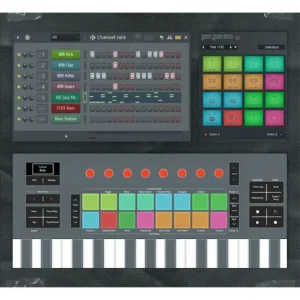
FLkey 2 is designed around direct access to the areas of FL Studio producers interact with most frequently: the Channel Rack, Mixer, Pattern system, transport controls, sequencing tools, and plugin parameters. On paper, those functions may appear routine. In practice, they represent a significant percentage of the actions performed during a typical production session.
The value becomes easier to understand when viewed as a workflow problem rather than a hardware problem.
One of the largest hidden costs in modern music production is context switching. A producer may spend only a few seconds moving between programming drums, editing MIDI, adjusting mixer levels, opening plugins, modifying arrangements, and returning to performance mode. Individually, those interruptions seem insignificant. Across a multi-hour session, they become a constant source of friction.
Creative work is rarely lost because a task is difficult. More often, momentum disappears through repeated interruptions. The longer the gap between an idea and execution, the greater the chance that a productive session turns into project maintenance.
This is why experienced producers often place greater value on workflow than on additional features. Faster navigation does not make music better, but it can preserve the decision-making process that leads to better music. The same principle appears in software instruments as well. As discussed in our Prophet-5 plugin review, workflow often has a greater impact on finished productions than the raw feature count of the instrument itself. Strong arrangements, effective transitions, and convincing performances are frequently the result of uninterrupted creative momentum rather than superior tools.
FLkey 2 should be evaluated through that lens. Its primary objective is not to improve performance capabilities or expand sound design options. It is to reduce the number of actions required to move through FL Studio’s production environment.
That distinction matters because most competing MIDI keyboards are built to work reasonably well with every DAW. FLkey 2 is built to work efficiently inside one DAW. Whether that specialization is valuable depends entirely on how central FL Studio is to a producer’s workflow.
How the Updated Hardware Affects Real Production Workflow
 At first glance, the FLkey 2 hardware updates appear incremental rather than transformative. The practical impact becomes clearer during extended production sessions, where small workflow improvements accumulate over hours of work.
The most meaningful hardware change is the addition of semi-weighted keybeds on the 49-key and 61-key models. While FL Studio is often associated with sequencing and beat production, many producers still record keyboard performances for chords, basslines, melodic hooks, orchestral layers, and harmonic sketches. A better keybed does not improve musical ideas, but it can improve how accurately those ideas are captured.
The difference becomes most noticeable when recording velocity-sensitive instruments. Lightweight synth-action keyboards often encourage corrective MIDI editing after the performance. Semi-weighted action provides greater dynamic control at the source, reducing the need for post-recording adjustments and making performances feel more intentional.
The updated RGB pads target a different part of the workflow. For producers working in hip-hop, trap, drill, house, EDM, and other rhythm-driven genres, pad response directly affects how quickly rhythmic ideas can be tested. The faster a producer can experiment with variations, the easier it becomes to discover grooves that would not emerge through mouse-based programming alone.
This is less about finger drumming and more about iteration speed. Many successful drum patterns evolve through rapid experimentation rather than deliberate construction. Hardware that responds consistently encourages that process.
The OLED display is arguably less important than marketing materials suggest, but it serves a practical purpose. Modern production sessions are increasingly screen-dominated environments. Between plugin interfaces, mixer windows, browser panels, automation lanes, and arrangement views, visual attention becomes fragmented.
Displaying project information directly on the controller does not eliminate screen dependence, but it reduces unnecessary navigation. Over the course of a long session, even minor reductions in screen switching can help maintain focus and reduce decision fatigue.
The most underrated upgrade may be the implementation of endless encoders. Traditional rotary controls frequently create workflow interruptions when controller positions no longer match software values after switching projects, presets, or parameter pages. Endless encoders remove that inconsistency and provide a more predictable control experience.
For tasks such as plugin adjustment, mixer balancing, automation recording, and parameter exploration, consistency matters more than raw controller count. A control surface that behaves predictably tends to remain part of a workflow. One that requires constant correction usually ends up ignored.
Viewed individually, none of these hardware revisions justify an upgrade on their own. Viewed collectively, they reveal a clear design objective: reducing small interruptions that accumulate during daily production work. That goal aligns far more closely with how modern producers actually use controllers than the traditional marketing focus on features and specifications.
FLkey 2 vs Original FLkey: Is the Upgrade Actually Worth It?
For existing FLkey owners, the most important question is not whether FLkey 2 introduces new features. It is whether those changes meaningfully improve daily production work inside FL Studio.
At a fundamental level, both generations share the same philosophy. They are designed around direct access to FL Studio’s core workflow rather than generic MIDI control. Pattern management, Channel Rack interaction, mixer access, transport control, and sequencing remain central to the experience.
That means FLkey 2 does not represent a complete reinvention of the platform. Producers expecting a radically different workflow may be disappointed. The underlying concept remains largely unchanged.
The improvements are concentrated in areas that affect long-term usability rather than first impressions.
The addition of semi-weighted keybeds on the 49-key and 61-key models is arguably the most meaningful hardware revision. Producers who regularly record keyboard performances will notice improved control over dynamics and velocity-sensitive instruments. While the original FLkey was perfectly usable for MIDI programming, FLkey 2 feels more refined during actual performance recording.
The updated RGB pads follow a similar pattern. They do not fundamentally change beatmaking workflows, but they create a more responsive and predictable interaction with FL Studio’s sequencing environment. Producers who build tracks through rapid pattern creation and drum experimentation are likely to notice the difference more than users focused primarily on editing.
The OLED display also represents an evolutionary improvement rather than a revolutionary one. It provides useful project feedback and reduces occasional screen dependence, but it should not be viewed as a reason to upgrade by itself.
The same applies to the endless encoders. Existing FLkey users may initially overlook them, yet they solve one of the most common frustrations found on many controller surfaces: parameter mismatches when moving between projects, presets, and control pages. Over time, that consistency can have a greater impact on workflow than more visible features.
For producers already satisfied with the original FLkey, the upgrade decision largely comes down to session frequency. Users who spend several hours a week inside FL Studio may see only incremental benefits. Producers working inside the DAW every day are more likely to appreciate the cumulative effect of the refinements.
The strongest reason to upgrade is not any individual feature. It is the overall improvement in workflow consistency. FLkey 2 feels less like a controller attached to FL Studio and more like an extension of the software itself.
For new buyers, the decision is straightforward. FLkey 2 is the better long-term investment. For existing owners, the upgrade becomes easier to justify as production volume increases.
Which FLkey 2 Model Should You Buy?
One of the advantages of the FLkey ecosystem is that Novation offers multiple form factors rather than forcing every producer into the same workflow. The challenge is determining which model actually matches the way you make music.
The correct choice has less to do with budget and more to do with how much of your production process happens at the keyboard.
FLkey Mini is the most portable option in the lineup. It makes sense for mobile producers, students, creators working in limited studio space, and users who primarily program drums, trigger patterns, and sketch ideas rather than perform complex keyboard parts. For beatmaking, travel setups, and content creation, the Mini covers surprisingly large portions of the FL Studio workflow. The limitation appears when projects become more performance-oriented. Recording two-handed parts, detailed chord voicings, or expressive piano performances quickly exposes the constraints of a compact keyboard.
FLkey 37 occupies an unusual but practical middle ground. For many producers, it may be the sweet spot of the entire range. Thirty-seven keys provide enough space for basslines, melodies, synth leads, chord work, and basic two-handed performance while maintaining a relatively compact footprint. Producers working primarily with electronic music, hip-hop, trap, house, and EDM often discover that 37 keys cover the majority of daily production tasks without consuming valuable desk space.
The comparison most buyers struggle with is FLkey 2 Mini vs FLkey 2 37. The answer usually comes down to performance. If your workflow revolves around sequencing, pattern creation, and beat construction, the Mini remains highly capable. If you regularly record MIDI performances, audition virtual instruments, or develop harmonic ideas directly from the keyboard, the 37-key version offers significantly greater flexibility.
FLkey 49 is where the lineup begins targeting producers who spend substantial time recording rather than programming. The addition of a semi-weighted keybed makes a noticeable difference for piano-based writing, orchestral sketching, expressive synth performances, and velocity-sensitive instruments. The larger key range reduces octave switching and allows more natural performance workflows. For serious producers who use FL Studio as their primary creative environment, FLkey 49 is arguably the strongest balance between workflow efficiency and keyboard functionality.
FLkey 61 is the most complete version of the platform. It is designed for producers who regularly perform complex arrangements, compose with two hands, work with orchestral libraries, or use FL Studio as a full-scale production workstation. The larger format is less suitable for small desktop setups but provides the closest experience to a dedicated performance keyboard while retaining the deep FL Studio integration that defines the FLkey range.
For most producers, the decision can be simplified. FLkey Mini prioritizes portability. FLkey 37 prioritizes efficiency. FLkey 49 prioritizes performance. FLkey 61 prioritizes maximum keyboard range. The best model is not necessarily the largest one. It is the version that aligns most closely with how music is actually created in your studio.
In practical terms, FLkey 2 Mini is best viewed as a portable beatmaking controller, FLkey 2 37 as the most balanced option for everyday production, FLkey 2 49 as the strongest value for serious musicians, and FLkey 2 61 as the most complete solution for producers who regularly perform complex keyboard parts. For buyers searching for an FLkey 2 Mini review, FLkey 2 37 review, FLkey 2 49 review, or FLkey 2 61 review, the choice depends less on features and more on how much keyboard performance is part of the daily workflow.
Pattern-Based Production Is Where FLkey 2 Gains a Real Advantage
Most MIDI controllers are designed around a traditional recording workflow. The assumption is straightforward: record a performance, edit the MIDI data, arrange the timeline, and refine the production as the project develops.
FL Studio has never operated entirely within that model.
While the software has evolved into a full-scale production environment, its Pattern system remains central to how many producers build tracks. Drums, basslines, melodic ideas, transitions, and arrangement elements are often developed as independent modules before being assembled into a finished song structure.
That distinction helps explain why FLkey 2 feels different from many generic MIDI controllers. Its dedicated Pattern controls are not simply additional shortcuts. They target one of the most frequently used parts of the FL Studio workflow.
Creating, triggering, duplicating, and organizing patterns may sound like routine tasks, but they become increasingly important as project complexity grows. A modern production can easily contain dozens of pattern variations distributed across drums, percussion, bass, synth layers, effects, transitions, and automation elements. Managing those components efficiently often has a greater impact on productivity than adding another instrument or performance feature.
This is where specialized integration starts to matter. Every interruption required to locate patterns, switch views, navigate menus, or perform repetitive organizational tasks introduces friction into the creative process. Individually, these actions consume very little time. Repeated hundreds of times across multiple projects, they become a meaningful workflow cost.
Pattern-based production also places different demands on hardware than traditional recording workflows. The goal is not simply capturing performances. It is rapidly testing variations, building arrangements, and moving between ideas without breaking concentration.
Many producers underestimate how much of their studio time is spent managing projects rather than creating music. Once sessions become large enough, organization and navigation often determine workflow speed more than processing power, plugin selection, or keyboard technique.
This is one of the reasons dedicated FL Studio integration has practical value beyond convenience. The benefits are rarely obvious during a brief demonstration or a feature comparison chart. They emerge gradually over months of production work, where reducing repetitive actions can save hours of accumulated effort.
For that reason, FLkey 2 is best evaluated as a workflow tool rather than a performance instrument. Its long-term value depends less on specifications and more on whether its integration reduces enough day-to-day friction to justify choosing it over more flexible, DAW-agnostic alternatives.
FLkey 2 Review Verdict: Where It Delivers and Where It Falls Short
The strongest argument for FLkey 2 is also the strongest argument against it.
Its deep integration with FL Studio creates a workflow advantage that generic MIDI controllers cannot fully replicate. At the same time, that advantage becomes less compelling the moment a producer’s workflow extends beyond FL Studio.
For users working exclusively inside Image-Line’s ecosystem, the specialization makes sense. For producers who regularly move between FL Studio, Ableton Live, Logic Pro, Cubase, Studio One, or Pro Tools, the value proposition becomes less clear. A controller optimized around a single DAW inevitably sacrifices some degree of flexibility.
This is the trade-off buyers should understand before focusing on specifications. FLkey 2 is not trying to be the most versatile MIDI controller on the market. It is trying to be the most efficient controller for a specific workflow.
Several of the headline hardware additions should also be viewed in proper context. The OLED display improves visibility and reduces occasional screen navigation, but it does not fundamentally change the production experience. Likewise, Scale Mode, Chord Mode, and the onboard arpeggiator are useful workflow tools rather than major differentiators.
Five years ago, those features carried more weight. In today’s market, they have become standard inclusions across a wide range of controllers. Their presence is expected rather than exceptional.
The more relevant question is whether FLkey 2 saves enough time to justify its position in a crowded controller market.
The answer depends largely on existing workflow habits.
Producers who rely heavily on pattern creation, drum programming, MIDI performance, and hands-on navigation are likely to see measurable benefits. Producers whose sessions revolve around detailed editing, audio manipulation, vocal production, advanced automation, mixing, or post-production may experience a smaller improvement.
There is another factor rarely mentioned in product marketing: adaptation cost.
Controller workflows are not efficient on day one. They become efficient once repetitive actions move into muscle memory. During the first few weeks, many users actually slow down as they learn new navigation methods and rebuild established habits.
This is particularly true for experienced FL Studio users. Producers who have spent years developing custom shortcuts, templates, macros, and highly optimized keyboard-and-mouse workflows may find the productivity gains less dramatic than expected.
That does not mean FLkey 2 is overrated. It means its value is highly dependent on the user. The controller is most effective when it removes friction from an existing workflow rather than attempting to replace a workflow that is already highly optimized.
Viewed realistically, FLkey 2 succeeds where dedicated hardware typically succeeds: reducing repetitive actions, improving workflow consistency, and making frequently used functions more accessible. What it does not do is fundamentally transform music production or eliminate the need for efficient project management, strong arrangement skills, and disciplined production decisions.
FLkey 2 vs Competing MIDI Controllers
Comparing FLkey 2 to other MIDI controllers requires a different approach than comparing synthesizers, audio interfaces, or studio monitors. The decision is less about specifications and more about workflow alignment.
Most competing controllers are designed to function across multiple DAWs with varying levels of integration. FLkey 2 takes the opposite approach. Its primary advantage comes from being optimized around a single production environment rather than attempting to serve every workflow equally well.
| Controller | Best For | Primary Advantage | Main Trade-Off |
|---|---|---|---|
| Novation FLkey 2 | Dedicated FL Studio users | Deep Pattern, Mixer, and Channel Rack integration | Reduced workflow advantage outside FL Studio |
| Novation Launchkey MK4 | Multi-DAW producers | Broad software compatibility | Less specialized FL Studio control |
| Arturia KeyLab Essential | Composers and hybrid producers | Strong software bundle and ecosystem flexibility | More generic DAW integration |
| Akai MPK Series | Beatmakers and performance-focused producers | Pad-centric workflow and performance features | Less emphasis on project navigation |
| M-Audio Oxygen Pro | Budget-conscious producers | Feature-to-price value | Less refined integration experience |
The most relevant comparison is arguably not between FLkey 2 and other FL Studio controllers. It is between specialized integration and long-term flexibility.
Launchkey, KeyLab, and similar products remain attractive because production workflows rarely stay static. A producer working exclusively in FL Studio today may eventually incorporate Ableton Live for performance, Logic Pro for composition, Studio One for editing, or Pro Tools for post-production work. Controllers built around broader compatibility tend to adapt more easily as those workflows evolve.
FLkey 2 makes a different bet. It assumes that deeper integration inside a single DAW creates more value than moderate integration across several DAWs. For producers heavily invested in FL Studio, that assumption is often correct.
The distinction becomes especially apparent in pattern-based production. Generic MIDI controllers can control FL Studio effectively, but they typically treat the software as another MIDI destination. FLkey 2 is designed around the way many FL Studio users actually build tracks, with greater emphasis on pattern management, sequencing, navigation, and project interaction.
That specialization will not matter equally to every producer. Users who primarily record audio, edit vocals, mix projects, or move between multiple software environments may find broader controller ecosystems more practical. Producers who spend most of their time creating, arranging, and developing ideas inside FL Studio are more likely to appreciate the workflow advantages FLkey 2 was designed to provide.
Ultimately, FLkey 2 is not competing to become the most versatile MIDI controller on the market. It is competing to become the most efficient controller for a specific type of producer. Whether it succeeds depends largely on how central FL Studio is to the user’s daily workflow.
Is FLkey 2 Worth the Price?
Value is one of the more interesting aspects of the FLkey 2 lineup because the controller is not competing solely on hardware specifications. Buyers are paying for workflow integration as much as physical components.
Viewed purely as a MIDI keyboard, FLkey 2 enters a highly competitive market filled with capable alternatives from Arturia, Akai, M-Audio, and Novation’s own Launchkey series. Most of those products offer pads, transport controls, software bundles, and DAW integration. Judged exclusively on features per dollar, FLkey 2 does not automatically dominate the category.
The equation changes when FL Studio becomes the center of the production environment.
Many producers underestimate the cumulative value of workflow efficiency. Saving a few seconds during pattern creation, mixer navigation, plugin control, and project management may appear insignificant in isolation. Across hundreds of production sessions, those small gains become measurable improvements in productivity.
This is where FLkey 2 separates itself from generic controller comparisons. The question is not simply whether the hardware is worth the price. The question is whether deeper FL Studio integration is worth paying for.
For dedicated FL Studio users, the answer is often yes. The controller is designed around tasks performed every day rather than features used occasionally. Producers who spend multiple hours per week inside FL Studio are more likely to recover the value of the investment through workflow improvements than through any individual hardware feature.
The value proposition becomes less convincing for users who divide their time across several DAWs. Once FL Studio represents only part of the workflow, the premium attached to specialized integration becomes harder to justify. In those situations, broader controller ecosystems may provide better long-term flexibility.
Ultimately, FLkey 2 is not the cheapest option available, nor is it trying to be. Its value comes from reducing friction inside a specific production environment. For committed FL Studio producers, that specialization often makes the pricing easier to justify than a specification sheet alone would suggest.
Who Should Consider FLkey 2?
 FLkey 2 is not attempting to serve every type of music producer, and that is arguably one of its strengths.
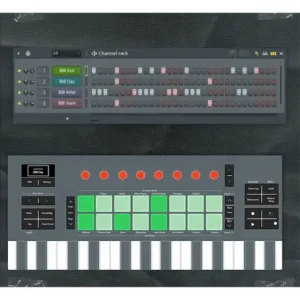
The controller makes the most sense for users whose production process revolves around FL Studio on a daily basis. Producers working in hip-hop, trap, drill, house, EDM, and other pattern-driven genres are likely to benefit the most because the controller’s workflow is closely aligned with how those projects are typically built. The same applies to beatmakers and producers who spend significant time creating patterns, sequencing drums, triggering clips, and developing arrangements directly inside FL Studio.
For these users, the value is not found in the keyboard itself. It comes from reducing repetitive interactions with the software and creating a more direct connection between ideas and execution.
FLkey 2 becomes less compelling as production workflows shift away from MIDI-centric creation.
Mix engineers, mastering engineers, editors, and post-production specialists generally spend more time working with audio than controlling virtual instruments. Their daily tasks revolve around editing, balancing, processing, automation, and critical listening rather than pattern creation or MIDI performance. In those environments, the workflow advantages offered by FLkey 2 become far less significant.
The same caution applies to producers who regularly move between multiple DAWs. A keyboard optimized around FL Studio inevitably delivers less value when sessions are distributed across Ableton Live, Logic Pro, Cubase, Studio One, or Pro Tools. In those cases, broader controller ecosystems may provide greater long-term flexibility.
Film composers and orchestral programmers occupy a similar middle ground. While FLkey 2 can certainly be used for composition, large template-based workflows often place greater emphasis on articulation management, expression control, and extensive orchestral navigation than on pattern-based production.
Ultimately, the decision has less to do with hardware quality than workflow compatibility. Many controller purchases fail because buyers focus on specifications instead of daily usage patterns. A controller can be exceptionally well designed and still be the wrong tool if it does not match the way projects are actually created.
Who Should Skip FLkey 2?
Despite its strengths, FLkey 2 is not a universal recommendation. In several production environments, its specialized design may provide far less value than broader controller alternatives.
Multi-DAW users should approach FLkey 2 carefully. Producers who regularly move between FL Studio, Ableton Live, Logic Pro, Cubase, Studio One, or Pro Tools are unlikely to benefit from its deepest integration features on a daily basis. In these situations, a controller designed around broader compatibility often represents a more flexible long-term investment.
Mix engineers are another group that may see limited benefit. Most mixing sessions involve audio editing, automation, balancing, routing, and critical listening rather than pattern creation or MIDI performance. While FLkey 2 can certainly control software parameters, its workflow advantages are concentrated in music creation rather than mix execution.
The same applies to mastering engineers. Mastering workflows rarely depend on MIDI input, sequencing, or virtual instrument control. Monitoring accuracy, room acoustics, translation analysis, and processing decisions remain far more important than controller integration.
Post-production professionals working in dialogue editing, podcast production, broadcast, video content, or sound-for-picture environments may also find little reason to prioritize FLkey 2. Their daily workflows typically revolve around audio manipulation rather than pattern-based composition.
Large-scale orchestral composers occupy another category where specialized FL Studio integration may not be the deciding factor. Template-heavy scoring sessions often place greater emphasis on articulation management, expression control, multi-timbral routing, and orchestral navigation than on pattern sequencing.
None of this makes FLkey 2 a weak product. It simply highlights an important reality: the controller is at its best when used by producers who spend most of their creative time building music inside FL Studio. The further a workflow moves away from that environment, the smaller the practical advantage becomes.
Real-World Production Perspective: Why Workflow Still Matters After the Music Is Written
Most controller reviews end at the creative stage. The assumption is that once ideas are recorded, the hardware has done its job. In practice, the decisions made during production often have a greater impact on the final release than the tools used during mixing or mastering.
This is where workflow becomes relevant beyond simple convenience.
Many of the problems mix engineers encounter are not mixing problems at all. Excessive layering, overcrowded arrangements, conflicting instrumentation, weak transitions, and inconsistent energy often originate during production. The distinction becomes clearer once you understand what actually separates mixing from mastering in real-world projects, because many issues attributed to mastering are already embedded in the arrangement and production stage. By the time a project reaches the mixing stage, those decisions are already embedded in the session.
Efficient workflows do not automatically create better music, but they can influence how decisions are made. Producers who maintain momentum tend to spend more time developing arrangements and less time navigating software. That distinction matters because arrangement quality frequently determines how difficult a mix will become later.
A well-structured production naturally creates space for instruments, vocals, dynamics, and automation. A poorly structured production often requires corrective processing to solve problems that originated long before mixing began. The same principle applies when preparing a project for mastering, where arrangement choices and mix decisions frequently determine how much can realistically be improved later in the process. Preparing a mix for mastering correctly often starts long before the final export.
From that perspective, the value of a controller such as FLkey 2 is not improved sound quality. It is reducing friction during the stage where the largest number of creative decisions are made.
The mastering stage provides a similar lesson. It is common to encounter productions with excellent sounds but weak translation. Dense arrangements, excessive low-frequency buildup, limited dynamic contrast, and constant full-spectrum activity can make a track feel smaller, less impactful, and more difficult to translate across playback systems.
Those issues are rarely caused by a lack of plugins or processing tools. More often, they reflect production decisions that accumulated throughout the life of the project.
That is why workflow tools deserve more attention than they typically receive. Their influence is indirect, but indirect does not mean insignificant. The environment in which creative decisions are made often shapes the final result more than any individual piece of processing.
There are limits, however.
No MIDI controller can improve monitoring accuracy, solve acoustic problems, optimize loudness strategy, or guarantee reliable translation across streaming platforms. It cannot compensate for weak engineering decisions, poor gain staging, or an ineffective mix.
Streaming normalization, codec compression, playback variability, and mastering considerations remain separate challenges that must be addressed through production skill, mixing expertise, and critical listening. Understanding how professional mastering actually works helps clarify where production decisions end and release optimization begins.
FLkey 2’s contribution is narrower and more realistic. It helps producers spend less time managing software and more time making decisions that ultimately affect the quality of the finished record.
Why FLkey 2 Reflects the Future of DAW Controller Design
FLkey 2 is easy to view as another incremental controller update. In reality, it reflects a broader change in how production hardware is being designed and marketed.
For years, manufacturers competed by adding more features. More pads, more controls, more bundled software, more integration options, and larger specification sheets became standard selling points. At the same time, modern DAWs evolved into highly capable production environments with mature routing systems, sophisticated automation, advanced MIDI editing, powerful stock plugins, and virtually unlimited creative flexibility.
As a result, feature availability is no longer the primary bottleneck for most producers.
The challenge today is managing complexity.
A typical production session involves dozens of creative and technical decisions competing for attention. Instruments, plugins, automation, arrangement changes, sound selection, editing, routing, and mix preparation all exist within the same workspace. The issue is rarely a lack of tools. More often, it is the growing amount of interaction required to use them efficiently.
This growing emphasis on workflow is not limited to controllers. Even software instruments are increasingly evaluated by how efficiently they fit into a production environment rather than by sound alone. Our Cherry Audio ESQ-1 review reached a similar conclusion: successful production tools reduce decision friction as much as they provide creative options.
This reality has pushed hardware development toward workflow optimization rather than feature expansion. The most influential products in recent years have not necessarily introduced new creative capabilities. Instead, they have focused on reducing friction between decisions and execution.
FLkey 2 fits squarely within that movement. Its significance is not tied to its keybed, display, pads, or encoders individually. Those features are useful, but none are unique. The more important story is the continued shift toward hardware designed around specific workflows rather than universal compatibility.
Whether that strategy ultimately serves producers better remains open to debate. Specialized tools often create more efficient workflows, but they can also reduce flexibility as production environments evolve. That tension increasingly defines the controller market.
For prospective buyers, the more practical takeaway is that FLkey 2 represents a growing category of workflow-specific controllers. Rather than attempting to serve every DAW equally well, it prioritizes efficiency inside a single production environment. Whether that approach makes sense depends largely on how central FL Studio is to your daily workflow.
For many producers, that may prove more valuable than another generation of sounds, plugins, or controller functions.
Final Review Score
| Category | Rating |
|---|---|
| FL Studio Integration | 10/10 |
| Workflow Efficiency | 9.5/10 |
| Hardware Design | 8.5/10 |
| Production Flexibility | 8/10 |
| Long-Term Value | 8.5/10 |
| Cross-DAW Compatibility | 6.5/10 |
| Value for Money | 9/10 |
| Overall | 8.8/10 |
FLkey 2 is one of the most focused MIDI controller releases currently available. Its value is not based on sound generation, bundled software, or universal compatibility. Instead, it delivers a workflow-centric experience designed specifically around FL Studio. Producers deeply invested in Image-Line’s ecosystem will find exceptional integration and productivity benefits, while users working across multiple DAWs may prefer broader controller platforms. As a dedicated FL Studio production tool, FLkey 2 is among the strongest options currently available.
Verdict
FLkey 2 is not the most versatile MIDI controller available, nor is it trying to be.
Its value comes from a clear design philosophy: optimizing the FL Studio workflow rather than maximizing compatibility across every production environment. That approach will inevitably limit its appeal, but it also explains why the controller stands apart from many of its competitors.
The hardware updates are sensible rather than revolutionary. The improved keybeds, more refined pad response, endless encoders, and display enhancements contribute to a better user experience, but they are not the primary reason to consider the product. The defining feature remains the depth of integration with FL Studio’s core workflow.
For producers who spend most of their time inside FL Studio, that integration can provide a tangible productivity advantage. This is particularly relevant for independent creators building tracks in untreated rooms and project studios, where workflow efficiency often has a larger impact on finished releases than additional software purchases. Many of the same challenges discussed in mastering for bedroom producers begin during the production stage rather than during mastering itself. Not because it changes how music sounds, but because it reduces the amount of navigation, project management, and repetitive interaction required to move through a session.
That distinction is important. FLkey 2 does not solve creative problems, improve mixes, or replace production skill. What it offers is a more efficient path through tasks that producers perform every day.
Users seeking a controller that moves seamlessly between multiple DAWs may find better long-term value in broader ecosystems such as Launchkey, KeyLab, or other platform-agnostic alternatives. Those products prioritize flexibility. FLkey 2 prioritizes specialization.
Ultimately, the controller succeeds for the same reason many dedicated studio tools succeed: it focuses on doing a specific job well rather than attempting to do everything.
For committed FL Studio users, that focus may prove more valuable than another collection of features, bundled software, or marketing promises. The real advantage is not the hardware itself. It is the reduction of friction between creative decisions and execution.

Yurii Ariefiev is a mastering engineer and audio production editor who regularly analyzes production workflows, monitoring translation, and the technical decisions that shape a track long before it reaches the mastering stage. His editorial work focuses on the relationship between music production tools, arrangement choices, mixing efficiency, and real-world playback results.
This article examines FLkey 2 from a production workflow perspective rather than a product marketing perspective, with emphasis on pattern-based creation, session efficiency, DAW integration, and how early production decisions influence mixing, mastering, and release translation.
FAQ
Is FLkey 2 worth upgrading from the original FLkey?
For producers deeply invested in FL Studio, the answer depends on how heavily they rely on controller-based workflow. The improved keybeds, updated pad response, display integration, and expanded control options offer meaningful benefits for daily use. Users who primarily use their controller for note entry may find the original FLkey remains sufficient.
Does FLkey 2 improve the sound quality of a production?
No. FLkey 2 does not affect audio conversion, plugin processing, mixing accuracy, or mastering quality. Its purpose is workflow optimization rather than sonic enhancement.
Can FLkey 2 be used with Ableton Live, Logic Pro, or other DAWs?
Yes. Standard MIDI functionality, Mackie HUI support, and NKS compatibility allow use outside FL Studio. However, many of the workflow advantages that distinguish FLkey 2 are specific to Image-Line’s ecosystem.
How does FLkey 2 compare with Launchkey MK4?
Launchkey MK4 is designed for broader compatibility across multiple DAWs. FLkey 2 prioritizes deeper integration with FL Studio. The better choice depends less on hardware specifications and more on which software environment you spend most of your time using.
Does FLkey 2 make beat production faster?
It can. Producers working with pattern-based workflows may benefit from faster navigation, sequencing, and project interaction. The gains tend to be most noticeable in genres that rely heavily on drum programming and iterative arrangement development.
Do semi-weighted keys matter if most parts are edited after recording?
They can. A more responsive keybed often improves velocity consistency and performance accuracy at the recording stage, reducing the amount of corrective MIDI editing required later.
Will FLkey 2 reduce CPU load in large FL Studio projects?
No. CPU performance remains dependent on project complexity, plugin count, sample libraries, and system resources. Controller hardware does not significantly influence processing demands.
Can FLkey 2 replace a dedicated mixing controller?
Not entirely. While it provides access to mixer functions and parameter control, it is designed primarily as a production controller. Engineers working on complex mixing sessions may still prefer dedicated control surfaces optimized for channel management and automation workflows.
Is FLkey 2 a good choice for professional studios?
In studios where FL Studio is a primary production platform, yes. Its value comes from workflow efficiency rather than studio size, making it equally relevant for independent producers and commercial production environments.
What type of producer will benefit most from FLkey 2?
FL Studio users who spend significant time creating patterns, programming drums, recording MIDI performances, and building arrangements are the most likely to benefit. Producers whose work is centered on audio editing, mixing, mastering, or multi-DAW workflows may see fewer advantages.
Is FLkey 2 good for beginners?
Yes, particularly for beginners who plan to learn FL Studio as their primary DAW. Unlike many generic MIDI controllers, FLkey 2 exposes core FL Studio functions directly through hardware controls, which can help new users develop faster workflow habits. However, producers still exploring multiple DAWs may benefit from a more platform-neutral controller.
Does FLkey 2 work without FL Studio?
Yes. FLkey 2 functions as a standard MIDI controller and supports operation in other DAWs through MIDI, Mackie HUI, and NKS compatibility. That said, many of its most valuable features—including deep Pattern, Mixer, and Channel Rack integration—are specifically designed for FL Studio and are not fully replicated in other software environments.