M Media Audio Curve Control Review: Is This $59 Stereo EQ Worth It?
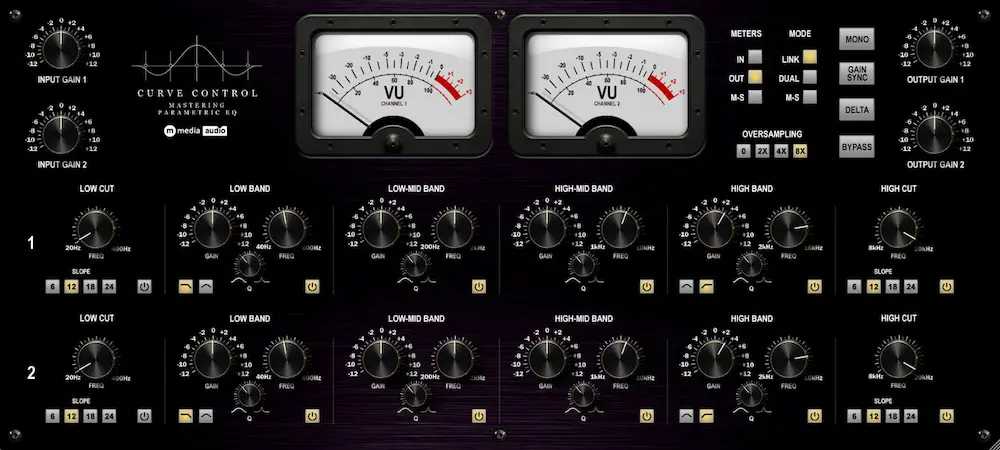
M Media Audio Curve Control is a $59 dual-channel parametric EQ for mixing and mastering, built around three stereo workflows: linked processing, independent left/right EQ, and Mid/Side shaping. Each side uses a structured six-band layout, while every processed signal also passes through an always-on level-dependent saturation stage.
After evaluating its routing, filter architecture, monitoring tools, and nonlinear signal path, the main conclusion is clear: Curve Control is most useful as a specialized stereo-shaping EQ, not as a replacement for a transparent surgical processor. Its Link, Dual, and M/S modes can make recurring stereo decisions faster, but the fixed band roles, lack of dynamic EQ, and permanent saturation significantly narrow its range.
At $59, Curve Control is worth considering for engineers who regularly work on stereo buses, stems, premaster processing, or mastering chains. Users who need unrestricted filter placement, transparent EQ, or one processor for both static and dynamic correction will get more flexibility elsewhere.
Curve Control’s Three Channel Modes Solve Different Stereo Problems
 Many modern EQs compete by adding more bands, dynamic processing, spectral analysis, masking displays, and deeper control over individual filters. Curve Control is narrower by design. The filters themselves are conventional; what matters is how its two six-band channels are routed.
In Link mode, both channels share the same settings. This is the straightforward choice for broad mix-bus shaping and mastering moves that should affect the left and right channels equally. There is little to learn and little to configure.
Dual mode separates the channels completely, giving the left and right sides their own six-band curves. The benefit becomes obvious when the imbalance exists mainly on one side: a harsh guitar panned left, a bright synth weighted toward the right, or low-mid room energy concentrated in one channel of a live recording. A linked cut would also alter material on the unaffected side. Dual mode keeps the correction closer to the location of the problem.
That precision comes with a stereo tradeoff. Different EQ curves across the left and right channels can shift the apparent image, change frequency-dependent channel balance, and pull correlated material away from its original position. Independent processing works best when it reduces an existing asymmetry without introducing a new one.
M/S mode changes the coordinate system. Channel A processes the Mid signal and Channel B processes the Side signal before the result is decoded back to stereo. This allows center-dominant material to be shaped separately from the stereo difference signal. In practice, an engineer can change the tonal balance of the center without applying the same curve to decorrelated side information, or process the Side channel without directly EQing the Mid signal.
Dual-mono and Mid/Side EQ are established techniques, so the modes themselves are not a technical breakthrough. Curve Control’s case rests on access: Link, Dual, and M/S processing use the same interface and control structure. For engineers who regularly switch between matched stereo shaping, asymmetric correction, and Mid/Side work, that consistency may be more useful than adding another layer of filter types or spectral features.
Twelve Bands, but Not Twelve Freely Assignable Filters
Curve Control provides twelve bands across two channels, but each six-band section follows a fixed architecture. The filters have defined roles rather than functioning as interchangeable nodes that can be placed anywhere in the spectrum.
Band 1 is a high-pass filter covering 20 to 400 Hz, with 6, 12, 18, and 24 dB/octave slopes. Band 6 is the corresponding low-pass filter, operating from 8 to 20 kHz with the same slope options. Bands 2 and 5 switch between shelf and bell responses for low- and high-frequency shaping, while Bands 3 and 4 are dedicated parametric bells for the low-mid and high-mid ranges. Frequency, gain, Q, and individual band enable controls are available where relevant to the filter type.
Link mode applies one six-band curve to both channels. In Dual and M/S modes, the two sections become independent, providing twelve separately adjustable bands across the stereo signal. The practical distinction is important: Curve Control offers two structured six-band EQs, not an unrestricted pool of twelve filters for each channel.
The layout favors a recognizable workflow—filtering at the extremes, shelf or bell shaping toward the outer ranges, and focused correction through the mids. That is well suited to tonal balance and moderate corrective work, but less flexible for forensic repair. Several narrow resonances clustered in one frequency region can exhaust the available bell filters quickly.
That limitation matters less in mastering than it does on individual tracks. A finished mix will often respond to broad shelves, one or two targeted bell moves, and deliberate filtering. If the same frequency region requires repeated narrow cuts, the issue may be better addressed in the mix—one of the distinctions that separates professional mastering from corrective work that belongs upstream.
Track-level problems are less accommodating. A resonant vocal, poorly captured guitar, or difficult room recording may require more bands and more freedom over their placement than Curve Control provides on one channel.
The same applies to dense layered instruments, where several sources may occupy similar spectral and stereo space before they ever reach the mix bus. As discussed in our UVI Synth Anthology 5 review, complex layered patches can create problems that are better solved at the source or arrangement stage than with another corrective EQ. Curve Control therefore makes more sense on stereo buses, stems, premaster processing, and mastering chains than as the default corrective EQ across an entire session.
Dual or M/S EQ? Start With Where the Problem Actually Lives
 Dual and M/S processing are not interchangeable routes to the same correction. The right choice depends on whether the imbalance exists between the physical left and right channels or between the Mid and Side components of the stereo signal.
Dual mode is the more direct option when one channel carries excess energy that the other does not. A linked EQ changes both sides, while an M/S move can affect material that contributes to the same Mid or Side component without sharing the original problem. Independent left/right processing keeps the correction in the channel where the imbalance exists.
The cost is image stability. A cut on one side changes both its spectrum and its level relative to the opposite channel within that frequency range. Push the two curves too far apart and correlated material can shift position, while the stereo image develops a frequency-dependent lean. The goal is to reduce an existing asymmetry without creating a new one.
M/S mode is the better fit when the issue is structural rather than channel-specific. A restrained high shelf on the Side signal can change the apparent openness of a mix without directly EQing center-dominant vocals, kick, snare, or bass. A low-mid cut in the Mid channel can reduce congestion in the center while leaving decorrelated guitars, reverbs, and ambience less affected.
The usual mistake is to judge Side processing by the immediate stereo impression. Extra high-frequency energy in the Side channel can sound wider and more detailed, even when the change has simply raised ambience or weakened the balance between the center and the edges of the mix. A move that impresses in stereo may become irrelevant—or expose a thinner center—when the signal is collapsed to mono.
Curve Control’s Mono function makes that check immediate. It removes the need to change the monitoring chain or insert another utility plugin while evaluating an M/S move. Mono does not prove that the processing is correct, but it quickly reveals whether the result depends too heavily on information that disappears in the collapse.
The distinction is straightforward: use Dual mode for a left-versus-right imbalance and M/S mode for a Mid-versus-Side imbalance. Choosing the routing first and looking for a reason afterward is how flexible stereo processing turns into unnecessary intervention.
Always-On Saturation Defines Curve Control—and Limits It
Curve Control includes a level-dependent soft-saturation stage in each channel’s output path. M Media Audio describes it as second-harmonic biased, with a relatively subtle response at lower drive levels and progressively more harmonic contribution as the stage is driven harder.
There is no saturation amount control. More importantly, there is no bypass.
That changes how the plugin has to be evaluated. With a conventional digital EQ, a flat curve can serve as a nominally neutral reference. Curve Control does not offer the same baseline: the filters may be flat, but the signal still passes through a level-dependent nonlinear stage. Input level is part of the processing, not just a gain-staging detail.
On suitable material, that may be the reason to use the plugin. Harmonic contribution can change perceived density and tone before any substantial EQ move is made. The specification alone does not establish whether that change is useful. Audibility depends on the source, the level feeding the stage, and the selected oversampling setting.
The constraint is harder to ignore in precision mastering. If the task calls for a small tonal correction with minimal collateral change, the nonlinear stage introduces another variable. The engineer is no longer hearing the filter move in isolation; the result may reflect the EQ curve, harmonic generation, a level difference, or all three.
Controlled A/B comparison is therefore essential. A processed version can appear denser or more cohesive even when the EQ curve is not responsible for the perceived improvement. Any simultaneous level change makes the comparison less reliable.
Gain Sync reduces that problem by linking output gain inversely to input trim as the saturation stage is driven differently. It can improve level matching, but it cannot provide a neutral reference. Matching loudness removes one source of bias; it does not remove nonlinear processing from the signal path.
Curve Control makes the most sense when its saturation is treated as part of the processor rather than an optional effect attached to the EQ. If the nonlinear behavior improves the source, the design works as a unified tonal stage. If the job requires transparent frequency shaping, the missing bypass is a hard limitation and a reason to choose another EQ.
Delta Monitoring Is Most Useful When the EQ Move Is Hard to Hear
Small EQ moves are easy to misjudge on a full mix. A fraction of a decibel can disappear into arrangement density, momentary level changes, or simple listening fatigue. Curve Control’s Delta function offers another way to inspect what the processing is actually changing.
Delta inverts the dry signal and sums it with the processed output, leaving the difference between the two paths. Instead of hearing the EQ against the full mix, the engineer can monitor the material affected by the processing directly.
Curve Control adds an important complication. Because its signal path includes always-on level-dependent saturation, the Delta output should not be interpreted as the EQ curve alone. Depending on operating level, the difference signal may also contain harmonics generated by the nonlinear stage. Delta therefore represents the total difference between dry and processed paths, not a perfectly isolated monitor of one filter move.
That distinction does not make the function less useful. During corrective mixing, Delta can help reveal whether a cut is concentrated on the intended resonance or taking more surrounding material than expected. In mastering, it can expose the footprint of a broad, low-gain move that is difficult to isolate while the full mix is playing.
The listening order matters. A difference signal removes the musical context that gives an EQ move its proper scale, so tiny changes can sound disproportionately important in isolation. Setting the curve primarily in Delta mode invites overcorrection. Make the decision on the full signal, compare it at matched level, then use Delta to audit the result.
Curve Control also provides switchable VU metering for input, output, and M/S levels. It does not replace dedicated loudness, true-peak, phase, or stereo analysis, but it provides a quick view of level and channel behavior inside the plugin.
Delta, Mono, Gain Sync, and selectable metering are closely tied to Curve Control’s design rather than added as generic utilities. Independent L/R and M/S processing can alter stereo balance, while the saturation stage makes operating level part of the result. The monitoring tools cannot prevent a bad decision, but they make the consequences easier to catch before the processing is committed.
Where Curve Control’s Focused Design Becomes a Constraint
Curve Control gains clarity by limiting its scope. The fixed six-band sections, three channel modes, and permanent nonlinear output stage create a more defined workflow than an open-ended surgical EQ, but they also establish hard boundaries around what the plugin can replace.
The missing neutral path remains the most obvious one. Because the saturation stage cannot be bypassed, frequency shaping and nonlinear processing cannot be separated within the same instance. That issue has greater consequences in mastering than in routine tonal shaping, where added character may already be part of the objective.
The larger commercial problem is overlap. Most intermediate and professional users already own EQs with independent L/R processing, M/S operation, or both. Curve Control is not selling access to a new technique. It has to justify another purchase by making recurring stereo work faster or more coherent than the tools already installed.
The fixed band roles narrow its corrective range further. Each channel has two dedicated parametric bell bands, supplemented by low- and high-frequency sections that can switch between shelf and bell responses. That is sufficient for broad shaping and moderate correction, but several resonances clustered in the same part of the spectrum can exhaust the available filters quickly and force a second EQ into the chain.
Dynamic processing is absent as well. Curve Control cannot reduce a resonance only when it becomes excessive or control frequency buildup that changes with the arrangement. That omission is irrelevant for static tonal shaping, but it matters to engineers accustomed to handling fixed and time-varying problems inside one EQ.
The hardware-inspired language around the saturation stage also deserves restraint. Running the nonlinear section at 2x, 4x, or 8x oversampling is a technically sensible way to manage aliasing without multiplying the cost of the entire signal path. It does not prove that the result has useful “hardware weight.” That judgment still depends on the source, the level feeding the stage, and a properly matched comparison.
Curve Control becomes difficult to justify when treated as a replacement for a full-featured digital EQ. That is not its role. The stronger case is as a dedicated stereo-shaping processor with fixed nonlinear character. If that combination shortens a recurring workflow, the constraints may be acceptable. If the job requires transparency, unrestricted filter placement, or dynamic control, a broader EQ is the better tool.
Curve Control vs Other Professional EQ Plugins
Compared with FabFilter Pro-Q, Kirchhoff-EQ, TDR SlickEQ M, and DMG Audio EQuilibrium, Curve Control is better judged by workflow than by raw feature count.
| Plugin | Primary Strength | Stereo Workflow | Dynamic EQ | Nonlinear Character | Main Tradeoff |
|---|---|---|---|---|---|
| M Media Audio Curve Control | Focused stereo tonal shaping | Link, independent L/R, and M/S | No | Always-on, level-dependent saturation | Fixed band roles and no neutral signal path |
| FabFilter Pro-Q | Surgical correction and general-purpose EQ | Flexible per-band stereo, L/R, and M/S processing | Yes | Primarily transparent | Broader workflow than a dedicated dual-channel processor |
| Kirchhoff-EQ | Detailed static and dynamic frequency control | Extensive channel-specific processing | Yes | Multiple filter behaviors rather than fixed output saturation | Greater complexity for routine stereo shaping |
| TDR SlickEQ M | Mastering-focused tonal balance | Purpose-built stereo and M/S processing | Limited | Selectable tonal coloration | Less suited to detailed surgical correction |
| DMG Audio EQuilibrium | Precision static EQ with deep configuration | Highly configurable channel processing | No | Configurable filter behavior without a fixed saturation stage | More setup depth than a focused stereo processor |
Against Pro-Q or Kirchhoff-EQ, Curve Control gives up substantial processing depth. It has fewer corrective options, no dynamic EQ, and less freedom over filter placement. Engineers who want one EQ for resonance control, broad shaping, channel-specific processing, and detailed visual analysis will get considerably more range from those platforms.
The difference is not simply that Curve Control has fewer features. Its routing is organized around three global operating states: matched stereo, independent left/right, or Mid/Side. The engineer chooses the stereo framework first, then works inside it. Pro-Q and Kirchhoff-EQ offer more granular routing and can perform many of the same tasks, but their broader architectures are designed to solve a wider range of problems.
SlickEQ M is the closer comparison for mastering-oriented tonal work. Both favor a defined workflow over unrestricted node placement, but their priorities differ. Curve Control puts independent L/R operation alongside M/S processing and couples the EQ to permanent saturation. SlickEQ M is more explicitly centered on mastering tone and stereo control.
EQuilibrium sits further in the opposite direction. Its appeal is deep control over filters, topology, and configuration. That makes it far more adaptable, but also more involved when the job is simply to reshape a stereo signal without building a custom EQ environment.
The permanent saturation stage creates the clearest dividing line. Engineers who want EQ and nonlinear character to behave as one processor may prefer Curve Control’s fixed path. Those who want to choose frequency shaping and saturation independently will retain more control with a transparent EQ followed by a separate character stage.
At $59, Curve Control does not need to match flagship EQs feature for feature. The relevant question is whether its Link, Dual, and M/S workflow handles recurring stereo decisions faster than the tools already installed. That same test applies beyond individual plugins: in our Waveform 14 review, workflow changes matter only when they reduce friction in an actual production session. Curve Control should be judged by the same standard. If its routing does not shorten a recurring task, it adds overlap. If it does—and the saturation suits the material—the focused architecture becomes a practical advantage.
Where Curve Control Fits in a Mixing or Mastering Chain
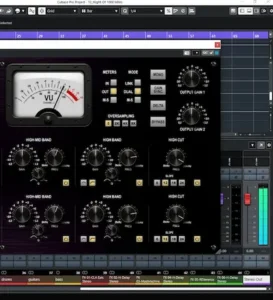 Curve Control makes the most sense after the stereo image has been established but before final level is locked. In practice, that points toward stereo buses, stems, premaster processing, and mastering chains rather than individual mono tracks.
On a mix bus, Dual mode can address asymmetric buildup without applying the same correction to both channels, while M/S mode can reshape the balance between the Mid and Side signals. The saturation stage can also affect density before final clipping or limiting. Because that stage is level-dependent, however, placement is not interchangeable: moving Curve Control before or after a gain-changing processor can alter the result even when the EQ settings remain identical.
The interaction becomes more consequential in mastering. Before a compressor or limiter, Curve Control changes the spectrum and harmonic content driving the next stage. A low-frequency cut may reduce detector activity or peak energy downstream, while the saturation can alter the density of the signal before final level control. Later in the chain, Curve Control may receive a denser or hotter signal and drive its nonlinear stage differently.
Processor order is therefore part of the sound. Moving the plugin during an A/B test changes more than its position on the screen; it changes both the level reaching the saturation stage and the signal presented to processors that follow it. This interaction between processor order and gain structure is central to how a mastering chain actually works, and comparisons are only meaningful when both variables are controlled.
Curve Control is less distinctive on mono sources. Link, Dual, and M/S routing offer little advantage there, while the fixed six-band architecture is less flexible than many general-purpose corrective EQs. The plugin can still function as a tonal processor, but most of its design value appears only when there is a stereo relationship to manipulate.
Translation checks matter more after independent channel processing. A correction that sounds stable on nearfields may produce a different image in headphones or become more obvious in a car, where the listener is already positioned asymmetrically between the speakers. Mono checking remains useful after M/S work as well: a move that sounds wider in stereo may contribute little after collapse, or reveal that the center was weakened rather than the stereo image genuinely improved.
Streaming platforms do not require a special Curve Control preset or service-specific EQ curve. The relevant question is whether the processed master remains stable through loudness normalization, lossy encoding, and playback on systems with limited bandwidth—the broader translation problem behind mastering for streaming platforms. M/S processing offers no automatic advantage. Aggressive high-frequency Side boosts can emphasize ambience and decorrelated information that may translate less consistently after perceptual encoding, particularly in already dense stereo mixes.
The saturation stage also complicates loudness evaluation. Driving it harder may increase harmonic density before the final limiter, but that does not automatically produce a louder or more competitive master. On sparse material, added harmonics may increase apparent solidity. On an already dense mix, the same treatment can reduce separation and feed the limiter a more congested signal.
Curve Control offers 2x, 4x, and 8x oversampling around the saturation stage rather than the entire signal path. Concentrating oversampling on the nonlinear section is technically logical because that is where aliasing is the primary concern. The practical CPU cost still needs to be judged in the actual session: one mastering instance and repeated use across a large mix are very different workloads, especially at the highest setting.
Recall requires more than saving the EQ curve. Because the saturation responds to level, the signal feeding Curve Control is part of the setup. Reopening the same preset after changing upstream gain, compression, or bus processing may not reproduce the same harmonic behavior. For mastering revisions, input level, processor order, and upstream gain structure should be treated as recall data rather than incidental session setup.
Is M Media Audio Curve Control Worth It?
Yes—but only for a specific type of workflow. Curve Control is worth $59 for engineers who regularly need linked stereo, independent left/right, and Mid/Side EQ on buses, stems, premasters, or mastering chains. Its advantage is not that these techniques are new, but that the plugin makes switching between them immediate.
It is harder to recommend as a primary EQ. There is no dynamic processing, the band architecture is fixed, and the saturation stage cannot be bypassed. Engineers who need transparent correction, unrestricted filter placement, or one EQ for both static and time-varying problems will get more range from a broader processor.
Its most credible role is alongside a broader corrective EQ. One tool handles unrestricted repair and dynamic control; Curve Control handles structured stereo shaping when its nonlinear character suits the material. Used that way, the overlap is limited and the plugin has a clear job.
At $59, the question is whether that job already exists in your workflow. Engineers who regularly switch between linked stereo, independent L/R, and M/S processing may find Curve Control faster than configuring a more open-ended EQ for the same work. If those routing decisions are only occasional—or if EQ and saturation need to remain separate—Curve Control is unlikely to justify another purchase.
Overall Rating
| Category | Rating |
|---|---|
| Sound Quality | 8.5/10 |
| Stereo Workflow | 9/10 |
| EQ Flexibility | 7.5/10 |
| Monitoring Tools | 8.5/10 |
| Mastering Suitability | 7.5/10 |
| Value for Money | 8.5/10 |
| Overall | 8.1/10 |
Sound Quality — 8.5/10. Curve Control is built around more than static frequency shaping. Its level-dependent saturation gives the processor a defined tonal behavior, while oversampling is concentrated around the nonlinear stage where additional harmonic generation can also produce aliasing. The deduction is deliberate: because the saturation cannot be bypassed, its character is inseparable from the EQ even when transparency would be preferable.
Stereo Workflow — 9/10. This is Curve Control’s strongest category. Link, independent L/R, and M/S modes cover three distinct stereo problems without forcing the engineer to rebuild routing or configure individual bands one by one. More flexible EQs can perform similar work, but Curve Control makes the stereo framework the starting point of the decision.
EQ Flexibility — 7.5/10. Two structured six-band sections are sufficient for tonal shaping and moderate correction, but the fixed filter roles become restrictive during forensic work. There is no dynamic EQ, no unrestricted pool of bands, and clustered resonances can exhaust the available bell filters quickly.
Monitoring Tools — 8.5/10. Delta, Mono, Gain Sync, and selectable VU metering are unusually well matched to the processor itself. They help audit level-dependent saturation, independent channel moves, and M/S decisions rather than functioning as unrelated extras. Dedicated loudness, true-peak, phase, and stereo analysis are still required for a complete mastering environment.
Mastering Suitability — 7.5/10. Curve Control is useful for stereo tonal shaping, asymmetric correction, and M/S work, but it is not a neutral mastering EQ. The permanent nonlinear stage prevents the engineer from separating frequency correction from harmonic processing inside the same instance. That is a significant constraint when minimal intervention is the objective.
Value for Money — 8.5/10. At $59 with a perpetual license and three simultaneous activations, the price is reasonable for a specialized stereo processor. The value drops sharply, however, if an existing EQ already handles L/R and M/S work efficiently. Curve Control earns its place through workflow speed, not feature count.
Overall — 8.1/10. Curve Control is a strong specialist rather than a universal EQ. Its direct stereo architecture and integrated nonlinear character give it a clear role on buses, stems, premaster processing, and mastering chains, but the missing saturation bypass and limited corrective depth prevent a higher score. The plugin makes the most sense for engineers who repeatedly work in L/R and M/S rather than users looking for one EQ to handle every production task.
M Media Audio Curve Control FAQ
What plugin formats does Curve Control support?
Curve Control is available as a 64-bit VST3 plugin for Windows, macOS, and Linux. The macOS release also includes an AU version for compatible Audio Units hosts.
Does Curve Control run natively on Apple Silicon and work in Logic Pro?
Yes. The macOS version is a Universal Binary with native support for Apple Silicon and Intel Macs, and the included AU format works in Logic Pro. macOS 11 Big Sur or later is required.
Does Curve Control support Linux?
Yes. The Linux release is available as a 64-bit VST3 plugin, with Ubuntu 22.04 or an equivalent distribution listed as the target platform.
How much does Curve Control cost, and how many activations are included?
Curve Control costs $59 as a perpetual license and includes three simultaneous activations. That allows the same license to cover multiple studio or mobile systems without purchasing separate seats.
Is there a free Curve Control demo?
Yes. The demo briefly mutes the output every 30 seconds. That is enough to evaluate the routing, filters, saturation behavior, and general workflow, but not for uninterrupted production use.
Can Curve Control be used on mono tracks?
Yes, but most of its value comes from stereo routing. Independent L/R and M/S processing offer little practical advantage on a mono source, where a more flexible general-purpose EQ will often be the better tool.
Where should Curve Control sit in a mastering chain?
There is no fixed position. Before compression or limiting, its EQ and saturation change the signal driving downstream processors. Later in the chain, a denser or hotter signal may drive the level-dependent saturation differently. Placement and gain structure should be evaluated together.
Should Curve Control run at 8x oversampling all the time?
No. Higher oversampling can reduce aliasing from the nonlinear stage, but it also increases processing cost. The appropriate setting depends on the source, drive level, session load, and whether the audible improvement justifies the extra CPU use.
Does Delta mode isolate only the EQ changes?
Not necessarily. Delta monitors the difference between the dry and processed paths. Because Curve Control includes always-on level-dependent saturation, the difference signal may contain harmonic changes as well as the effect of the filter curve.

Yurii Ariefiev is a mastering engineer and audio production editor working with stereo EQ, Mid/Side processing, gain structure, and translation across real-world playback systems. His plugin analysis focuses on how routing, nonlinear processing, and monitoring tools behave inside practical mixing and mastering chains.
This review evaluates Curve Control as a stereo-processing tool, with particular attention to independent L/R correction, M/S workflow, always-on saturation, and the consequences of processor placement in mastering.