Sonimus S-Console Review: Can This British Console Emulation Replace Satson in Modern Mixing Workflows?
Console emulation remains one of the most polarizing categories in audio production. Some engineers consider it an essential part of their mixing template, while others see little value beyond subtle harmonic coloration. The disagreement isn’t really about analog sound—it’s about whether a virtual console can improve the way an entire mix behaves rather than simply changing the tone of individual tracks.
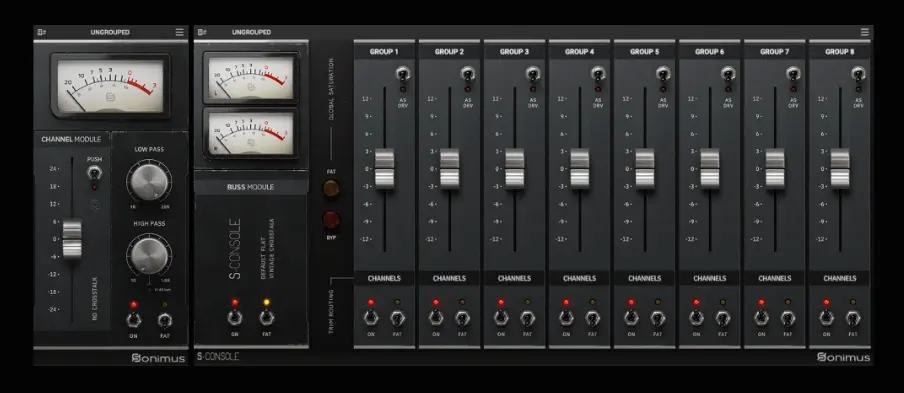
That question becomes more relevant with the release of Sonimus S-Console. Instead of treating it as a routine update to Satson, Sonimus has redesigned its console workflow around integrated channel and bus processing, expanded gain staging, configurable crosstalk, flexible saturation, and modern oversampling options. The goal isn’t to recreate every electrical characteristic of a vintage British 4K console, but to build a console environment that fits today’s DAW-based production workflows.
For experienced mix engineers, the real evaluation goes far beyond harmonic character. Does S-Console make balancing easier across large sessions? Does its console architecture translate into more cohesive mixes? And is it compelling enough to replace long-established options like Slate VCC, Brainworx bx_console, or an existing Satson-based workflow? Those are the questions that matter—and the ones this review aims to answer.
Contents
Why Console Emulation Still Matters in 2026
 Console emulation has outlived multiple production trends because it addresses a workflow issue rather than a technical limitation. Modern DAWs already deliver transparent summing, negligible distortion, and virtually perfect channel separation. Yet many professional engineers continue building entire sessions around virtual console architectures—not because digital mixing is deficient, but because console-based workflows encourage more consistent gain staging and cumulative harmonic behavior across large projects.
That’s an important distinction. A console plugin isn’t intended to transform the sound of a single channel. Its purpose is to introduce small nonlinear changes throughout an entire session, allowing those changes to accumulate naturally across channels, buses, and ultimately the stereo mix.
In analog consoles, that behavior resulted from the interaction of multiple circuit stages, amplifier saturation, transformer response, channel tolerances, bus amplifiers, and limited channel isolation. None of those elements dramatically altered an individual source on their own, but together they influenced transient response, harmonic density, stereo interaction, and overall mix cohesion.
Software can’t reproduce every variable of a physical console, nor does it need to. Modern console emulation focuses on recreating the aspects that remain relevant inside a DAW: controlled harmonic generation, channel-to-channel interaction, predictable gain staging, and a consistent signal path that scales across an entire mix.
This is why experienced engineers rarely evaluate console plugins on isolated tracks. The meaningful comparison begins once every channel, subgroup, and mix bus operates within the same console ecosystem. Only then does it become possible to judge whether the workflow produces a more cohesive mix—or simply adds unnecessary processing.
S-Console is clearly designed around that philosophy. Rather than functioning as another saturation plugin, it aims to provide a complete console framework that remains active from the first balance decision through the final mix print.
The Evolution from Satson to S-Console
Satson built its reputation by taking a restrained approach to console emulation. Rather than emphasizing obvious analog coloration, it introduced subtle nonlinear behavior that became more noticeable as additional channels were added to a mix. Many engineers adopted it as a permanent part of their templates because it encouraged more consistent gain staging and slightly more cohesive balances without drawing attention to itself.
S-Console builds on that foundation instead of replacing it. The biggest changes aren’t found in the saturation algorithm alone—they’re reflected in how the plugin manages an entire console workflow.
Instead of treating each instance as an isolated processor, S-Console links channels, buses, and the mix bus into a unified system. That architecture becomes increasingly valuable in larger productions, where maintaining consistent signal levels across dozens—or even hundreds—of tracks is often more challenging than applying EQ or compression.
Its feature set reflects that design philosophy. Integrated grouping, channel-to-bus communication, adjustable stereo crosstalk, parallel processing through the Mix control, FAT mode, and selectable oversampling aren’t simply additional controls; they’re intended to make the console behave as a complete mixing environment rather than a collection of independent saturation plugins.
That places S-Console in a different category from many competing products. Some console emulations focus almost exclusively on reproducing the behavior of a specific analog desk, often at the expense of CPU efficiency or workflow flexibility. Others reduce console modeling to harmonic enhancement, delivering instant coloration but little interaction between channels or buses.
S-Console takes a more workflow-oriented approach. It doesn’t attempt to become the most aggressive saturation plugin or the most forensic hardware recreation. Instead, it prioritizes consistency, scalability, and session-wide integration—qualities that become increasingly important as projects grow in complexity.
Workflow Before Tone: The Design Philosophy Behind S-Console
Many console emulation plugins are judged almost entirely by their harmonic character. S-Console takes a different approach. Its most significant improvements aren’t tied to saturation alone—they’re built around reducing friction during the mixing process.
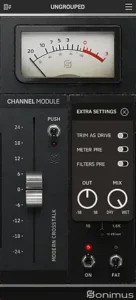
That philosophy is evident in the plugin’s gain staging workflow. The Trim-as-Drive control allows engineers to increase harmonic content without constantly chasing output level changes. It sounds like a minor convenience until it’s repeated across 80 or 100 channels, where small gain mismatches can quickly complicate automation, bus processing, and objective A/B comparisons.
For professional sessions, consistency is often more valuable than dramatic coloration. Commercial projects rarely move in a straight line. Mix revisions, alternate versions, vocal updates, instrumental edits, and stem deliveries all require engineers to revisit decisions without disrupting the balance established earlier in the project. A console workflow that maintains predictable signal relationships can save considerably more time than one that simply adds another layer of analog character.
The integrated Mix control follows the same philosophy. Parallel saturation has become a standard production technique, but implementing it traditionally requires duplicate tracks or auxiliary routing. Having that capability available directly within every console instance simplifies experimentation while preserving transient detail when heavier harmonic processing isn’t appropriate.
The same workflow-first philosophy is becoming increasingly common across modern production tools. Rather than focusing solely on sound, developers are also redesigning how engineers interact with large sessions. We explored a similar trend in our Rast Sound Evolver 2 review, where automation workflow plays a bigger role than the effects themselves.
None of these workflow improvements make better mix decisions on the engineer’s behalf. They simply remove repetitive technical tasks that interrupt critical listening. For engineers managing large commercial sessions, eliminating repetitive technical tasks often delivers more value than pursuing increasingly dramatic analog coloration.
Where the New Processing Engine Makes the Biggest Difference
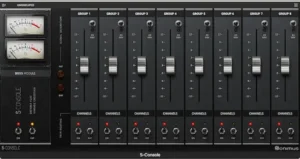 S-Console’s processing engine isn’t defined by a single headline feature. Its strengths come from several smaller additions that influence how an entire session behaves rather than how an individual track sounds.
Stereo crosstalk is one of the more interesting examples. Analog consoles never provided perfect channel separation. Small amounts of electrical bleed between adjacent channels subtly affected stereo perception, particularly when dozens of signals were summed through the same mix bus. Digital mixers eliminate that interaction almost entirely, producing exceptionally clean channel separation that can sometimes feel overly discrete in dense arrangements.
S-Console allows engineers to reintroduce that behavior in a controlled way. Used sparingly, adjustable crosstalk can create a slightly more connected stereo image without relying on artificial widening or additional ambience processing. Push it too far, however, and the opposite happens—stereo localization becomes less precise, making it harder for individual elements to maintain their position within the mix.
Oversampling is another area where S-Console moves beyond earlier generations of console emulation. Harmonic processing inevitably generates high-frequency content that can fold back into the audible spectrum as aliasing, particularly when higher drive settings are used. Providing both minimum-phase and linear-phase oversampling modes allows engineers to choose between lower latency during mixing and maximum processing accuracy during final rendering.
In practice, there’s little reason to run every session at the highest oversampling setting. Moderate values are usually sufficient while balancing a mix, preserving CPU resources for virtual instruments and other processing. Higher settings make more sense during final exports, stem printing, or projects where console saturation is applied across most channels and buses.
Oversampling also affects plugin latency. While the additional delay is generally insignificant during offline rendering, it can become relevant in low-buffer recording sessions or when monitoring through a heavily processed mix template. Most engineers therefore reserve the highest oversampling modes for mix revision, stem export, or final printing rather than day-to-day tracking.
Neither configurable crosstalk nor high-rate oversampling guarantees a better mix. Their value lies in giving engineers more precise control over cumulative console behavior without introducing additional plugins or unnecessary routing complexity.
Console Emulation Is About Accumulation, Not Individual Instances
Console emulation is often misunderstood because users evaluate it the same way they evaluate an EQ or compressor: by inserting it on a single track and listening for an immediate difference. That’s rarely how virtual console systems are intended to work.
Typical Console-Based Mixing Signal Flow
Track
↓
Console Channel Processing (S-Console)
↓
Corrective EQ
↓
Compression / Dynamics
↓
Bus Routing
↓
Console Bus Processing
↓
Stereo Mix Bus
↓
Mastering
The defining characteristic of console modeling isn’t the processing applied to one channel—it’s the cumulative effect created when every channel, subgroup, and mix bus shares the same signal path. Small amounts of harmonic saturation, subtle nonlinearities, channel interaction, and consistent gain staging become progressively more audible as they build across the entire session.
That’s why inserting S-Console on a kick drum and expecting a dramatic transformation misses the point. The plugin is designed to influence the relationship between tracks rather than radically reshape individual sources. As additional instances are introduced, cumulative processing can subtly affect transient behavior, bus response, perceived depth, and the overall stability of a mix without calling attention to any single channel.
This also explains why console plugins often produce conflicting first impressions. Engineers performing isolated A/B comparisons may hear only modest tonal changes and dismiss the processor entirely. Those mixing through a complete console architecture tend to judge it differently because they’re evaluating the finished mix instead of individual inserts.
For that reason, S-Console is better viewed as part of a session’s infrastructure than as a creative effect. Its purpose isn’t to replace channel strips, saturation plugins, or sound-design processors. It’s to establish a consistent analog-inspired framework that remains active throughout the entire mixing process.
Critical Evaluation: Where S-Console Delivers—and Where It Doesn’t
S-Console succeeds because it improves the overall mixing environment rather than chasing dramatic analog coloration. That’s also the reason it may leave some users underwhelmed. Engineers expecting obvious tonal changes from a single insert are unlikely to hear what the plugin is designed to do.
Its real strength lies in cumulative processing. Gain staging, channel interaction, bus integration, harmonic saturation, configurable crosstalk, and oversampling work as parts of the same console architecture instead of functioning as isolated effects. The more consistently that architecture is applied across a session, the more coherent the overall mix tends to become.
That advantage grows with project size. Sessions containing 70, 100, or more tracks benefit far more from a consistent console framework than smaller productions where only a handful of channels require subtle harmonic enhancement. In compact electronic projects or beat-oriented productions, the difference may be considerably less noticeable.
There are also practical limitations. Like every console emulation, S-Console operates within the boundaries of software modeling. It won’t compensate for poor monitoring, inconsistent gain staging elsewhere in the signal chain, weak source recordings, or arrangement problems. If a mix lacks depth because instruments compete for the same spectral space, console saturation alone won’t solve it.
Its restrained character is likely to divide opinion. Some competing plugins intentionally exaggerate harmonic coloration because dramatic A/B comparisons create a stronger first impression. S-Console takes the opposite approach, favoring incremental changes that become more apparent over the course of a complete mix than during isolated listening tests.
Console emulation is only one stage in a much larger production chain. If you’re evaluating where it fits alongside limiting, clipping, EQ, and dynamics processing, our detailed Mastering Chain Explained article walks through the complete signal flow used during professional mastering.
Marketing Claims vs. Practical Engineering Reality
Console emulation is often marketed with familiar promises: analog warmth, glue, depth, punch, and three-dimensional imaging. Those descriptions are useful shorthand, but they don’t explain what these plugins actually contribute to a modern mix.
No software can recreate every variable that shapes the behavior of a large-format analog console. Hardware changes over time. Components age, channels drift, calibration varies, and every console develops its own tolerances. Even two units of the same model rarely behave in exactly the same way.
What modern console emulation can reproduce is the broader behavior of an analog workflow: controlled harmonic generation, predictable nonlinear response, channel interaction, and consistent gain staging across an entire session. For most engineers, those characteristics matter far more than perfectly modeling the electrical behavior of a specific piece of hardware.
S-Console reflects that philosophy. Instead of pursuing absolute hardware authenticity, it combines analog-inspired behavior with features that only make sense in software. Adjustable stereo crosstalk is a good example. A physical console has a fixed amount of channel bleed determined by its circuitry. In software, that behavior becomes a creative parameter that can be adapted to the production rather than dictated by the hardware.
The Mix control follows the same logic. Traditional analog consoles don’t offer instant parallel processing on every channel, yet parallel harmonic blending has become a standard mixing technique. Implementing it directly within the console workflow isn’t historically accurate, but it’s undeniably practical.
Viewed from that perspective, S-Console isn’t trying to become a virtual museum piece. It’s using analog console design as a starting point while embracing the flexibility that makes software a different—and in many situations more capable—production environment.
Competitive Positioning: Where S-Console Fits Among Today’s Console Emulations
Choosing a console emulation plugin is less about finding the most accurate analog model and more about selecting the workflow that best matches the way you mix. Today’s market is no longer divided by sound alone. Different developers prioritize different engineering philosophies, from highly detailed hardware recreation to streamlined session management.
S-Console sits closer to the workflow-driven end of that spectrum. Rather than focusing exclusively on recreating a specific console circuit, it combines console-style harmonic behavior with tools designed to simplify large-scale mixing sessions. That makes it fundamentally different from products built around channel-strip emulation or component-level hardware modeling.
For engineers who mix complete productions rather than individual tracks, that distinction is significant. Session consistency, repeatable gain staging, and integrated channel-to-bus behavior often have a greater impact on long-term workflow than the subtle tonal differences between competing analog models.
| Plugin | Design Philosophy | Primary Strength | Best Suited For |
|---|---|---|---|
| Sonimus S-Console | Integrated virtual console workflow | Session-wide gain staging, channel interaction, scalable console architecture | Mix engineers building complete console-based templates |
| Slate Digital Virtual Console Collection | Multiple console personalities | Fast switching between several console flavors | Engineers who prefer tonal variety across projects |
| SSL Native 4K Series | SSL production workflow | Familiar SSL processing and streamlined channel operation | Studios already centered around SSL-style mixing |
| Acustica Audio Console Libraries | Component-level hardware modeling | Highly detailed analog behavior | Engineers prioritizing realism over CPU efficiency |
| Brainworx bx_console Series | Channel-strip emulation with channel variation | Detailed per-channel modeling and TMT technology | Mixers focusing on individual channel processing |
S-Console doesn’t compete by offering the most dramatic saturation or the most exhaustive hardware recreation. Its advantage lies in balancing analog-inspired behavior with a workflow that remains practical across large commercial sessions. Engineers looking for obvious coloration may gravitate toward more character-driven processors, while those treating console emulation as part of their everyday mixing infrastructure are more likely to appreciate S-Console’s design priorities.
Is S-Console Better Than Slate Digital Virtual Console Collection?
Not necessarily—it depends on what you expect from a virtual console.
Slate Digital Virtual Console Collection focuses on giving engineers several distinct console personalities that can be switched between projects. Its appeal lies in tonal variety and a workflow that has been widely adopted in commercial studios for years.
S-Console approaches the problem from a different angle. Instead of emphasizing multiple console flavors, it concentrates on creating a unified console environment with consistent gain staging, integrated channel and bus behavior, configurable crosstalk, and a modern routing workflow.
For engineers who frequently move between different console models to shape a mix, Slate VCC remains a flexible option. For those who prefer building repeatable mix templates where every channel follows the same console architecture, S-Console provides a more streamlined workflow with fewer distractions.
Neither plugin is objectively superior. The decision comes down to whether tonal variety or workflow consistency is the higher priority in your mixing process.
Who Should Consider S-Console?
S-Console is best suited to engineers who build complete mixes rather than processing isolated tracks. Its strengths become increasingly apparent as more channels, buses, and subgroups operate within the same console environment, making it a better fit for full-scale productions than for lightweight editing or creative sound design.
Projects with large track counts stand to benefit the most. Rock, pop, country, jazz, orchestral scoring, film music, and commercial productions often involve complex routing, multiple bus stages, and frequent mix revisions. In those situations, maintaining consistent gain relationships across the entire session is usually more valuable than adding another saturation plugin.
It’s also a sensible choice for engineers who revisit projects regularly. Client revisions, alternate mixes, instrumental versions, broadcast edits, and stem deliveries all require reliable session recall. Working within a consistent console architecture helps preserve balance from one revision to the next without constantly recalibrating signal levels.
Producers looking to move beyond stock DAW processing may also find S-Console appealing, particularly if they want a console-based mixing approach without the higher CPU demands often associated with detailed component-level analog modeling.
Who Probably Doesn’t Need It?
S-Console isn’t a universal upgrade for every production workflow. Its advantages are most apparent in full-session mixing, which means some users will see only marginal benefits.
Producers whose mixes already rely heavily on dedicated saturation processors, clipping, tape emulations, or creative distortion may find that another layer of console modeling contributes little beyond additional complexity. If harmonic character is already being shaped intentionally at multiple stages, adding console emulation doesn’t automatically produce a better mix.
The same applies to engineers who have already standardized on another virtual console ecosystem. If an existing template consistently delivers reliable results and integrates well with daily work, replacing it with S-Console is unlikely to transform the outcome. The differences are more evolutionary than revolutionary.
Users expecting dramatic tonal changes from a single insert are also likely to miss the point. S-Console is designed to influence an entire mix through cumulative processing rather than obvious channel-by-channel coloration.
Finally, it’s difficult to justify in production environments where transparency is the primary goal. Podcast editing, dialogue restoration, audiobook production, and other speech-focused workflows rarely benefit from console-wide harmonic processing. In those cases, corrective tools and efficient editing workflows typically provide a greater return than analog-inspired console architecture.
By contrast, experimental sound-design environments often benefit from entirely different priorities. If your productions are built around generative synthesis and evolving textures instead of traditional console workflows, our sonicLAB SSNN review examines a plugin designed for that kind of creative production.
Real-World Production Perspective: Does Console Emulation Survive Outside the Studio?
 A common criticism of console emulation is that its benefits disappear once a mix leaves the studio. After streaming normalization, lossy codec compression, smartphone playback, and inexpensive earbuds, does subtle analog-style processing still matter?
Not in the way many marketing campaigns suggest.
Listeners aren’t identifying individual harmonic changes introduced by a console plugin, nor are they distinguishing one console model from another in everyday playback. What survives distribution is the cumulative effect those decisions have on the mix itself. If console emulation contributes to more consistent gain staging, smoother bus interaction, controlled saturation, and better transient relationships, those improvements continue to influence how the mix translates after mastering, codec encoding, and loudness normalization.
In other words, the audience isn’t hearing the console—they’re hearing the consequences of a more stable mix.
That’s particularly relevant for streaming platforms, where integrated loudness targets have reduced the importance of raw playback level. If you’re interested in how normalization changes the way finished mixes are perceived, our LUFS Mastering Guide explains the practical implications in more detail. Competitive mixes are now defined less by peak loudness and more by transient preservation, spectral balance, and the ability to maintain clarity after lossy compression. Console emulation can support those goals, but only as one component within a disciplined mixing process.
Monitoring quality remains equally important. Decisions made on accurate monitoring systems often survive translation even when the individual processing responsible for those decisions becomes impossible to identify on consumer playback devices. That’s true for console emulation just as it is for EQ, compression, or stereo imaging.
From a production standpoint, CPU efficiency deserves as much attention as sound quality. S-Console is designed for full-session deployment rather than occasional insert use, so processor load becomes increasingly important as track counts grow. On a modern Apple Silicon system or a recent multi-core Intel or AMD CPU, running 60–100 instances at moderate oversampling settings is generally practical, although exact performance depends on sample rate, buffer size, and the rest of the plugin chain.
Higher oversampling settings are better treated as production-stage tools than default mixing settings. During tracking and mix development, moderate oversampling typically provides the best balance between processing accuracy and responsiveness. Maximum oversampling becomes easier to justify during final mix printing or stem export, where real-time performance is no longer the primary concern.
Ultimately, console emulation doesn’t replace critical listening, accurate monitoring, or disciplined engineering. It provides a framework that supports those decisions throughout the mix, increasing the likelihood that the finished production will translate consistently across streaming platforms and playback systems.
Mixing Before Mastering: Why Console Plugins Don’t Replace Good Engineering
Console emulation is often discussed in terms of analog character, but mastering engineers rarely judge it that way. Their concern isn’t whether additional harmonics sound pleasing—it’s whether the mix arriving for mastering still has the headroom, transient definition, spectral balance, and dynamic stability needed for final processing. Those requirements are covered in much greater detail in our guide to preparing a mix for mastering.
A disciplined console workflow can support those objectives by encouraging consistent gain staging and controlled harmonic buildup throughout the mix. The opposite is equally true. Excessive drive, cumulative saturation, or aggressive soft clipping across multiple channels can leave a mastering engineer with fewer options for shaping dynamics without introducing unwanted artifacts.
This becomes increasingly important as modern mixes accumulate multiple layers of nonlinear processing. Console emulation often sits alongside tape simulations, analog compressors, transformer models, clippers, and saturation plugins. Each processor may contribute only subtle coloration, yet together they can reduce transient contrast, narrow perceived dynamics, and limit how far the master can be pushed before distortion becomes audible.
That is why experienced engineers evaluate console plugins as part of the entire signal chain rather than as isolated processors. Bus compression, stereo bus limiting, saturation, clipping, and console modeling all interact, and their combined effect determines how well a mix responds during mastering—not the contribution of any single plugin.
Viewed in that context, S-Console works best when it provides subtle cumulative behavior instead of obvious coloration. It should establish a stable foundation for the mix, leaving enough flexibility for mastering rather than consuming it before the final stage of production.
Verdict
S-Console isn’t trying to become the most colorful console emulation on the market, nor is it chasing component-level hardware replication. Its focus is much more practical: providing a consistent console framework that scales from the first fader move to the final mix print.
That philosophy won’t appeal to everyone. Engineers looking for immediate tonal transformation or obvious analog coloration are likely to find other plugins more satisfying during quick A/B comparisons. S-Console delivers its strongest results gradually, as cumulative processing shapes the behavior of an entire session rather than individual channels.
For users coming from Satson, the upgrade is less about a radically different sound than a more capable production environment. Integrated channel and bus communication, improved gain staging, configurable crosstalk, oversampling, and a more flexible processing architecture make everyday mixing more efficient without abandoning the restrained approach that made Satson popular in the first place.
Ultimately, the value of S-Console depends on how you approach mixing. If you see console emulation as a subtle foundation for an entire production, it’s one of the more thoughtful workflow-oriented options currently available. If you’re searching for dramatic analog character from a single insert, you’re looking at the wrong category of plugin—not the wrong plugin.
Of course, even the best console workflow cannot replace an experienced mastering stage. If you’d like to see how professional mastering complements a finished mix, our article on how professional mastering works explains the complete process from delivery to the final release master.
Editorial Rating
| Category | Rating |
|---|---|
| Console Workflow | 9.7/10 |
| Mix Cohesion | 9.3/10 |
| Gain Staging & Session Management | 9.8/10 |
| CPU Efficiency | 9.1/10 |
| Analog Character | 8.7/10 |
| Value for Money | 9.4/10 |
| Overall | 9.3/10 |
S-Console isn’t designed to impress with exaggerated analog coloration or dramatic A/B comparisons. Its real strength lies in building a consistent console environment that scales naturally across complete productions. For engineers who mix large sessions and value repeatable gain staging, integrated routing, and subtle cumulative processing, it stands out as one of the strongest workflow-oriented console emulations currently available. Those looking primarily for obvious saturation or vintage coloration may prefer more character-driven alternatives, but as a modern virtual console architecture, S-Console delivers an exceptionally balanced combination of efficiency, control, and mix consistency.

Yurii Ariefiev is a mastering engineer who works with commercial releases across streaming platforms, helping producers and mix engineers improve translation, preserve dynamics, and prepare mixes for reliable mastering. His editorial articles are based on practical studio workflows rather than manufacturer specifications or promotional material.
This review evaluates Sonimus S-Console from the perspective of real mixing and mastering practice, focusing on gain staging, console architecture, cumulative processing, mix translation, and how console emulation influences the quality of the final master—not simply how the plugin sounds in isolation.
Frequently Asked Questions
Is Sonimus S-Console intended to replace Satson?
Yes. S-Console expands the original Satson concept with integrated channel and bus communication, configurable crosstalk, oversampling, improved gain staging, and a more flexible console architecture while preserving the restrained mixing philosophy that made Satson popular.
Should S-Console be inserted on every track?
In most cases, yes. Console emulation delivers its greatest benefit when the entire session shares the same processing framework. Applying it to only a few channels rarely produces the cumulative behavior that virtual console systems are designed to create.
Where should a console emulation plugin sit in the signal chain?
Many engineers place console emulation early in the channel strip so subsequent EQ, compression, and saturation respond to the same gain structure. Exact placement varies by workflow, but consistency across the session is generally more important than the specific insert position.
Does S-Console increase CPU usage significantly?
CPU consumption depends primarily on oversampling settings and project size. Moderate oversampling is usually practical for full-session mixing, while higher settings are better reserved for final printing or stem exports.
Does oversampling always produce better results?
Not necessarily. Oversampling reduces aliasing during nonlinear processing, but the audible improvement depends on how aggressively the plugin is driven. Higher settings also increase CPU load, making them more useful during final rendering than during tracking.
Can console emulation improve mastering results?
Indirectly. Console emulation can produce a more controlled and consistent mix before mastering, but it cannot replace proper balancing, dynamics processing, or a dedicated mastering chain.
Is S-Console a replacement for saturation plugins?
No. Dedicated saturation processors are typically designed to create audible harmonic coloration. S-Console focuses on cumulative console behavior across an entire session rather than aggressive sound shaping on individual tracks.
Does console emulation affect streaming translation?
Not by itself. Better translation comes from improved gain staging, controlled harmonic buildup, and balanced dynamics throughout the mix. Console emulation can support those goals, but it isn’t a substitute for strong engineering decisions.
Is S-Console suitable for electronic music production?
Yes, although its contribution is often subtler in productions that already rely heavily on clipping, saturation, and creative distortion. It tends to provide greater workflow benefits in larger multi-track sessions.
Is upgrading from Satson worth it?
For engineers who use Satson across every mix, S-Console offers meaningful workflow improvements rather than a radically different sound. Users who only insert console emulation occasionally may notice fewer practical advantages.