Rast Sound Evolver 2 Review: A Motion FX Plugin Built Around Smarter Automation
Modern productions rarely rely on static sounds. Pads evolve, transitions breathe, textures shift, and even supporting elements often carry some form of rhythmic or spectral movement. In genres such as melodic techno, progressive house, future bass, cinematic scoring, and contemporary pop, motion has become part of the arrangement rather than an occasional effect.
Creating that movement is no longer the difficult part. Every major DAW provides automation lanes, modulators, macro systems, and routing tools capable of producing virtually any result. The bottleneck is efficiency. Complex automation often spreads across dozens of parameters, multiple plugins, and several sections of a session, turning simple creative decisions into time-consuming editing work.
That workflow problem has fueled the growth of a dedicated category of motion-design plugins. Instead of drawing separate automation curves for filters, delays, reverbs, distortion, and modulation effects, these tools attempt to centralize movement inside a single environment. The goal is not more processing. The goal is faster experimentation, easier revisions, and greater control over how movement evolves throughout a track.
Evolver 2 enters this space with a graph-based approach built around visual motion editing, multi-effect modulation, and performance-oriented control. Its value does not depend on whether it can create pumping, stutters, swells, or transitions. Nearly every advanced modulation platform can do that. The more relevant question for producers, mixing engineers, and sound designers is whether Evolver 2 offers a faster and more practical workflow than traditional automation—and whether those advantages remain useful once a project reaches the mixing and mastering stages.
- Where Evolver 2 Fits in Today’s Plugin Landscape
- The Real Workflow Advantage
- How Evolver 2 Performs in Real Mixing Scenarios
- A Practical Example: Building Motion Without Automation Overload
- Why Mastering Engineers Should Pay Attention to Motion Plugins
- Critical Evaluation
- How Evolver 2 Compares to Alternative Motion FX Solutions
- Who Evolver 2 Is Actually For
- Translation Matters More Than Motion
- Verdict
Why Motion Design Has Become a Core Production Skill
Movement is no longer reserved for transitions, risers, or special effects. In modern audio production, it is often built directly into the sound itself. A single synth pad may carry filter modulation, stereo movement, evolving ambience, harmonic shifts, transient variation, and rhythmic gating at the same time. What once required multiple layers and arrangement changes is now frequently achieved within a single channel.
This shift is particularly evident in melodic techno, progressive house, drum & bass, cinematic scoring, hybrid orchestral productions, and modern pop records. Across these genres, producers are expected to maintain energy and forward motion without constantly introducing new musical material. Sound design has become part of the arrangement.
The result is a growing dependence on automation and modulation. Sessions that appear relatively simple at first glance often contain hundreds of automation points controlling filters, effects sends, saturation, stereo width, delay feedback, reverb parameters, and countless micro-adjustments designed to prevent static repetition.
That complexity creates a practical problem. More movement generally improves perceived depth and engagement, but it also increases the amount of automation that must be created, managed, revised, and translated across an entire mix.
What begins as a creative decision can quickly become an editing exercise. The challenge becomes even greater when a motion-heavy production reaches the final delivery stage, where proper mix preparation for mastering often determines whether complex automation translates cleanly or creates new problems during final processing.
This is the environment that gave rise to motion-design plugins. Their purpose is not simply to add effects. Their primary function is to reduce the amount of manual automation required to create evolving sounds while keeping that movement predictable enough to survive mixing, mastering, and real-world playback systems.
Where Evolver 2 Fits in Today’s Plugin Landscape
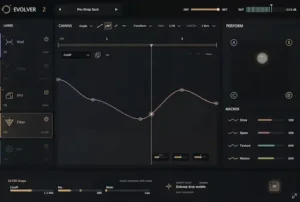 The most useful way to evaluate Evolver 2 is not as a multi-effects plugin, but as an alternative approach to automation. The effects themselves are familiar territory. Modern producers already have access to countless filters, delays, distortions, reverbs, and modulation processors. The larger challenge is managing movement across a session without creating a maze of automation lanes and routing decisions.
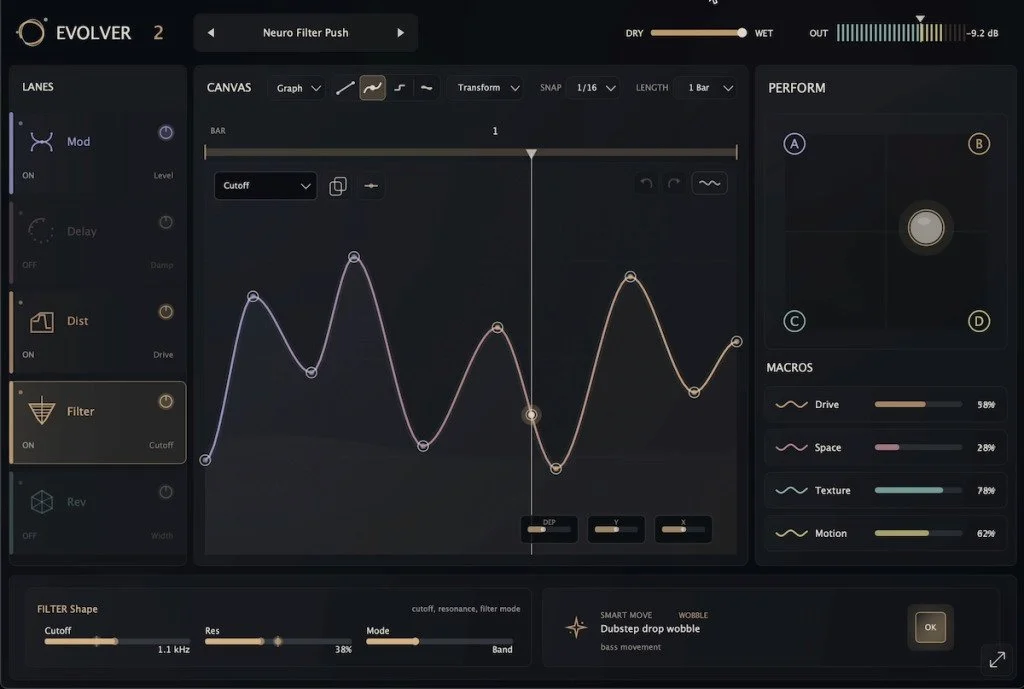
Evolver 2 addresses that problem through a graph-based motion engine that sits above the effects layer. Instead of drawing separate automation curves throughout a DAW project, users build a movement pattern inside the plugin and use that pattern to influence multiple processes simultaneously. Timing, depth, shape, and intensity can then be adjusted from a centralized control structure rather than revisiting individual automation data.
That places Evolver 2 in a category that overlaps several different production tools. It functions partly as a multi-effects processor, partly as a modulation environment, and partly as a creative performance tool. In practice, it is closer to a motion-design platform than a conventional effects plugin.
The visual motion canvas is the feature that defines the workflow. Rather than treating modulation as a collection of disconnected parameter changes, Evolver 2 treats movement as a single editable object. A graph can simultaneously influence filtering, ambience, saturation, delay behavior, and other effect parameters while remaining easy to reshape as the production evolves.
This approach becomes particularly valuable during arrangement development. Producers often discover that movement created early in a track no longer fits after structural changes, mix revisions, or sound replacements. Traditional automation typically requires manual cleanup and reprogramming. A centralized motion system makes those revisions significantly faster, especially in projects where multiple effects are designed to move together.
The result is less about generating new sounds and more about reducing friction between creative decisions and execution. For producers working with evolving textures, transition-heavy arrangements, and automation-intensive genres, that workflow advantage may ultimately be more important than any individual effect included in the plugin.
The Real Workflow Advantage: Centralized Motion Design
The strongest aspect of Evolver 2 is not its delay, filter, distortion, or reverb processing. Similar effects are available in countless plugins. What differentiates the platform is its ability to treat movement as a single editable system rather than a collection of independent automation events.
In a typical production session, motion is often scattered across multiple plugins and automation lanes. Filter sweeps live in one processor, delay changes in another, reverb automation somewhere else, and additional modulation is handled through DAW envelopes. The result is a workflow that becomes increasingly difficult to manage as a project grows.
That complexity usually remains hidden until revisions begin. Arrangement changes, sound replacements, mix updates, and client feedback frequently require movement to be adjusted long after the original automation was created. What initially took a few minutes to program can become a tedious process of tracking down automation data across an entire session.
Evolver 2 approaches the problem differently. Instead of managing individual automation events, producers build a motion structure that can influence multiple effects simultaneously. Timing relationships, modulation depth, and overall movement behavior remain connected, making large-scale revisions considerably faster than rebuilding separate automation passes.
This is where controls such as DEP, X, and Y become more important than they initially appear. Rather than forcing users to redraw modulation curves every time a sound needs refinement, the plugin allows broad adjustments to intensity, timing, and movement range from a higher level. A texture can become more aggressive, more subtle, slower, or more rhythmic without redesigning the entire modulation architecture.
For producers working on automation-heavy genres, the benefit is cumulative. Saving a few minutes on a single sound is insignificant. Saving those minutes repeatedly across dozens of tracks, revisions, and mix iterations becomes a meaningful workflow advantage. In that context, Evolver 2 functions less like an effects processor and more like a project management tool for movement itself.
How Evolver 2 Performs in Real Mixing Scenarios
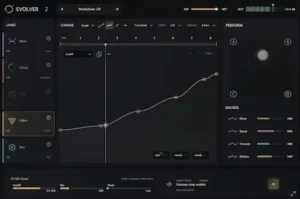 Many modulation-heavy plugins sound impressive during sound design and far less impressive once a mix begins to fill out. Movement that feels exciting in isolation often becomes distracting when layered against vocals, drums, bass, and other competing elements. Excessive filtering, aggressive gating, and constant stereo manipulation can quickly create masking issues, unstable balances, and unnecessary mix complexity.
Evolver 2 is at its best when used to introduce controlled movement rather than obvious movement. The plugin excels at creating gradual shifts inside otherwise static sounds, allowing pads, textures, atmospheres, and supporting instruments to evolve without constantly drawing attention away from the core arrangement.
This distinction matters because most commercially successful mixes rely on perceived development rather than continuous effect-driven excitement. Listeners often register movement subconsciously. A texture feels alive, a breakdown feels larger, or a transition feels more natural, even when the source of that change is difficult to identify.
In practice, Evolver 2 is particularly effective when movement serves an existing musical role instead of becoming a new focal point. Small changes in harmonic content, ambience, stereo spread, or modulation depth can create a sense of progression without introducing additional layers or arrangement elements. That approach is generally more mix-friendly than aggressive stutters, extreme filter sweeps, or heavily processed transition effects that compete for attention.
The graph-based workflow also encourages a more cohesive style of modulation. Because multiple effects can respond to the same motion structure, movement tends to feel connected rather than fragmented. Spatial changes, tonal shifts, and dynamic variation can evolve together, producing results that often feel more intentional than stacking unrelated automation moves across several plugins. This becomes particularly relevant when movement and spatial perception are working together, a topic explored in our analysis of W.A. Production PsychoPan, where psychoacoustic positioning is used to influence perceived depth and placement inside a mix.
Perhaps the most important observation from a mixing perspective is that Evolver 2 makes subtle modulation easier to achieve. That may sound less exciting than dramatic sound design, but subtle movement is usually what survives into a finished release. Once a track reaches the final stages of mixing, the elements that continue to add value are rarely the most obvious ones. More often, they are the small changes that create depth, maintain listener engagement, and prevent repetition without destabilizing the mix.
A Practical Example: Building Motion Without Automation Overload
Consider a typical melodic techno production built around a sustained pad, atmospheric textures, and a long arrangement with gradual energy shifts. Using traditional DAW automation, a producer may automate filter cutoff, reverb send level, delay feedback, stereo width, and distortion drive independently throughout the track.
After several arrangement revisions, those automation lanes often become one of the most difficult parts of the session to maintain. Small structural changes can require updates across dozens of separate automation events.
Evolver 2 approaches the same task differently. A single motion graph can drive multiple effect parameters simultaneously, allowing the entire movement structure to evolve as one system rather than a collection of unrelated edits.
The advantage is not creative capability. Both approaches can reach similar sonic results. The advantage is revision speed. In production environments where arrangements continue evolving until late in the process, reducing automation management often has a larger impact on workflow than adding another effect processor.
Why Mastering Engineers Should Pay Attention to Motion Plugins
Motion-based processing is usually discussed as a sound-design tool, but its impact extends well beyond production. Every modulation decision affects the stability of a mix, and stability is ultimately what mastering engineers work to preserve.
As movement becomes more aggressive, the behavior of a mix becomes less predictable. Filters continuously reshape frequency balance. Stereo modulation alters width and localization. Dynamic effects change perceived density from section to section. Even subtle automation can influence how a limiter responds once the project reaches the mastering stage.
These interactions are often overlooked during production because they occur gradually. In practice, many of the issues engineers encounter during mastering—unstable tonal balance, inconsistent stereo behavior, and unpredictable dynamics—originate much earlier in the production process. They are among the most common mastering problems found in modulation-heavy mixes.
None of these issues are unique to Evolver 2. They exist whenever movement is introduced into a mix. The difference is that motion-heavy productions place greater importance on managing consistency across time rather than simply balancing frequencies at a single moment.
This is where centralized motion design offers a practical advantage. When multiple modulation decisions are connected to a common movement structure, it becomes easier to evaluate how a sound evolves across an entire arrangement. Engineers can identify problematic sections more quickly, make broader revisions with fewer adjustments, and avoid chasing isolated automation events scattered throughout a session.
From a mastering perspective, the goal is not to eliminate movement. Modern productions depend on it. The goal is to ensure that movement remains controlled enough to survive limiting, loudness normalization, codec conversion, and playback across different listening environments. Tools such as Evolver 2 become most valuable when they help producers create motion that enhances translation rather than working against it.
Critical Evaluation: Where Evolver 2 Delivers—and Where It Doesn’t
Evolver 2 solves a real workflow problem, but workflow improvements should not be confused with production improvements. Reducing the time required to create movement is valuable. Whether that movement actually benefits a track is a separate question.
One of the recurring problems in modern electronic production is over-modulation. As movement tools become more sophisticated, producers often feel compelled to animate everything. Pads continuously evolve, delays never settle, filters remain in motion, and transitions appear every few bars. Instead of creating engagement, excessive movement can reduce contrast and make an arrangement feel busy without becoming more interesting.
Evolver 2 makes complex modulation easier to build, which means it also makes over-processing easier to create. The plugin lowers the technical barrier to motion design, but it cannot determine whether a sound actually requires additional movement. That decision remains an arrangement and mixing decision rather than a software decision.
The platform also introduces a tradeoff between flexibility and visibility. Traditional automation is highly transparent. Every parameter change exists directly on the timeline, making it easy to identify exactly what happens at any moment in a project. Centralized motion systems move part of that information into an additional layer of abstraction.
For creative work, that abstraction is often beneficial. It encourages experimentation, accelerates revisions, and allows broad changes to be made quickly. During troubleshooting, however, the same abstraction can occasionally slow analysis. Unexpected tonal shifts, stereo changes, or effect behavior may require engineers to examine the motion structure itself rather than simply inspecting automation lanes inside the DAW.
Features such as Smart Move and Alive highlight this balance particularly well. They can generate useful ideas and introduce variation that might not emerge through manual programming alone. At the same time, they shift the workflow slightly away from deliberate parameter-level decision making and toward guided experimentation. Some producers will view that as a creative advantage. Others, particularly engineers working in highly controlled commercial environments, may prefer direct automation for critical mix decisions.
The integrated effects deserve similar context. Evolver 2 is unlikely to replace a producer’s preferred delay, reverb, distortion, or filtering tools. Most experienced engineers already own dedicated processors that offer deeper control and more specialized functionality. The value proposition is not the individual effects themselves but the motion engine that connects them.
Viewed through that lens, Evolver 2 competes less with premium effects processors and more with alternative modulation workflows. Producers evaluating the plugin primarily on effect quality may miss its strongest advantage. Producers looking to simplify automation-heavy sessions are far more likely to understand where the platform delivers meaningful value.
How Evolver 2 Compares to Alternative Motion FX Solutions
Choosing a motion-design plugin is rarely about effect quality alone. Most modern modulation platforms can generate pumping, rhythmic filtering, transitions, stutters, stereo movement, and evolving textures. The real differences appear in workflow, speed, control, and how easily those results can be revised later in a project.
Evolver 2 positions itself between highly technical modulation environments and traditional DAW automation. Rather than pursuing maximum routing complexity, it focuses on reducing the amount of work required to create coordinated movement across multiple effects.
| Solution | Primary Advantage | Ideal User | Main Limitation |
|---|---|---|---|
| Evolver 2 | Centralized graph-based motion design | Producers prioritizing workflow speed and fast revisions | Less precise than parameter-level automation |
| ShaperBox | Advanced modulation depth and control | EDM producers and power users | Requires more setup and programming |
| Infiltrator | Extensive effect sequencing and experimentation | Sound designers and experimental producers | Can become overly complex for everyday workflow |
| Movement | Immediate rhythmic animation | Quick groove enhancement and loop manipulation | Narrower overall scope |
| DAW Automation | Maximum transparency and precision | Mixing engineers and detailed production work | Time-intensive on large projects |
The strongest argument for Evolver 2 is not that it outperforms every alternative. It doesn’t. Producers seeking the deepest modulation architecture will likely gravitate toward more specialized platforms. Engineers requiring complete visibility into every parameter change may still prefer native automation.
Its advantage lies in efficiency. Evolver 2 allows movement to be treated as a unified design element rather than a collection of unrelated automation tasks. That distinction becomes increasingly valuable as projects grow in complexity and revision cycles become longer.
For producers who regularly build evolving pads, animated textures, transition effects, and motion-heavy arrangements, Evolver 2 offers a middle ground between the rigidity of manual automation and the complexity of advanced modulation systems. The result is a workflow that remains powerful enough for professional production while staying accessible during fast-moving creative sessions.
Who Evolver 2 Is Actually For
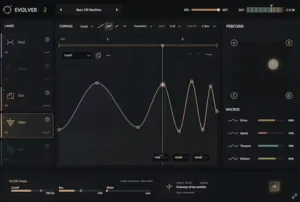 Evolver 2 delivers the most value in workflows where movement is treated as part of the composition rather than an occasional production effect. Producers working with evolving textures, long transitions, animated atmospheres, and continuously developing soundscapes are likely to benefit far more than those using modulation only for isolated moments.
This makes the plugin particularly relevant in genres where internal sound movement carries a significant portion of the arrangement. Melodic techno, progressive house, future bass, cinematic scoring, trailer music, hybrid orchestral production, and many forms of modern electronic music frequently rely on evolving timbres to create momentum without constantly introducing new musical material.
In these environments, the value of Evolver 2 is not simply that it can generate movement. The value comes from reducing the amount of time required to build, revise, and maintain that movement across an entire project. Producers who regularly automate multiple effects throughout a track will immediately understand the workflow advantage. The same workflow-driven philosophy is increasingly appearing in AI-assisted production tools, including systems designed to generate vocal doubles and performance variations, as discussed in our review of IK Multimedia ReSing Doubling.
The plugin becomes less essential in recording-focused workflows. Engineers spending most of their time balancing multitrack recordings, refining vocal performances, controlling dynamics, correcting tonal issues, and preparing mixes for release are unlikely to view Evolver 2 as a daily-use processor. It can still serve as a creative enhancement tool, but it is unlikely to occupy the same level of importance as EQs, compressors, saturation tools, or spatial processors.
The same distinction applies to mastering. Many producers still blur the line between production tools, mixing decisions, and mastering objectives, despite the fact that each stage serves a different purpose. Understanding the difference between mixing and mastering becomes increasingly important as modulation and automation play larger roles in modern productions. Engineers working at the mastering stage are generally evaluating the consequences of modulation decisions rather than creating them. Understanding motion-heavy production techniques remains valuable because those choices directly influence translation, stereo behavior, and loudness performance. However, Evolver 2 is fundamentally designed for creating movement during production rather than solving problems at the end of the release chain.
Ultimately, the plugin is best suited to producers who view automation as a creative process rather than a technical necessity. The more time a workflow depends on building movement, shaping transitions, and evolving sounds over time, the more relevant Evolver 2 becomes.
Real-World Production Perspective: Translation Matters More Than Motion
Creating movement is relatively easy. Creating movement that survives real-world playback is considerably harder.
Most motion-design tools are demonstrated in ideal listening conditions: studio monitors, controlled environments, and isolated examples designed to highlight the effect itself. Commercial releases face a different reality. They must translate across earbuds, phones, Bluetooth speakers, cars, headphones, club systems, streaming codecs, and loudness normalization platforms that constantly alter how a mix is perceived.
This becomes particularly important on streaming platforms, where loudness normalization and codec conversion can exaggerate weaknesses that remain hidden during production. Understanding how movement behaves after upload is a major part of modern Spotify mastering and release preparation.
Every modulation decision changes more than the sound being processed. Filter movement reshapes spectral balance over time. Stereo modulation affects localization and mono compatibility. Dynamic effects influence how compressors and limiters react throughout a track. As movement becomes more aggressive, maintaining consistency becomes increasingly difficult.
This is often where production decisions that sound impressive in isolation begin to create problems. A rhythmic filter sweep may deliver strong contrast on studio monitors yet disappear entirely on small playback systems. Expanding stereo width can produce a larger image while simultaneously reducing mono stability. Ambience modulation that feels subtle during production may become exaggerated after streaming codec conversion or loudness processing.
The most successful commercial productions rarely maximize movement. Instead, they control it. Vocals remain intelligible, low-end energy remains predictable, stereo information remains stable, and perceived loudness remains consistent even as sounds evolve throughout the arrangement. Movement supports those objectives rather than competing against them.
This is one reason many transition-focused processors lose effectiveness in finished releases. They are designed to generate excitement quickly but provide limited visibility into how that excitement behaves once the mix reaches mastering and distribution. The result can be transitions that sound dramatic during production yet feel disconnected, exaggerated, or unstable in the final release.
Evolver 2 benefits from offering more control over how movement is constructed and revised. Producers can shape modulation with greater precision, reduce unnecessary extremes, and maintain stronger relationships between tonal, spatial, and dynamic changes. That flexibility improves the likelihood of creating motion that translates well beyond the studio.
Even so, no motion-design platform can compensate for weak arrangement decisions, poor gain staging, unstable balances, or excessive processing. Translation remains an engineering discipline rather than a software feature. The plugin can make movement easier to create, but it cannot determine whether that movement ultimately serves the record.
Workflow Efficiency Versus Endless Experimentation
Creative software is often evaluated by the number of possibilities it offers. In practice, professional workflows are usually defined by something far less glamorous: how quickly a producer can make a decision and move forward.
Modern production environments already provide an overwhelming number of options. Between automation systems, modulation tools, effects processors, sample libraries, virtual instruments, and routing possibilities, most producers are not limited by a lack of creative choices. They are limited by the amount of time required to evaluate those choices.
This is where many creative plugins become contradictory. They are marketed as workflow enhancers but ultimately introduce additional layers of complexity. More presets, more modulation options, more routing paths, and more customization frequently lead to longer sessions rather than faster results.
Evolver 2 avoids much of that problem because its workflow is built around modifying existing motion structures rather than constructing every modulation event from scratch. Graph presets, transformation tools, macros, and centralized motion controls make it possible to explore multiple directions without repeatedly rebuilding automation.
That advantage becomes increasingly important during revision-heavy projects. Producers rarely create movement once and leave it untouched. Arrangement changes, sound replacements, mix adjustments, and client feedback often require modulation to evolve alongside the project. The less time spent reconstructing automation, the more time remains available for actual production decisions.
At the same time, Evolver 2 does not eliminate the risk of endless experimentation. In some respects, it makes experimentation easier. The ability to generate new movement patterns quickly can encourage constant refinement long after a sound is already serving its purpose within the arrangement.
Ultimately, the plugin rewards producers who treat motion as a tool rather than a destination. Used with clear creative objectives, it can streamline automation-heavy workflows and reduce repetitive editing. Used without those objectives, it becomes another source of decision fatigue in an industry already saturated with options.
That balance may be one of the most revealing aspects of Evolver 2. Its greatest strength is not the movement it creates, but the amount of time it can save when a producer already knows what kind of movement a track actually needs.
Verdict: Evolver 2 Is More About Workflow Than Effects
Evolver 2 should not be evaluated as a collection of effects. Producers looking for the industry’s most advanced delay, reverb, distortion, or filtering algorithms can find dedicated tools that offer deeper functionality in each category. Judged purely on individual processors, Evolver 2 risks being misunderstood.
The platform’s value comes from how it organizes movement. Instead of treating automation as a series of disconnected tasks spread across a project, it consolidates modulation into a system that is easier to create, revise, and manage over time. That distinction becomes increasingly meaningful in productions where motion is embedded throughout the arrangement rather than reserved for occasional transitions.
For producers working in melodic techno, house, progressive electronic music, cinematic scoring, trailer production, and other automation-heavy genres, the workflow benefits are immediately relevant. The ability to build coordinated movement without maintaining large numbers of automation lanes can reduce friction during both creative development and later revision stages.
Engineers whose priority is maximum transparency and parameter-level precision will still find traditional DAW automation difficult to replace. Native automation remains the benchmark for detailed mix decisions, corrective work, and situations where every change must remain fully visible on the timeline.
That is ultimately where Evolver 2 finds its place in the market. It is not attempting to replace professional automation workflows altogether. It is attempting to reduce the amount of manual work required to achieve complex movement in the first place.
Viewed from that perspective, Evolver 2 is one of the more practical additions to the growing motion-design category. Its strongest contribution is not a new effect, a new sound, or a new processing technique. It is a workflow model that allows producers to spend less time managing automation and more time shaping the musical ideas behind it.
Overall Rating
| Category | Rating |
|---|---|
| Workflow Efficiency | 9.5/10 |
| Motion Design Flexibility | 9/10 |
| Mix Translation Potential | 8.5/10 |
| CPU Efficiency | 9/10 |
| Ease of Revision & Automation Management | 9.5/10 |
| Value for Money | 9/10 |
| Overall | 9.1/10 |
Evolver 2 succeeds where many motion-focused plugins struggle: it improves workflow rather than simply adding more effects. The graph-based motion engine makes automation-heavy productions easier to build, revise, and manage without sacrificing creative control. While dedicated modulation environments may offer deeper routing possibilities and traditional DAW automation still provides unmatched precision, Evolver 2 delivers an unusually effective balance between speed, flexibility, and real-world usability. For producers whose projects depend on evolving textures, transitions, and movement-driven arrangements, its workflow advantages are often more valuable than the effects themselves.

Yurii Ariefiev is a mastering engineer and audio production editor specializing in mix translation, playback consistency, streaming delivery, and real-world release optimization. His work focuses on how production, mixing, and mastering decisions affect listener perception across modern playback environments.
This analysis examines Evolver 2 from a production-to-mastering perspective rather than a feature-by-feature review, focusing on automation workflow, modulation control, translation risks, and how motion-heavy productions behave once they leave the studio and reach real listeners.
FAQ
What is the difference between a motion plugin and traditional DAW automation?
DAW automation controls individual parameters directly on the timeline. Motion plugins use reusable modulation structures that can influence multiple parameters simultaneously, reducing the amount of manual automation required.
Can motion-design plugins improve workflow speed in large projects?
Yes. Centralized modulation systems often make revisions faster because movement can be adjusted globally rather than edited across multiple automation lanes and plugins.
Do motion plugins work better for production or mixing?
Most are designed for production. While they can support mixing decisions, their primary role is creating movement, transitions, evolving textures, and dynamic variation during track development.
What are the biggest mistakes producers make with modulation effects?
Overusing movement, automating too many elements simultaneously, destabilizing the stereo image, and creating frequency shifts that become problematic during mastering.
Can modulation affect loudness and limiting performance?
Yes. Significant changes in frequency balance, transient content, and density can influence how compressors and limiters react throughout a track.
Are motion plugins useful outside electronic music?
Yes. Cinematic composers, trailer producers, ambient artists, sound designers, and modern pop producers frequently use motion-based processing to create depth and progression.
How important is mono compatibility when using motion effects?
Very important. Stereo modulation can create impressive width while introducing phase-related issues that become noticeable during mono playback.
What should producers check before sending a motion-heavy mix for mastering?
Pay close attention to stereo stability, low-frequency consistency, vocal clarity, transition levels, and whether modulation remains effective across multiple playback systems.
Do motion-design plugins increase CPU usage significantly?
CPU impact varies by effect complexity and instance count. Projects using multiple animated effects across many channels will generally require more processing power than static mixes.
Are motion plugins replacing traditional automation workflows?
No. They are increasingly used alongside traditional automation, offering faster ways to generate movement while preserving the option for detailed manual control when needed.