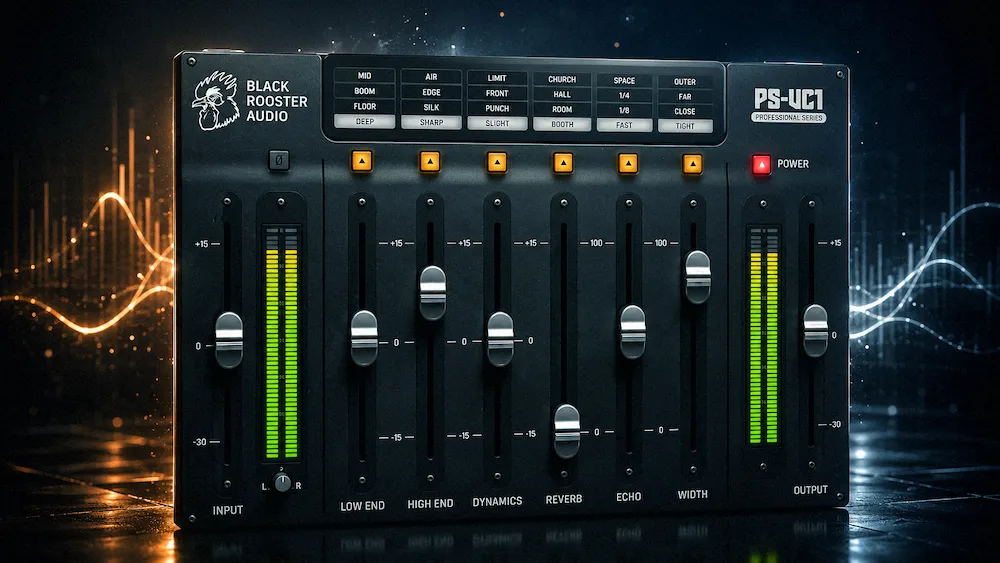
Black Rooster Audio PS-VC1 is a vocal channel strip plugin that combines EQ, compression, delay, reverb, and stereo widening inside a single interface. In this PS-VC1 review, we examine its workflow, sound quality, CPU efficiency, and how it compares with popular vocal mixing plugins such as Waves CLA Vocals, SSL Vocalstrip 2, Harrison Vocal Flow, and iZotope Nectar 4.
Vocal processing has become increasingly fragmented. A typical modern vocal chain may involve separate EQs, compressors, delays, reverbs, stereo processors, and utility plugins before a mix engineer even starts making creative decisions. While that flexibility is valuable, it also creates friction. Building the same processing framework across dozens of sessions consumes time that rarely improves the final record.
Black Rooster Audio’s PS-VC1 Vocal Chain was designed as a production-focused vocal chain plugin built around a different idea. Rather than emulating a specific piece of analog hardware or introducing another AI-assisted mixing environment, it combines the most common stages of vocal processing into a single channel strip with a fixed signal flow. The goal is straightforward: reduce setup time without turning vocal mixing into a preset-driven black box.
The important question is whether that approach delivers a meaningful production process advantage or simply trades flexibility for convenience. For producers comparing vocal chain plugins, evaluating alternatives to CLA Vocals or Nectar, or looking for a faster vocal mixing session speed, PS-VC1 deserves to be judged on what it actually changes inside a session rather than what appears on its feature list.
Quick Navigation
PS-VC1 At A Glance
| Developer | Black Rooster Audio |
| Type | Vocal Channel Strip |
| Best For | Fast vocal processing workflows |
| Includes | EQ, Compression, Delay, Reverb, Stereo Width |
| Main Strength | Workflow efficiency |
| Main Limitation | No advanced corrective processing |
| Overall Rating | 8.6/10 |
Key Features
- Integrated vocal channel strip
- Peak and Vintage compressor modes
- Automatic makeup gain
- Built-in reverb and delay
- All-Pass, Haas and Hilbert stereo widening
- Fixed signal path architecture
Who Should Use PS-VC1?
- Music producers looking for a faster vocal mixing workflow
- Recording engineers building vocal chains quickly
- Podcast editors and voiceover creators
- Songwriters creating rough mixes and demos
- Content creators producing spoken-word content
What Is PS-VC1 Vocal Chain Plugin?
PS-VC1 is a vocal channel strip plugin developed by Black Rooster Audio that combines EQ shaping, compression, ambience processing, stereo enhancement, and vocal tone control inside a single streamlined interface. Rather than functioning as a full vocal production suite, it focuses on accelerating common vocal-mixing decisions while reducing the need for complex plugin chains.
Pros and Cons
| Pros | Cons |
|---|---|
| Fast streamlined design | No built-in de-esser |
| Integrated delay and reverb | No dynamic EQ |
| Multiple stereo widening methods | Limited corrective processing |
| Simple learning curve | Not a complete vocal production suite |
Why Fast Vocal Processing Matters More Than Ever
 Modern vocal mixing is overloaded with options. Most engineers already own multiple EQs, compressors, de-essers, delays, reverbs, saturators, and vocal enhancement tools. Ironically, having access to more processing choices has not necessarily made vocal mixing faster. In many cases, it has created additional decision-making before meaningful work even begins.
Building a vocal chain from scratch remains one of the most repetitive tasks in audio production. Whether the session involves a pop vocal, a podcast narrator, a YouTube voiceover, or a hip-hop lead, engineers often reach for a familiar combination of corrective EQ, dynamics control, spatial processing, and stereo treatment. The tools may change, but the session setup rarely does.
This reality has created a growing market for vocal channel strips and integrated vocal processors. Products such as Waves CLA Vocals, SSL Vocalstrip 2, Harrison Vocal Flow, and iZotope Nectar all attempt to reduce setup time by consolidating common vocal processing tasks into a single environment. The differences lie in how much control they preserve and how much complexity they remove.
Fast vocal mixing has become increasingly important across music production, podcast editing, streaming content, and voiceover work. Instead of building separate EQ, compressor, delay, and reverb chains for every session, many engineers now prefer integrated vocal channel strips that reduce setup time while maintaining consistent results. They are searching for fewer decisions between a raw vocal track and a workable mix.
Inside the PS-VC1 Processing Architecture: Speed First, Flexibility Second
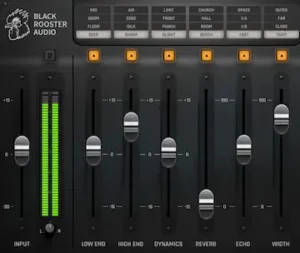
PS-VC1 is built around six processing stages: low-frequency control, high-frequency shaping, compression, reverb, delay, and stereo width. None of those modules are unusual on their own. The distinguishing factor is that they exist inside a fixed signal path designed to mirror a typical vocal mixing process.
That design choice immediately defines the plugin’s purpose. PS-VC1 is not trying to compete with fully modular channel strips, custom plugin chains, or vocal suites that offer deep routing options. Instead, it targets one of the most repetitive tasks in mixing: assembling the same foundational vocal processing chain at the start of every session.
Most engineers follow a broadly similar sequence when working on vocals. Problematic low-end information is addressed first, dynamics are brought under control, top-end balance is refined, and only then does spatial processing become part of the conversation. PS-VC1 simply locks that session setup into a single environment.
The practical advantage is not better sound by default. The advantage is reaching a usable starting point faster. Reverb and delay are already part of the chain. Stereo enhancement is available without adding another insert. For production sessions, rough mixes, songwriting work, podcasts, and voiceover projects, that reduction in setup time can be more valuable than adding another highly specialized processor to the plugin folder.
The compressor is the section that will likely determine whether users keep returning to the plugin. Black Rooster includes both peak and vintage detection modes, along with automatic makeup gain. Auto gain is not a new concept, but it addresses a common problem in plugin evaluation. Louder often appears better during quick A/B comparisons. By compensating for gain reduction automatically, the compressor makes it easier to judge what the processing is actually doing rather than reacting to a volume increase.
Compression remains one of the most important elements of any vocal chain. While PS-VC1 integrates dynamics control into a streamlined session speed, engineers who prefer dedicated compression tools may also be interested in the Pulsar Modular P252 MDN Diode compressor plugin, which takes a far more specialized approach to dynamics shaping and character-driven compression.
The width module shows a similar level of practical thinking. Rather than relying on a single stereo widening algorithm, PS-VC1 offers All-Pass, Haas, and Hilbert-based approaches. That matters because stereo enhancement is rarely a one-size-fits-all process. A widening technique that works well on a sparse pop arrangement may create phase-related issues in a dense production or fold down poorly when summed to mono. Giving users multiple widening methods increases flexibility without turning the plugin into a routing exercise.
Where PS-VC1 draws a clear line is in corrective processing. There is no dynamic EQ, no dedicated de-esser, no pitch correction, and no spectral repair. Those omissions are intentional. The plugin is designed to accelerate common vocal processing decisions, not replace the specialized tools that engineers rely on when solving detailed mix problems.
PS-VC1 Review: Is It Faster Than Building a Traditional Vocal Chain?
 The easiest mistake when evaluating PS-VC1 is to judge it as a breakthrough vocal processor. It isn’t. Nothing in the plugin suggests a new generation of compression, vocal analysis, spatial processing, or DSP design. Most of the underlying processing concepts are already familiar to anyone who spends time mixing modern vocals.
What PS-VC1 actually offers is a reduction in mixing process overhead.
That focus on mixing process distinguishes PS-VC1 from many recent plugin releases that prioritize sound design and experimentation. For example, tools such as Minimal Audio Lucid are built around creative granular processing and texture generation, whereas PS-VC1 is designed to accelerate routine vocal-mixing decisions inside everyday production sessions.
That may sound less exciting than a new algorithm or an AI-assisted mixing engine, but in practical production environments it is often more valuable. Engineers rarely lose time because they lack processing options. They lose time rebuilding variations of the same vocal chain across multiple sessions, revisiting routine setup decisions, and managing increasingly complex plugin stacks before meaningful mix decisions can begin.
PS-VC1 addresses that problem directly. Instead of encouraging users to assemble a processing chain from individual components, it provides a structured environment where the most common vocal treatments are already connected and ready to work. The result is not necessarily a better vocal sound. The result is reaching a workable vocal sound faster.
That distinction becomes especially relevant during production-heavy projects where speed influences creative momentum. Songwriting sessions, commercial production work, podcast editing, voiceover projects, and revision-driven client mixes often benefit more from reduced friction than from another layer of processing flexibility.
The limitations become more apparent once a mix enters its refinement stage. Complex vocal productions frequently require dynamic resonance management, frequency-dependent compression, detailed de-essing, parallel treatment chains, automation-driven ambience control, and other corrective processes that fall outside the scope of PS-VC1’s design philosophy.
For that reason, the plugin is unlikely to replace the specialized tools found in established professional workflows. Engineers working on major-label productions will still reach for processors such as FabFilter Pro-Q, Pro-DS, Weiss, Sonnox, SSL, UAD, or dedicated dynamic processing tools when precision becomes more important than speed.
In day-to-day production work, PS-VC1 works best as an early-stage mixing process accelerator. It helps establish tone, dynamics, space, and overall vocal direction quickly, allowing engineers to spend less time constructing a chain and more time evaluating whether the vocal actually serves the record.
Where PS-VC1 Fits in a Market Already Crowded With Vocal Processors
| Plugin | Primary Focus | Best For | Main Limitation |
|---|---|---|---|
| PS-VC1 | Integrated vocal processing | Fast production and mix preparation | Limited corrective processing |
| Waves CLA Vocals | Instant vocal enhancement | Quick demos and songwriting | Less flexibility and dated interface design |
| iZotope Nectar | Complete vocal production suite | Detailed vocal shaping and repair | Higher complexity and heavier workflow |
| SSL Vocalstrip 2 | Precision vocal control | Mix engineers | No built-in ambience processing |
| Harrison Vocal Flow | Streamlined professional processing | Recording and mixing applications | Narrower feature set than full vocal suites |
PS-VC1 enters one of the most mature categories in audio production. Vocal processors are no longer competing on basic functionality. Nearly every major solution can handle compression, tonal shaping, ambience, and stereo enhancement. The real differentiator today is production speed and usability.
That is where PS-VC1 positions itself. It does not attempt to become a full vocal production environment like Nectar, nor does it reduce processing to the simplified macro controls associated with products such as CLA Vocals. Instead, it occupies the middle ground between those extremes.
Nectar remains the stronger choice when a vocal requires extensive corrective work. Dynamic EQ, de-essing, pitch-related processing, and detailed control over individual stages make it better suited to complex productions. The tradeoff is increased complexity. Users gain flexibility but spend more time managing options.
CLA Vocals approaches the opposite end of the spectrum. It can deliver a usable vocal sound almost immediately, but its architecture leaves less room for nuanced decision-making. Engineers often reach its ceiling quickly when a mix demands greater control.
PS-VC1’s appeal comes from avoiding both extremes. It provides enough control to shape a vocal intentionally while remaining focused on speed. That balance makes it particularly relevant for producers who already understand vocal processing fundamentals and want to move through sessions more efficiently.
The plugin is less compelling for engineers whose mixing approach depends on surgical intervention. If vocal repair, resonance management, advanced dynamics processing, or complex automation form a significant part of the job, dedicated processors will remain essential. PS-VC1 works best before those stages begin, helping establish a solid vocal foundation that can later be refined with more specialized tools.
In practical terms, PS-VC1 is not trying to replace the industry’s flagship vocal suites. Its goal is narrower and arguably more realistic: reducing the amount of time spent building a vocal chain before the actual mixing work starts.
PS-VC1 for Different Vocal Applications
Music Production
PS-VC1 works well for pop, rock, EDM, hip-hop, and singer-songwriter productions where engineers need a fast starting point for vocal shaping.
Podcast Production
The integrated compression, EQ, ambience, and stereo tools make PS-VC1 useful for podcast editing workflows where speed and consistency matter.
Voiceover Processing
Voiceover creators can use PS-VC1 to build a polished vocal sound without assembling complex plugin chains.
Content Creation
YouTube creators, educators, and streamers may benefit from the simplified workflow and reduced setup time.
PS-VC1 vs Nectar 4
Although both plugins target vocal production, they solve different problems. Nectar 4 is designed as a complete vocal production suite that combines corrective processing, vocal repair, dynamic EQ, de-essing, pitch-related tools, and advanced assistant features. PS-VC1 takes a far more focused approach by concentrating on the core stages of vocal shaping inside a streamlined processing environment.
For engineers dealing with problematic recordings, harsh resonances, excessive sibilance, or detailed vocal repair tasks, Nectar 4 remains the more capable solution. Its processing depth allows users to address issues that fall well beyond the scope of a traditional channel strip.
PS-VC1 becomes more attractive when speed matters more than corrective flexibility. Instead of presenting dozens of modules and routing decisions, it delivers the essential elements of a vocal chain within a fixed workflow. Producers can move from a dry vocal recording to a polished starting point significantly faster, particularly during songwriting sessions, podcast production, content creation, and rough-mix preparation.
| Feature | PS-VC1 | Nectar 4 |
|---|---|---|
| Workflow Speed | Excellent | Moderate |
| De-Essing | No | Yes |
| Dynamic EQ | No | Yes |
| Pitch Processing | No | Yes |
| Built-In Reverb & Delay | Yes | Yes |
| Learning Curve | Low | Moderate to High |
| Best For | Fast vocal mixing | Comprehensive vocal production |
The choice ultimately depends on production priorities. Users searching for a Nectar alternative focused on speed rather than processing depth may find PS-VC1 more efficient. Users requiring detailed corrective control will likely continue to prefer Nectar 4.
PS-VC1 vs CLA Vocals
The comparison with Waves CLA Vocals is arguably more relevant because both products pursue a similar goal: reducing the time required to achieve a polished vocal sound.
CLA Vocals relies heavily on simplified macro-style controls that can produce immediate results with minimal effort. That simplicity remains one of its biggest strengths, particularly for demo production, songwriting sessions, and quick vocal enhancement tasks.
PS-VC1 takes a more modern approach. Instead of hiding processing behind broad enhancement controls, it provides direct access to individual session management stages including compression, ambience processing, tonal shaping, and stereo width management. The result is a mixing process that remains fast while allowing more intentional decision-making.
Another advantage is flexibility within the stereo section. The inclusion of multiple widening algorithms gives PS-VC1 greater adaptability across different production styles, whereas CLA Vocals focuses primarily on speed and simplicity.
| Feature | PS-VC1 | CLA Vocals |
|---|---|---|
| Workflow Speed | Excellent | Excellent |
| Detailed Control | Higher | Lower |
| Stereo Processing Options | Multiple Algorithms | Limited |
| Learning Curve | Low | Very Low |
| Mix Flexibility | Higher | Moderate |
| Best For | Fast vocal mixing | Instant vocal enhancement |
For users specifically searching for a CLA Vocals alternative, PS-VC1 offers a compelling middle ground between one-knob convenience and full vocal-production suites. It remains fast enough for rapid production work while providing more control over how a vocal is shaped inside the mix.
How PS-VC1 Holds Up Once a Project Leaves the Demo Stage
 Many vocal processors sound convincing during a five-minute demo. The more important question is whether they remain useful once a project becomes larger, revision cycles begin, and dozens of tracks compete for attention inside a mix.
That is where PS-VC1 makes its strongest case. By consolidating several common stages of vocal processing into a single insert, it reduces the amount of session management required to reach a workable result. Engineers spend less time opening multiple plugin windows, managing auxiliary routing, or rebuilding familiar vocal chains from project to project.
The benefit becomes particularly obvious in fast-turnaround environments. Podcast editors, voiceover producers, content creators, and commercial production teams often prioritize consistency and speed over maximum processing flexibility. In those workflows, reducing setup complexity can have a measurable impact on productivity.
Music production presents a more nuanced picture. PS-VC1 fits naturally into songwriting sessions, production work, rough mixes, and projects where establishing vocal direction quickly matters more than refining every detail. A producer can move from a dry vocal recording to a presentation-ready sound without building an entire processing architecture from scratch.
The limitations become more apparent as productions grow in complexity. Modern pop, commercial EDM, and heavily layered vocal arrangements frequently depend on automation-intensive workflows, multiple ambience paths, parallel dynamics processing, and detailed frequency management. Those requirements often extend beyond the scope of an integrated channel strip.
Engineers should also pay attention to stereo behavior. The inclusion of multiple width algorithms provides more flexibility than many competing vocal processors, but widening remains a tradeoff rather than a free enhancement. Mono compatibility, phase interaction, and streaming codec behavior still need to be evaluated carefully, particularly when the vocal occupies a dominant position in the mix.
This becomes even more important at the mastering stage. Excessive stereo enhancement applied during mixing can create translation issues that are difficult to address later without compromising tonal balance or vocal presence. Many of the problems attributed to mastering are actually translation issues that begin inside the mix itself, particularly when stereo processing is pushed too far. For a deeper breakdown, see why tracks often sound worse after mastering. While the All-Pass and Hilbert-based approaches are generally more controlled than aggressive Haas-style widening, no stereo processing should be considered immune to playback-dependent side effects.
Ultimately, PS-VC1 does not solve the factors that determine whether a mix translates well across streaming platforms, consumer earbuds, studio monitors, cars, and smart speakers. Translation remains a system-level issue involving arrangement, balance, monitoring accuracy, and final delivery decisions. The same challenges become even more apparent once a track reaches platform normalization and codec processing, as discussed in this guide to mastering for streaming platforms. Arrangement choices, monitoring accuracy, balance decisions, and dynamic control remain far more influential. What the plugin can do is remove friction from the path toward those decisions, which is arguably its most valuable contribution to a real-world production session management.
Overall Rating
Ratings reflect mixing efficiency, feature set, practical usability, and overall value within the vocal processing category rather than isolated sound quality alone.
| Category | Rating |
|---|---|
| Sound Quality | 8.5/10 |
| Workflow Efficiency | 9.5/10 |
| Ease of Use | 8.5/10 |
| CPU Efficiency | 9/10 |
| Feature Depth | 7.5/10 |
| Value for Money | 8.5/10 |
| Overall | 8.6/10 |
PS-VC1 is not attempting to redefine vocal processing. Its strength lies in simplifying one of the most repetitive tasks in modern production: building a functional vocal chain. While it lacks the deep corrective capabilities of larger vocal suites, it succeeds as a workflow-focused tool that helps producers, mixers, and content creators reach usable results faster without sacrificing essential control.
Best PS-VC1 Alternatives and Vocal Chain Plugins
PS-VC1 occupies a useful middle ground between simplified vocal enhancers and full-scale vocal production suites. However, depending on workflow priorities, several competing plugins may be a better fit for specific production environments.
| Plugin | Best For |
|---|---|
| iZotope Nectar 4 | Deep vocal production and corrective processing |
| Waves CLA Vocals | Fast vocal enhancement and songwriting workflows |
| SSL Vocalstrip 2 | Precision vocal mixing and detailed control |
| Harrison Vocal Flow | Streamlined professional vocal workflows |
| PS-VC1 | Balance of speed, workflow efficiency, and control |
Users focused on vocal repair, de-essing, dynamic EQ, and advanced vocal shaping will generally find Nectar 4 more capable. Engineers who prioritize immediate results with minimal setup may prefer CLA Vocals. SSL Vocalstrip 2 remains attractive for precision-oriented mixing, while Harrison Vocal Flow targets streamlined professional production environments. PS-VC1 distinguishes itself by balancing workflow speed with enough control to shape vocals intentionally without becoming overly complex.
Should You Buy PS-VC1?
If your primary goal is faster vocal mixing, PS-VC1 offers a strong balance between simplicity and control. Users who frequently build the same vocal chain across multiple sessions can save time by consolidating EQ, compression, delay, reverb, and stereo processing into a single plugin.
However, engineers who rely on advanced de-essing, dynamic EQ, resonance control, vocal repair, or pitch correction will still need additional processing tools.
Final Verdict: A Smart Workflow Upgrade for the Right User
The vocal processing market does not need another plugin that promises to reinvent mixing. Most engineers already have access to more compressors, EQs, delays, and reverbs than they realistically use. The challenge today is rarely a lack of tools. It is the amount of time spent managing them.
PS-VC1 addresses that reality more effectively than it addresses innovation. There is little here that qualifies as a major DSP breakthrough, and experienced engineers are unlikely to discover processing capabilities that fundamentally change how vocals are mixed. Black Rooster Audio is solving a workflow problem, not a technology problem.
That distinction ultimately defines the plugin’s value. By combining the most common stages of vocal processing into a structured signal path, PS-VC1 reduces repetitive setup work and shortens the distance between a raw recording and a workable mix. In many production environments, that benefit is more valuable than adding another highly specialized processor to an already crowded toolkit.
The plugin is unlikely to replace the detailed vocal chains used on high-end commercial productions. In many professional environments, vocal decisions are evaluated not only in the context of the mix itself but also in terms of how the material will behave during the final mastering stage. Engineers who want a clearer picture of that relationship should understand the differences between mixing and mastering, particularly when vocal balance and spatial processing are involved. Surgical EQ, advanced dynamics control, de-essing, automation, vocal tuning, and problem-solving processors remain essential when precision becomes the priority. Engineers working at that level will continue to rely on dedicated tools for critical mix decisions.
Where PS-VC1 succeeds is in helping users establish direction quickly. Producers, content creators, recording engineers, and mixers working under deadlines can build a solid vocal foundation without spending unnecessary time assembling and managing multiple plugins. That alone gives the product practical relevance in a category where many releases struggle to offer a meaningful advantage.
Ultimately, PS-VC1 is not a must-have vocal processor, nor is it trying to become one. It is a focused production tool built for users who value speed without giving up essential control. For the right production environment, that may prove far more useful than another feature-heavy vocal suite competing for attention inside an already crowded plugin folder.
Who Is PS-VC1 For?
| User Type | Recommendation |
|---|---|
| Songwriters | Highly Recommended |
| Podcast Producers | Highly Recommended |
| Content Creators | Highly Recommended |
| Professional Mix Engineers | Situational |
| Vocal Repair Specialists | Not Recommended |
A Better Vocal Chain Won’t Fix a Weak Final Master
Plugins like PS-VC1 can help shape a vocal faster, but release-quality results depend on how the entire mix translates beyond the studio. Stereo width, vocal balance, low-end control, dynamics, and codec behavior all become critical once a track reaches Spotify, Apple Music, YouTube, and other streaming platforms.
One of the fastest ways to evaluate a mix is to compare it against a professional master. Upload up to 35 seconds of your track and receive a free mastering demo prepared by an experienced mastering engineer. Compare your original mix against the mastered version and hear what still needs attention before release.
Get your free mastering demo →
FAQ
Is PS-VC1 designed for recording vocals or mixing vocals?
PS-VC1 is primarily a mixing tool, although its streamlined architecture can also make it useful during recording sessions when artists want to monitor through a more polished vocal chain. Its greatest advantage appears after tracking, when the goal is to move quickly from a dry vocal to a workable mix.
Can PS-VC1 replace a traditional vocal plugin chain?
For demos, content production, podcasts, songwriting sessions, and many commercial projects, it can replace a large portion of a traditional vocal chain. For detailed mix work involving de-essing, dynamic EQ, vocal tuning, or advanced automation, additional processors will still be required.
How does PS-VC1 compare to Waves CLA Vocals?
Both plugins prioritize speed, but they approach it differently. CLA Vocals focuses on immediate results through simplified controls, while PS-VC1 provides more direct control over individual processing stages without becoming a full-scale vocal production suite.
Is PS-VC1 a realistic alternative to iZotope Nectar?
Only for users who prioritize speed over processing depth. Nectar remains the stronger choice for corrective work, vocal repair, and detailed vocal shaping. PS-VC1 is better suited to users who want fewer decisions and faster setup.
Does PS-VC1 introduce noticeable latency?
Black Rooster Audio does not position PS-VC1 as a latency-intensive processor. Actual latency depends on the DAW, buffer settings, and project configuration. It should be suitable for most low-latency production and monitoring workflows, although exact figures depend on the host DAW and session configuration.
Is PS-VC1 suitable for large mixing sessions?
Its integrated architecture can actually become more useful as projects grow. Fewer plugin instances, fewer routing decisions, and a simplified vocal workflow can make session management easier, particularly when multiple vocal tracks require similar treatment.
How safe is the stereo widening section for streaming platforms?
The widening algorithms appear more sophisticated than the basic stereo spread controls found in many vocal processors, but mono compatibility should still be verified. Streaming codecs, Bluetooth speakers, smartphones, and smart devices can expose phase-related issues that may not be obvious during mixing.
Does PS-VC1 make sense for professional mix engineers?
Yes, but not necessarily as a final-stage processor. Many professionals may find greater value in using it to establish a vocal direction quickly before moving to more specialized tools for refinement and corrective work.
What type of user gets the highest return on investment from PS-VC1?
Producers, content creators, podcast editors, recording engineers, and mixers working under tight deadlines are likely to benefit the most. The plugin’s value comes from workflow acceleration rather than unique sonic capabilities.
Will PS-VC1 still be useful if you already own premium vocal plugins?
That depends on your workflow. Users who already have strong vocal processing tools may not gain new processing options, but they may gain a faster path to a usable starting point. For many engineers, that can be a worthwhile advantage on its own.

Yurii Ariefiev analyzes audio plugins and mixing tools through the lens of real-world production workflows, focusing on vocal processing, mix translation, production efficiency, and the practical tradeoffs between all-in-one channel strips and traditional plugin chains.
At AREFYEV STUDIO, vocal processors are evaluated not only by their sound but also by how they influence vocal clarity, stereo stability, session speed, and downstream mastering decisions. Special attention is given to whether processing choices improve translation across streaming platforms, headphones, speakers, and professional monitoring systems.
☕ Buy me a coffee