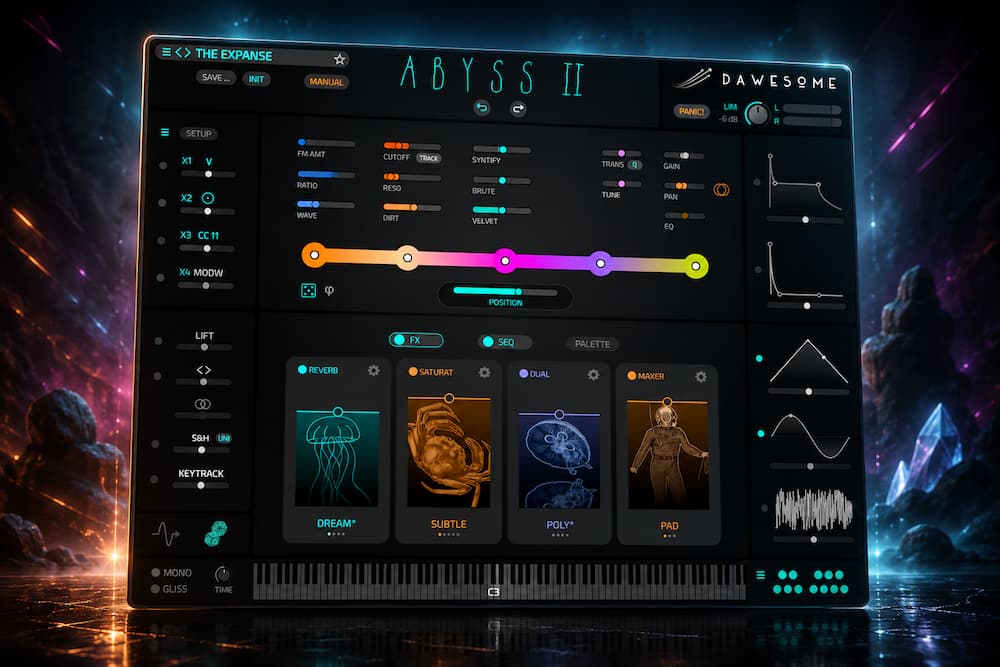
Dawesome Abyss II takes a different approach to synthesis by making timbral exploration—not oscillator architecture—the starting point. The original Abyss built its identity around Tone Colors and a visual sound space; version II expands that concept with audio-to-Tone-Color analysis, custom palettes, a polyrhythmic sequencer, a reworked effects section, new character controls, improved preset management, mono operation, and more than 400 factory presets.
The feature that changes Abyss II most is the ability to feed it your own audio and turn the source’s timbral characteristics into playable material. A vocal fragment, guitar note, percussion hit, field recording, or sound from an existing production can become the starting point for a new instrument rather than simply being played back as a sample. That gives Abyss II a much broader role in sound design than the original preset-focused workflow suggested.
It is still not a replacement for a general-purpose synth such as Serum, Pigments, or Omnisphere, and several additions are workflow refinements rather than major advances in synthesis technology. The real case for Abyss II is narrower and more useful: when the target is an evolving, harmonically complex texture and the fastest route is to explore timbre rather than build the sound parameter by parameter, its workflow can be genuinely faster.
Review status: Tested on the current Abyss II release available from August 20, 2026.
Dawesome Abyss II Review — Contents
Dawesome Abyss II: Specifications at a Glance
| Specification | Dawesome Abyss II |
|---|---|
| Instrument Type | Visual soundscape synthesizer |
| Core Sound Engine | Spectral analysis and Tone Color synthesis |
| Audio Import | Yes — samples can be analyzed into Tone Colors and custom palettes |
| Polyphony | Polyphonic with new mono-synth mode |
| Sequencer | Polyrhythmic sequencer with independent step lengths |
| MPE | Full MPE support |
| Effects | Reworked multi-effects section with 16 new effect types |
| Factory Presets | 400+ |
| Plugin Formats | VST3, AU, AAX |
| Platforms | macOS and Windows |
| Launch Price | $89 / €89 |
| Regular Price | $149 / €149 |
| Upgrade Price | $45 / €45 introductory; $75 / €75 regular |
The specifications only tell part of the story. The more useful question is what these additions actually change in a production workflow: sound-design speed, source-derived synthesis, musical control, mix integration, and the situations where Abyss II is either a strong specialist or the wrong tool.
Dawesome Abyss II Sound Design: How Tone Colors Work
 Modern synths already offer more synthesis depth than most producers will ever exhaust. Serum, Pigments, Phase Plant, Falcon, and Omnisphere can all reach extremely complex results. The limiting factor is often not what the instrument can generate, but how quickly you can get from a sonic idea to a usable sound.
Abyss takes a different route. Rather than making oscillator, filter, and modulation architecture the primary interface, it puts timbral exploration at the center. Its Tone Color system organizes related sonic characteristics visually, allowing you to move through a continuous field of timbres instead of constructing every sound from individual synthesis parameters.
In practice, this changes how you approach the instrument. You are choosing a timbral direction first and worrying about the underlying synthesis architecture later. If you know you need a specific bass architecture, a conventional synth will usually get you there faster. But if the brief is “a dark, unstable texture that gradually opens up behind the vocal,” the useful question is not which oscillator or filter to start with. It is which timbral region gets you closest to the result.
That is where Abyss II makes its case.
The addition of user-supplied audio pushes the concept further. A recording can now become source material for new Tone Colors rather than remaining a static sample. That puts Abyss II alongside the broader movement toward sample-driven synthesis and resynthesis, but without trying to become a conventional sampler or granular instrument.
The addition of user-supplied audio also places Abyss II in the same broader sound-design territory as modern granular processors, although the underlying approach is different. Where a granular plugin can continuously reshape a recording through grain position, time, pitch, and density, Abyss II extracts timbral characteristics and turns them into playable synthesis material. For a closer look at how another modern tool approaches source transformation and evolving textures, see our Minimal Audio Lucid review.
The result is a more defined role in a professional production setup: Abyss II is less interesting as another general-purpose synthesizer and more useful as a tool for turning unusual source material and loose sonic ideas into playable, evolving instruments.
In actual use, the difference is most obvious when you stop browsing the factory library and start feeding the instrument material from the project itself. A source that already has a recognizable character can produce a useful starting point quickly; a dense or overly busy recording is much less predictable. That makes the audio-analysis feature more valuable as a sound-design shortcut than as a replacement for conventional sampling or resynthesis.
Dawesome Abyss II Audio-to-Tone-Color Workflow: Using Your Own Samples
The most consequential addition in Abyss II is its ability to analyze user-supplied audio and turn its timbral characteristics into Tone Colors. Drag a recording onto the Tone Color gradient or into a palette, and Abyss II analyzes the source frame by frame, deriving spectral information that is mapped into Tone Colors for further exploration and playback.
Feed it a vocal phrase and you are not building a conventional sampled-vocal instrument. Abyss II uses the recording as timbral input for a new playable sound. The recording becomes a source of timbral information that can be reshaped through the Abyss II architecture. The same principle applies to guitar, percussion, field recordings, synths, or other sounds already present in a production.
This creates a useful workflow for sound designers and composers. A metallic impact can become the basis of a sustained texture; a mechanical recording can produce an evolving tonal layer; a guitar or synth part can generate related sounds that retain some of the source’s character without simply duplicating it. For electronic production, that makes it possible to derive supporting material from sounds already associated with the track.
The quality of the result still depends heavily on the source. A clean, distinctive recording with a clear timbral identity is a better starting point than a dense mix containing multiple instruments, room noise, transients, and unrelated spectral information. Abyss II is analyzing and transforming the source, not recovering some hidden “ideal” instrument from it.
The limitation is equally clear. If the goal is faithful sample playback or detailed reconstruction of an acoustic performance, a dedicated sampler or resynthesis instrument is a better fit. Abyss II is more interesting when the source is treated as raw material for a new playable sound.
Hear What Professional Mastering Can Bring to Your Mix
Abyss II can add depth, movement, and dense harmonic texture, but those elements still have to translate as part of a finished mix. If you want to hear how much clarity, punch, depth, and balance your track can gain at the mastering stage, upload up to 35 seconds of your mix and get a free mastering demo. You can hear the difference before committing to a full mastering project.
Request your free mastering demo →
Dawesome Abyss II Tone Colors: Sound Design and Timbral Exploration
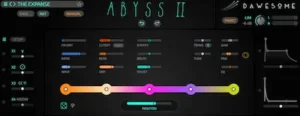
Abyss II retains the original instrument’s gradient-based approach to timbre. Multiple Tone Colors can be positioned within the sound field, and moving through that space changes the character of the patch. Instead of modulating a single parameter such as filter cutoff or wavetable position, you can move between related timbral states.
That makes Abyss II particularly effective for sounds whose identity needs to evolve over time. A pad can shift gradually between contrasting spectral characters; a drone can develop without a long chain of DAW automation; and an effect can move from restrained to abrasive within the same patch. With MPE, some of that movement can also become part of the performance rather than a separate automation process.
The approach fits ambient, cinematic, experimental electronic, and game-audio work especially well. It is less compelling when the job is conventional subtractive synthesis: a tightly specified bass, a predictable lead, or a supersaw built around known oscillator and filter behavior.
This is the central compromise in Abyss II. The instrument gives up some parameter-level predictability in exchange for a faster way to explore timbral relationships. If you already know the exact oscillator, filter, envelope, and modulation architecture you need, a conventional synthesizer will usually be the more direct tool. If the target is defined by character rather than circuitry, Abyss II’s abstraction becomes an advantage.
Abyss II BRUTE, VELVET and SYNTIFY Character Controls
Abyss II adds three macro-style controls—BRUTE, VELVET, and SYNTIFY—designed to shift the character of a patch without requiring the user to edit multiple underlying parameters.
BRUTE pushes a sound toward a more aggressive character, VELVET moves it toward a softer and smoother result, and SYNTIFY emphasizes a more overtly synthetic character. Their usefulness is less about the individual algorithms than the way they compress several sound-design decisions into a few performance controls.
That fits the rest of Abyss II. The instrument is built around perceptual decisions rather than exposing every stage of the synthesis architecture. In a production session, these controls can be useful for quickly reshaping a pad, texture, or lead during arrangement and for creating larger tonal changes with a single automation lane.
They are not, however, a major synthesis breakthrough. The meaningful improvement is control abstraction: getting from “too soft” or “not aggressive enough” to a usable variation without rebuilding the patch. For sound design and automation, that is practical; as DSP innovation, it is modest.
Dawesome Abyss II Sequencer and Effects: What Changed in Version II
 The new sequencer is one of the more meaningful additions to Abyss II because pitch, octave, gate, and velocity can each use different step lengths. Instead of forcing every modulation cycle to repeat together, the four sequences can run at different rates and gradually shift their relationship over time.
That matters because Abyss already specializes in timbral movement. The sequencer adds rhythmic and performance variation at the same level, so an evolving patch can generate its own phrasing without relying on separate MIDI processors or several lanes of DAW automation.
For example, a seven-step pitch sequence combined with eight-step gating and an eleven-step velocity cycle will produce a much longer composite pattern before all three return to the same starting point. The concept is simple, but it is effective for creating patterns that feel less mechanically looped without requiring a complex MIDI setup.
This is particularly useful for ambient and generative electronic work, cinematic underscore, techno textures, game audio, and transitional elements. A single Abyss II instance can provide both the evolving timbre and the movement, which can reduce the number of supporting tracks needed in an arrangement.
That expands the instrument’s role. Abyss 1 was primarily a timbral and texture-focused synthesizer; the new sequencing architecture makes Abyss II more capable of functioning as a self-contained musical voice.
Abyss II’s Effects and Workflow Improvements Make It Easier to Finish Sounds
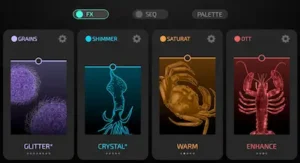
Abyss II uses a reworked multi-effects section with 16 new effect types, custom effect presets, and an improved limiter. This gives you enough processing inside the instrument to take a raw Tone Color and turn it into a more production-ready patch without immediately opening additional plugins. For sound design, that is particularly useful for spatial effects, modulation, delay, and intentional coloration.
It is not a replacement for a dedicated effects collection. Once a sound reaches the mix, engineers generally need more precise control, better metering, consistent automation, and processors that can be applied across multiple tracks. Abyss II’s internal effects are primarily about speed during sound creation, not replacing a mixer’s processing toolkit.
The practical advantage is continuity. You can shape the source, movement, and effects of a patch without leaving the instrument, which keeps experimentation fast and makes it easier to save the complete sound as a preset.
The same principle applies to the less visible changes: undo/redo, tagged presets and favorites, MIDI controller mapping, mono mode, a larger LFO editing area, preset management, and improved Abyss 1 content migration. None is a synthesis breakthrough, but these are the features that determine whether an instrument remains enjoyable after the first week of exploration.
Abyss II’s workflow additions are mostly infrastructure rather than innovation, but they address the friction that can otherwise keep a specialized synthesizer out of regular production sessions.
Dawesome Abyss II Mixing: How to Fit Evolving Synth Textures Into a Mix
Abyss II can generate some of the most useful atmospheric material in a production, but those sounds are rarely mix-neutral. Evolving pads, drones and harmonically dense textures can spread energy across the low mids, upper mids and stereo field at the same time, which makes them easy to overuse.
The practical approach is to treat an Abyss II layer according to its arrangement role rather than its solo sound. A background texture may need substantial low-end filtering even when it sounds impressive in isolation. A wide pad may need mono compatibility checks if it carries harmonic information that the arrangement depends on. Dynamic EQ can also be more useful than a static cut when the Tone Color changes substantially over time.
Before mastering, the most important checks are therefore not Abyss-specific settings but spectral density, low-mid accumulation, stereo stability, transient interaction and headroom. If the source is already unstable or masking important elements, mastering is not the right place to solve the problem.
A Practical Abyss II Mixing Example
For an evolving Abyss II pad supporting a vocal, I would first remove unnecessary sub and low-mid energy rather than trying to make the synth sound larger. I would then check the patch in mono, listen for masking around the vocal presence range, and automate either level or dynamic EQ if the Tone Color movement creates changing conflicts during the arrangement.
The important point is that the best Abyss II sound in solo is not necessarily the best Abyss II sound in the mix. These patches are designed to evolve, so their frequency balance can change from section to section. A static EQ setting that works in the verse may become excessive in the chorus, while automation can preserve the character without allowing the texture to dominate the record.
Where Abyss II Delivers — and Where Its Abstraction Gets in the Way
The “sound is color” concept is a useful description of Abyss II’s interface, but it is not the reason to buy the instrument. The real advantage is the way Tone Colors organize related timbres into a space that can be explored and modulated without building every sound from individual synthesis parameters.
That approach works best when the target is defined by character rather than by a specific synthesis recipe. If the brief is a dark, unstable texture that gradually opens into something brighter, moving through related Tone Colors can be more direct than constructing that behavior from oscillators, filters, envelopes, and modulation routings.
The opposite is also true. If you need a bass with a specific harmonic structure, predictable oscillator behavior, a defined envelope, and tightly controlled filter modulation, a conventional synthesizer will usually be faster. Abyss II’s abstraction removes some of the parameter-level control that makes those decisions precise.
That is the central trade-off: Abyss II is optimized for exploring timbral relationships, not for reproducing a predefined synthesis architecture.
The same perspective applies to the 400-plus factory presets. A large library makes the instrument easier to evaluate and provides plenty of usable starting points, but preset count says little about the depth of the synthesis engine. The more important test is what happens once you move beyond factory sounds and start building Tone Color palettes from your own material.
Dawesome Abyss II vs Abyss 1: What’s New and Is the Upgrade Worth It?
Abyss II keeps the original Tone Color concept but turns it into a substantially more complete production instrument. The most important difference is that the new version is no longer limited to exploring the existing sound world: you can now bring your own audio into the process and generate custom Tone Colors and palettes from it.
| Feature | Abyss 1 | Abyss II |
|---|---|---|
| Visual Tone Color workflow | Yes | Yes, expanded |
| User audio to Tone Colors | No | Yes |
| Custom Tone Color palettes | Limited to existing material | Yes |
| Mono synth mode | No | Yes |
| Polyrhythmic sequencer | No | Yes |
| Full MPE support | Yes | Yes, expanded |
| BRUTE / VELVET / SYNTIFY | No | Yes |
| Expanded multi-effects | Earlier effects system | Reworked with 16 new effect types |
| Preset browser | Basic | Tags, filters and favorites |
| Undo / redo | Limited | Yes |
| Factory presets | Original library | 400+ |
The upgrade is most compelling for active Abyss users who want to turn their own recordings into new synthesis material or use Abyss II as a more complete musical instrument. If you mainly use Abyss 1 for its existing presets and do not need sequencing, custom audio analysis, mono operation, or deeper expressive control, the upgrade is less urgent.
Dawesome Abyss II vs Serum and Pigments: Which Synth Is Better?
Feature count is not especially useful here. Serum and Pigments expose far more synthesis architecture, while Abyss II is built around a different search process: you move through timbral relationships instead of constructing every patch from the same set of oscillator and filter decisions. That distinction also matters when comparing Abyss II with more conventional hybrid instruments such as discoDSP Corona 7, where synthesis architecture, modulation depth, oversampling, and workflow efficiency play a much more central role.
| Instrument | Core Strength | Parameter-Level Control | Audio-to-Synthesis Workflow | Best Fit | Why Choose It Instead of Abyss II |
|---|---|---|---|---|---|
| Dawesome Abyss II | Tone Color exploration and evolving timbres | Moderate | Strong | Sound design, cinematic textures, ambient and experimental production | — |
| Serum | Wavetable synthesis and precise patch programming | High | Strong | Electronic production, basses, leads, detailed synth programming | More predictable control over synthesis architecture |
| Arturia Pigments | Multiple synthesis engines and extensive modulation | Very high | Strong | General-purpose synthesis and advanced sound design | Greater control and synthesis flexibility |
| Spectrasonics Omnisphere | Large sound-source library and broad production coverage | High | Very strong | Composition, scoring, electronic and commercial production | Much broader content and instrument coverage |
| UVI Falcon | Deep synthesis, sampling, and modular sound construction | Extremely high | Extremely strong | Advanced sound design and custom instruments | Far greater architectural depth |
If your priority is precise control over how a sound is constructed, Serum, Pigments, Omnisphere, or Falcon are generally stronger choices. They expose more of the underlying architecture and make specific synthesis decisions easier to reproduce.
Abyss II makes more sense when the problem is different: you know the character you want but do not necessarily know the synthesis recipe. Its advantage is the speed of moving through related timbres and, in version II, turning your own recordings into new Tone Color material.
That makes Abyss II a complement rather than a replacement for a conventional synth collection. A producer who already owns Serum or Pigments does not need to abandon either instrument.
Abyss II Stereo Width, Headroom and Mix Translation
 Abyss II is particularly good at producing sustained, evolving material, but those sounds can occupy considerably more mix space than their fader level suggests. Pads, drones, spectral textures, and wide atmospheric layers often carry energy across a broad frequency range, which makes them easy to overbuild in a dense arrangement.
The first issue is spectral density. An evolving patch can move energy through the low mids while simultaneously changing its upper-mid content and stereo image. Left unchecked, that movement can mask vocals, guitars, percussion, dialogue, or other elements that need a more stable position in the mix.
For supporting pads, remove low-frequency content that does not contribute to the part rather than leaving the full-range signal intact. With drones and sustained textures, the 100–300 Hz region deserves particular attention because several seemingly quiet layers can accumulate substantial low-mid energy. Wide patches should also be checked in mono, especially when the arrangement depends on a centered kick, bass, vocal, or dialogue.
Because Tone Colors can change the spectral balance over time, dynamic EQ or level automation can be more appropriate than a static corrective EQ. A cut that is useful at one point in the patch may become unnecessary—or even damaging—when the sound moves into another timbral region.
There is a similar issue with headroom. Sustained, harmonically dense sounds can raise average level without sounding proportionally louder, particularly when several Abyss II layers are stacked. The result can be a mix that reaches mastering with less usable headroom and reduced contrast between dense and sparse sections even though no individual track appears excessively loud.
That is not a flaw specific to Abyss II. It is a production consequence of working with broad, continuously evolving sources. The solution is to define each texture’s role in the arrangement and manage its spectrum, dynamics, and stereo footprint accordingly. That becomes especially important before handing the finished mix to mastering; for a broader checklist of what actually matters at that stage, see our guide to preparing a mix for mastering.
Abyss II, Stereo Translation, and Streaming Delivery
Abyss II does not require any special treatment for Spotify, Apple Music, YouTube, or lossy codecs. The relevant issue is the kind of material the instrument can produce: wide, sustained, spectrally active textures that may behave differently across playback systems and delivery formats.
Extremely wide or highly decorrelated patches should be checked in mono when they carry important musical information. A sound that feels large in stereo can lose substantial energy or change character when the left and right channels are summed. That matters more for an essential pad, hook, or tonal layer than for a disposable atmospheric effect.
Dense high-frequency textures also deserve a check after the final limiter and through a lossy encode. Codec artifacts are not unique to Abyss II, but sustained material with significant high-frequency complexity can make them easier to hear, particularly when the master is already heavily limited.
For mastering, the useful distinction is source behavior versus delivery behavior. If an Abyss II patch becomes unstable in mono, masks another element, or turns abrasive after limiting, the best fix is usually in the production or mix while the source remains editable. Mastering can improve translation, but it should not be expected to repair a fragile sound-design decision. The same principle becomes more important when preparing a release for multiple streaming services; our guide to mastering for streaming platforms covers the delivery side in more detail.
Abyss II CPU Performance: What We Know and What We Don’t
Dawesome describes Abyss II as light on CPU, but there is not yet enough independent benchmark data to turn that claim into a meaningful performance rating. A useful comparison would need to control for system architecture, buffer size, sample rate, polyphony, patch complexity, and effects rather than relying on a single preset or DAW meter reading.
CPU load is inherently patch-dependent. Voice count, unison, modulation, effects processing, release times, and sequencing can produce large differences between otherwise identical instances. A CPU figure from one preset therefore says little about how the instrument will behave across a full production.
For large sessions, the practical solution is unchanged: once an evolving Abyss II part is musically finished, freeze or print it and release the real-time processing overhead. There is little benefit in keeping a complex texture live for the entire mix if its sound and automation are already committed.
The absence of independent benchmarks is not evidence that Abyss II performs poorly. It simply puts a limit on what can be claimed responsibly at launch. Until controlled testing is available, the sensible conclusion is that the instrument’s CPU performance appears promising but remains unverified across a representative range of real-world workloads.
Is Dawesome Abyss II Worth It at $89 or $149?
Abyss II launched at $89, with a regular price of $149. Existing Abyss owners can upgrade for $45 during the introductory period, rising to $75 at the regular price, while customers who purchased Abyss 1 during 2026 receive the upgrade free. At launch pricing, Abyss II is much easier to recommend because the instrument offers a genuinely different sound-design workflow rather than simply expanding a conventional synthesizer architecture.
At $89, Abyss II is worth considering if you regularly create cinematic pads, drones, evolving textures, experimental electronic sounds, or source-derived instruments. At $149, the decision is more demanding. If your main requirement is precise bass, lead, wavetable, or subtractive synthesis programming, Serum, Pigments, Falcon, or another architecture-focused synth will generally offer more control for the money.
At the regular price, I would buy Abyss II for its workflow, not for its feature list. If Tone Color exploration and audio-derived sound design are not part of your normal process, the broader synths in this price range are easier to justify.
For an existing Abyss owner, the upgrade case is stronger because the new sample-to-Tone-Color workflow, mono mode, polyrhythmic sequencing, expanded modulation, MPE support, and updated effects materially extend the instrument’s production role. The strongest reason to buy Abyss II is therefore not the number of features, but whether its way of finding and shaping sound is faster for the work you actually do.
The regular $149 price requires a more specific reason to buy. Serum, Pigments, and other established synthesizers offer broader control over conventional synthesis, so Abyss II is not competing on feature count. Its justification is the workflow: visual timbral exploration, user-derived Tone Colors, and evolving sound design. If those are not part of your normal production process, the broader alternatives may deliver more practical value.
For existing Abyss users, the upgrade is easier to justify. The combination of audio-derived Tone Colors, custom palettes, independent sequencer lengths, expanded effects, mono mode, and workflow improvements changes what the instrument can do rather than simply refreshing its interface or preset library. At $45, that is a substantial expansion for an existing owner.
Dawesome Abyss II Review Score
| Category | Rating |
|---|---|
| Sound Quality | 9/10 |
| Timbral Exploration | 9.5/10 |
| Source-to-Sound Workflow | 9.5/10 |
| Production Workflow | 9/10 |
| Synthesis Control | 7.5/10 |
| Mix Integration | 8.5/10 |
| Value for Money | 8.5/10 |
| Overall | 8.9/10 |
Sound Quality — 9/10: Abyss II produces convincing, harmonically rich textures with enough movement and character to stand out in a production. Its strength is not conventional synth precision but the quality of the evolving material it can generate.
Timbral Exploration — 9.5/10: The Tone Color system is the instrument’s defining advantage. It makes searching through related timbres faster and more intuitive when the target is described by character rather than by a specific synthesis architecture.
Source-to-Sound Workflow — 9.5/10: Turning user-supplied audio into playable Tone Color material is the most important addition in version II. It gives producers a practical way to derive new instruments and textures from recordings already connected to a project.
Production Workflow — 9/10: The polyrhythmic sequencer, internal effects, preset management, mono mode, MIDI mapping, and MPE support make Abyss II considerably easier to integrate into a working session than a purely experimental sound-design instrument.
Synthesis Control — 7.5/10: This is where Abyss II deliberately gives ground to conventional synthesizers. The abstraction that makes timbral exploration fast also limits parameter-level control, making Serum, Pigments, Falcon, and similar instruments better choices for precisely engineered patches.
Mix Integration — 8.5/10: Abyss II can produce excellent mix material, but its wide and spectrally active sounds need disciplined arrangement, low-mid management, stereo checking, and headroom control. Abyss II can give you a strong starting layer, but the final balance still has to be solved in the mix.
Value for Money — 8.5/10: The introductory $89 price makes the instrument easy to justify for producers who need its specific workflow. At the regular $149 price, the purchase becomes more dependent on whether Tone Color exploration and source-derived synthesis solve a real production need.
Overall — 8.9/10: Abyss II earns a high score because it offers a genuinely different route to sound design rather than simply adding another conventional synthesis architecture. Its limitations are real, but they are largely the consequence of the same abstraction that makes the instrument distinctive. For evolving textures, source-derived instruments, cinematic sound design, and experimental production, that trade-off works strongly in its favor.
Who Should Buy Dawesome Abyss II?
Abyss II is a strong fit for:
- sound designers who prefer exploring timbre over programming synthesis architecture;
- ambient and cinematic producers creating evolving pads, drones and textures;
- electronic producers who want unusual source material to become playable instruments;
- composers working with expressive MPE controllers;
- producers who want a fast way to generate supporting textures from recordings already used in a project.
It is a weaker choice for:
- producers who primarily need precise subtractive or wavetable programming;
- sound designers who require deep modular routing and parameter-level control;
- users looking for a single synth that covers conventional basses, leads, pads and advanced synthesis equally well.
Dawesome Abyss II Review Verdict: Is It Worth Buying?
Dawesome Abyss II earns its value by changing the way you search for sounds, not by adding another set of conventional synthesis features. The original Abyss established the Tone Color concept; version II makes it considerably more useful by allowing user-supplied audio to become source material for new Tone Colors and custom palettes.
The new sequencer, expanded effects, MPE support, mono mode, and workflow improvements matter because they turn that sound-design concept into a more complete production instrument. The result is particularly well suited to composers, sound designers, ambient producers, experimental electronic musicians, and anyone who regularly needs evolving textures rather than conventional synth patches.
For mixing engineers, Abyss II is useful only if sound design or production is also part of the job. It offers essentially no direct mastering advantage. Producers who prefer precise oscillator-level programming may also get to their target faster with Serum, Pigments, Phase Plant, Falcon, or another architecture-focused synthesizer.
Abyss II makes more sense as a complement to those instruments. Its advantage appears when a parameter-driven workflow keeps taking you toward predictable results.
Overall: 8.9/10. Abyss II is not a universal production synth and does not need to be. Its second generation makes the original Tone Color concept substantially more useful in serious sound-design and production workflows, particularly when the goal is evolving texture, source-derived synthesis, expressive performance, or fast timbral exploration rather than precise oscillator-level programming.
Your Synth Can Create the Sound. Mastering Makes It Translate.
Abyss II can generate wide, dense, evolving textures, but the finished track still has to hold together when the arrangement gets crowded and the mix leaves the studio. Professional mastering is where overall balance, dynamics, low-end control, stereo translation, and playback consistency are evaluated as a complete record—not as isolated plugin outputs.
If you want to hear what that final stage can change in your own mix, upload up to 35 seconds and receive a free mastering demo prepared by a real mastering engineer. Compare the result before deciding whether the track is ready for release.
Get your free mastering demo →
Dawesome Abyss II FAQ: Compatibility, CPU, Workflow, and Buying Advice
Does Abyss II support sample import?
Yes. You can drag audio into Abyss II for timbral analysis and use the resulting Tone Colors as synthesis material. This is different from conventional sample playback: the source recording is analyzed and transformed rather than simply mapped across the keyboard.
Can you turn a sample into a synth sound with Abyss II?
Yes. Abyss II analyzes the imported audio and converts its timbral information into Tone Colors that can be played and explored inside the synth. It is not conventional sample playback: the recording becomes source material for a new playable sound.
Is Abyss II a replacement for Serum or Pigments?
No. It serves a different purpose. Serum and Pigments are better when you already know how you want to build the patch; Abyss II is more useful when you want to explore the sound itself and move between related timbres quickly.
Can Abyss II be used in a professional mixing workflow?
Yes, but primarily before the mix. It can generate pads, textures, transitions, drones, and supporting parts that become source tracks in a production. It does not replace the EQ, dynamics, stereo, or other processing tools used to mix those sounds.
How much CPU does Abyss II use?
Dawesome describes Abyss II as CPU-efficient, but there is not yet enough independent standardized testing to publish a reliable CPU figure. Actual load will vary with patch complexity, polyphony, modulation, effects, buffer size, and sample rate. In large sessions, freezing or printing completed parts is still the practical approach.
Can Abyss 1 presets be opened in Abyss II?
Yes. Abyss II supports migration of Abyss 1 presets and user content. The original and new versions can also coexist, which is useful when maintaining older DAW sessions that depend on Abyss 1.
Is the $45 Abyss II upgrade worth it?
For existing Abyss users who actively use the instrument, the introductory upgrade is easy to justify. The new audio-analysis workflow, custom Tone Colors, independent sequencer lengths, expanded effects, and workflow improvements materially broaden the instrument rather than simply refreshing its interface.
What types of music are best suited to Abyss II?
Ambient, cinematic, experimental electronic, techno, game audio, and other texture-heavy production are the strongest fits. It can also add useful layers to pop, hip-hop, and EDM, but it is less compelling as a primary synth for conventional basses, leads, and chord sounds.
Is Abyss II useful for film scoring and game audio?
Yes. Its evolving Tone Colors, user-derived source material, MPE support, effects, and polyrhythmic sequencing are well suited to drones, environmental textures, transitions, evolving beds, and hybrid acoustic-synthetic sound design. For projects that ultimately move into a finished score, our guide to mastering for film scoring covers the final-stage considerations that sit outside the sound-design process.
Is Abyss II worth $149 at the regular price?
Only if its workflow solves a problem your current synths do not. At full price, broader instruments offer more conventional synthesis depth, so the justification is not feature count. The strongest test is the demo: use your own source recordings and a real production project to see whether Abyss II gets you to useful sounds faster.

Yurii Ariefiev evaluates virtual instruments and audio production tools from the perspective of real studio use, focusing on synthesis behavior, sound-design workflow, mix integration, and the practical difference between a feature that looks good on paper and one that actually saves time in production.
At AREFYEV STUDIO, instruments such as Abyss II are judged by what happens after the preset browser: how their sounds behave in a dense arrangement, how spectral and stereo decisions affect mix translation, and what ultimately needs to be controlled before the track reaches mastering.
☕ Buy me a coffee