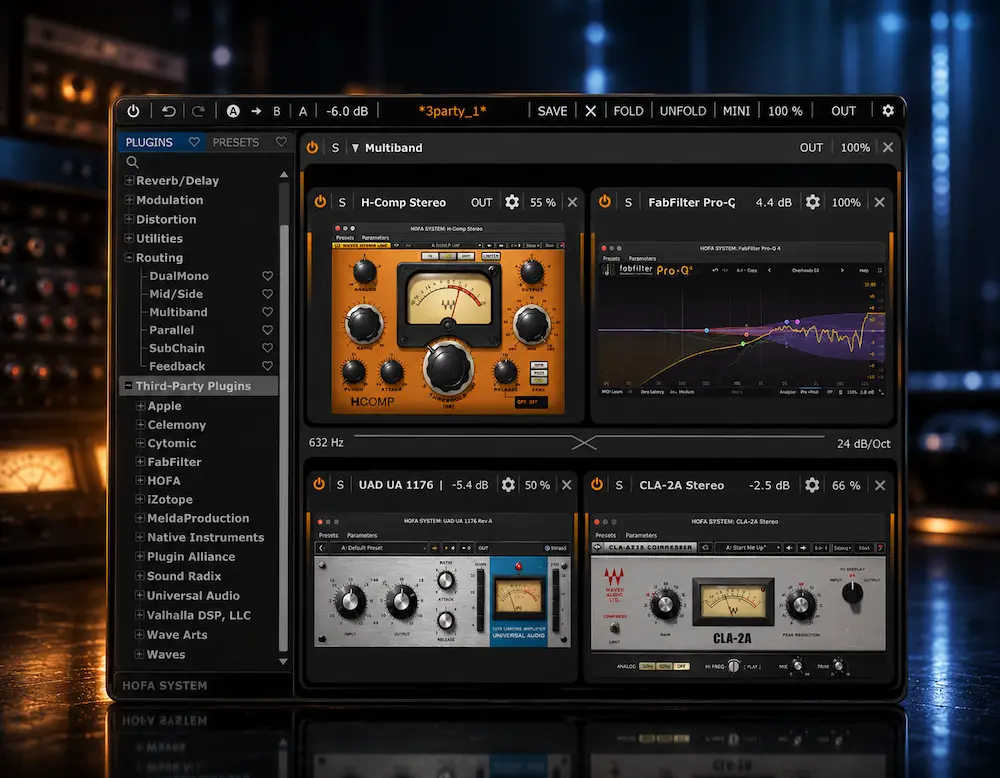
Most experienced producers and engineers do not need another compressor, EQ, or saturator. They need more control over the processors they already trust. That is the problem HOFA SYSTEM ThirdPartyPluginLoader is trying to solve: it loads VST2, VST3, and AU plugins into the HOFA SYSTEM environment, where those processors can be placed inside multiband, mid/side, left/right, parallel, feedback, modulation, and oversampling structures.
ThirdPartyPluginLoader does not change the underlying DSP of a third-party compressor or EQ. Its contribution is the signal architecture around that processor. A familiar compressor can be used only in a defined frequency range; an EQ can be placed in an M/S path; a saturator can run inside an oversampled chain. For mixing and mastering, that is a more relevant proposition than simply adding another processor to an already crowded plugin folder.
But there is no new processing category here. Plugin hosting, modular routing, multiband processing, M/S architectures, parallel chains, and oversampling have been available in products such as DDMF MetaPlugin and Blue Cat PatchWork for years. The case for HOFA therefore rests on implementation and integration with SYSTEM—not on inventing the underlying technology.
The practical question is whether ThirdPartyPluginLoader gives an engineer enough control over existing plugins to justify adding another processing layer to a professional workflow.
HOFA ThirdPartyPluginLoader at a Glance
| Feature | What It Offers |
|---|---|
| Guest Plugin Formats | VST2, VST3, AU |
| Supported Routing | Multiband, M/S, L/R, parallel, feedback |
| Oversampling | Available for loaded third-party plugins |
| Sidechain | Sidechain input can be passed to loaded plugins |
| Plugin Delay Compensation | Supported within the SYSTEM chain |
| Automation & Modulation | DAW automation and HOFA SYSTEM modulators |
| Plugin Chains | Save and recall complete chains with routing and settings |
| Free Version | Loads one third-party plugin |
| Full Version | Loads multiple third-party plugins |
| Introductory Price | €39; regular price €60 |
Best suited to: mixing engineers, mastering engineers, producers, and sound designers who already own trusted plugins but need more flexible signal routing around them.
HOFA ThirdPartyPluginLoader: Pros and Cons
| Pros | Cons |
|---|---|
| Extends existing plugins with SYSTEM routing | Does not improve the underlying plugin DSP |
| Multiband and M/S processing around trusted plugins | Complex routing can increase CPU and latency |
| VST2, VST3 and AU guest plugin support | CLAP is not currently supported |
| Sidechain and Plugin Delay Compensation | More useful for experienced engineers than beginners |
| Free version allows practical testing | Full version is mainly valuable when multiple plugins are required |
| Strong integration with HOFA SYSTEM | Less compelling if you already have a dedicated plugin host |
In This Review
Plugin Hosting & Routing ·
What It Changes ·
Innovation & Alternatives ·
Mixing & Mastering ·
CPU, Latency & Compatibility ·
Price & Free Version ·
Is It Worth It? ·
FAQ
HOFA ThirdPartyPluginLoader: Plugin Hosting and Signal Routing
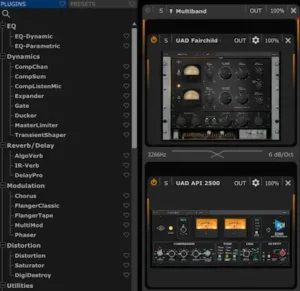 A well-stocked studio rarely lacks processors. The harder problem is using the right processor in the right part of the signal path. A mastering engineer may already have a compressor with the exact envelope behavior they want, an EQ with familiar tonal response, and a saturation plugin that works reliably on a full mix. What those processors often lack is the routing flexibility to deploy them selectively.
A conventional compressor is normally reacting to the complete signal presented to it. A conventional EQ likewise processes the stereo path it receives unless the plugin provides its own M/S architecture. The same limitation appears with saturation, distortion, reverb, and other processors: the sound of the plugin may be exactly what the engineer wants, while the available signal topology is not.
ThirdPartyPluginLoader addresses that gap by putting those processors inside HOFA SYSTEM rather than requiring the engineer to replace them with SYSTEM modules. The external plugin remains responsible for its own processing; SYSTEM supplies the signal splitting, routing, modulation, parallel paths, and oversampling around it.
The practical advantage is selective deployment. A compressor, EQ, or saturator can stay in the chain even when its native routing is the part that no longer fits the job. That is particularly relevant in mastering, where changing the processor just to obtain M/S or frequency-dependent control can alter the behavior you were trying to preserve in the first place.
What ThirdPartyPluginLoader Actually Changes
ThirdPartyPluginLoader is best understood as a routing layer for plugins you already own. It does not replace the DSP inside a third-party processor; it puts that processor inside HOFA SYSTEM, where the surrounding signal path can be configured independently.
A compressor can be placed inside a multiband structure instead of processing the entire spectrum. An EQ can operate within an M/S or L/R configuration. A saturator can be placed inside an oversampled path, while multiple third-party processors can be arranged in serial or parallel chains. SYSTEM can also expose parameters from loaded plugins to DAW automation and its own modulation sources.
That changes the engineering decision from which plugin do I need? to what signal architecture does this plugin need for this particular job? For an established studio with a deep plugin collection, that is the more useful question—and the core reason this loader has practical value.
Format Bridging: VST and AU Plugins in Unsupported DAWs
One of the less obvious advantages of ThirdPartyPluginLoader is format bridging. The loader accepts VST2, VST3, and AU plugins, while HOFA SYSTEM itself runs as VST3, AU, and AAX. This allows compatible third-party plugins to be used in DAWs where their original format is not supported.
The practical value is broader than format support alone. A plugin collection can contain processors whose preferred format does not match the DAW used for a particular project. In that situation, SYSTEM acts as the compatibility layer: the external plugin is loaded by ThirdPartyPluginLoader, while the DAW sees the HOFA SYSTEM plugin format available for that host.
This is more than a technical compatibility detail. For an engineer with a large plugin collection, format availability can determine whether an otherwise useful processor can be used in a particular project at all. ThirdPartyPluginLoader turns SYSTEM into a routing layer as well as a format bridge.
Hear What Professional Mastering Changes
A strong processing chain still has to translate as a finished master. If you want to hear what a mastering engineer can improve in your mix without changing its character, upload up to 35 seconds and receive a free mastering demo. It is a direct way to compare the result before committing to the full project.
Request your free mastering demo →
Multiband Processing for Third-Party Plugins
Multiband processing is arguably the most useful part of ThirdPartyPluginLoader for mixing and mastering. The practical advantage is not that SYSTEM makes a compressor or saturator inherently better; it lets you decide where in the spectrum that processor is allowed to work.
Take a compressor with the exact attack, release, knee, and tonal behavior you want, but whose low-frequency response makes it unsuitable across the full mix. Replacing it with a dedicated multiband compressor may solve the problem, but it also changes the character of the processing. Placing the original compressor inside SYSTEM’s multiband architecture gives you another option: keep the processor and limit its action to the frequency range that actually needs control.
The same approach applies to saturation, distortion, and other nonlinear processors. A saturator can be confined to the upper mids instead of adding harmonics to the low end. A distortion plugin can be kept out of the sub-bass region. A compressor can be used to control a specific low-mid buildup without imposing the same gain reduction on the rest of the master.
SYSTEM provides the crossover and routing architecture; it does not rewrite the third-party plugin’s DSP. The plugin still behaves according to its own algorithm and controls. What changes is the context in which that processor operates.
Mid/Side Processing Without Replacing the Plugin
M/S routing is particularly relevant to mastering because it allows an engineer to treat center and side information differently while retaining a familiar processor.
For example, an EQ with a response you already trust can be deployed selectively on the Mid or Side signal instead of applying identical processing to the stereo bus. That can be useful when the tonal problem is localized to the center or when the sides need a different degree of correction.
Again, the underlying technique is hardly new. M/S processing has been standard mastering practice for years. The useful part here is workflow: the third-party EQ, compressor, or other processor becomes part of the same reusable SYSTEM architecture rather than requiring a separate routing setup in the DAW.
Parallel Processing That Can Be Recalled as a Chain
Parallel routing is not new, but integrating third-party processors into the same modular environment has a practical advantage: the routing becomes part of the preset rather than a separate DAW construction that has to be rebuilt or maintained.
A compressor, saturator, or reverb can run on its own path while the dry signal remains intact, and more elaborate parallel structures can be saved with their routing, modulation, and plugin settings. That matters in a studio where the same processing topology is used repeatedly across mixes or mastering sessions.
The benefit is workflow consistency rather than sonic novelty. A well-designed parallel chain that can be recalled exactly is often more valuable than another processor added to an already crowded plugin collection.
Oversampling for Third-Party Nonlinear Processing
Oversampling is more useful when applied selectively to nonlinear processors. Saturators, clippers, distortion plugins, and some compressors can generate harmonics above the original Nyquist frequency, which may fold back into the audible spectrum as aliasing. Some plugins expose their own oversampling controls; others do not.
HOFA SYSTEM can place a loaded third-party processor inside its oversampled processing environment. That gives an engineer another way to manage aliasing without requiring the guest plugin to implement its own oversampling mode. The same issue can originate before the mixing stage: our Corona 7 review looks at how higher-rate oversampling in a synthesizer can reduce unwanted high-frequency artifacts before compression, saturation, limiting, and mastering further expose them.
But oversampling is not a universal quality upgrade. Higher rates increase CPU load, and the audible benefit varies considerably with the processor, input level, amount of nonlinear processing, and material being processed. This becomes particularly relevant when saturation or clipping is being used to shape perceived level, because the nonlinear stage can affect both the character of the master and the amount of headroom available to the final limiter. The sensible approach is to compare native and oversampled processing under controlled conditions rather than leaving the highest setting engaged by default; the same distinction applies when evaluating loudness and clipping in mastering.
Sidechain Routing and Plugin Delay Compensation
ThirdPartyPluginLoader also passes sidechain inputs to loaded third-party plugins and provides Plugin Delay Compensation within the SYSTEM chain. These features are less visible than multiband or M/S routing, but they matter when the loader becomes part of a serious mixing or mastering setup.
For mixing, sidechain routing allows a third-party compressor or dynamics processor to react to an external trigger while remaining inside the SYSTEM environment. This is useful when the processing topology requires more than a conventional DAW insert: the guest plugin can sit inside a larger multiband, parallel, or modular routing structure while still receiving its sidechain signal.
Plugin Delay Compensation becomes increasingly important as chains become more complex. Lookahead, oversampling, and different third-party processors can introduce different amounts of latency. PDC helps maintain timing relationships between processing stages instead of leaving the engineer to compensate for every plugin manually. HOFA lists both sidechain pass-through and PDC among the functions available in the ThirdPartyPluginLoader.
This does not make a complex chain latency-free. The actual monitoring latency and CPU cost still depend on the guest plugins, oversampling, lookahead, parallel paths, and host buffer settings. The advantage is that the internal timing relationships can be compensated within the processing architecture.
Feedback and Modulation: More Useful for Sound Design Than Mastering
Feedback routing moves ThirdPartyPluginLoader beyond conventional mix-bus and mastering applications. A distortion feeding a reverb inside a feedback structure can create evolving textures that would otherwise require a more elaborate collection of DAW sends, returns, and automation.
The same distinction applies to modulation. DAW automation already handles straightforward parameter moves; SYSTEM becomes more interesting when its modulators drive third-party plugin parameters inside multiband, parallel, or feedback structures.
For mastering, these features are niche. For electronic production, experimental mixing, and sound design, they are considerably more relevant—and potentially one of the stronger reasons to use SYSTEM as a third-party processing environment.
What ThirdPartyPluginLoader Does—and Does Not—Innovate
 ThirdPartyPluginLoader is not a new DSP processor. There is no new compressor model, synthesis engine, neural processing system, analog-modeling method, or proprietary nonlinear algorithm at its core. Its technical contribution is architectural: it brings external plugins into the routing and processing framework of HOFA SYSTEM.
That distinction matters because the underlying technology is already well established. DDMF MetaPlugin has offered third-party plugin hosting, routing, M/S and multiband processing, parameter mapping, plugin delay compensation, and oversampling for years. Blue Cat PatchWork provides another mature approach to plugin hosting, serial and parallel routing, and multi-format integration.
Waves StudioRack occupies the same broader category, combining third-party plugin hosting with chain-based routing and processing. The competitive question for HOFA therefore is not whether it created plugin chaining. It did not. The question is whether its implementation works well enough inside the SYSTEM ecosystem to offer a better workflow than the alternatives.
For professional engineers, that is the meaningful test. A plugin host is valuable when it makes complex processing repeatable, predictable, and easy to recall—not simply because it provides another place to stack plugins.
Where ThirdPartyPluginLoader Actually Saves Time
ThirdPartyPluginLoader is not about shaving a few clicks off a single EQ adjustment. Its value shows up when a particular signal architecture needs to be built, recalled, and reused across projects.
Consider a mastering chain built around a trusted third-party compressor, EQ, and saturator. If those processors need to run in a specific multiband or M/S configuration, the routing normally has to be constructed at the DAW level or recreated from a template. Inside HOFA SYSTEM, the processing structure can be saved with the guest plugins, routing, modulation, and settings intact.
The same approach works in mixing. A vocal chain might combine a third-party compressor with frequency-dependent processing, parallel saturation, and a modulated effects path. Once that architecture has been built and tested, it can be recalled as a single processing structure rather than reconstructed from individual inserts, sends, and routing assignments.
That is the strongest workflow argument for the loader: repeatable processing architecture. The time savings come from eliminating reconstruction and reducing the number of routing decisions that have to be made every time the same technique is used.
The important workflow advantage is that the routing structure and the loaded processors can remain together. Instead of rebuilding the same multiband, M/S, parallel, or feedback topology around individual DAW inserts, the engineer can keep that architecture as part of the SYSTEM chain.
Where ThirdPartyPluginLoader Falls Short of the Marketing
ThirdPartyPluginLoader expands what you can do with an existing plugin, but it does not improve the plugin’s underlying processing. A compressor does not become more musical because it is running inside SYSTEM, and a saturation plugin does not become a mastering-grade processor simply because it can be placed in an oversampled path.
The same applies to multiband processing. Giving a favorite compressor frequency-dependent control can be extremely useful, but it also introduces crossovers and additional signal-path decisions. More control is not automatically better control. If a master becomes harsher, thinner, denser, or less coherent after processing, the first step should be identifying the actual mastering problem rather than adding another processing stage.
That is the trade-off with any modular routing environment. Poor crossover choices can create audible inconsistencies between bands; unnecessary gain changes can distort the processing relationship; additional latency can complicate monitoring; and excessive processing can make a master less coherent rather than more controlled. The architecture rewards engineers who know exactly why a particular split, parallel path, or feedback structure is being used.
Compatibility also has boundaries. ThirdPartyPluginLoader currently accepts VST2, VST3, and AU as guest formats, while HOFA SYSTEM itself is available as VST3, AU, and AAX. CLAP is not currently listed as a supported guest format. That makes the format-hosting capability useful, but it should not be mistaken for universal plugin compatibility.
The practical conclusion is straightforward: ThirdPartyPluginLoader gives an experienced engineer more routing options. It does not remove the need to make good routing decisions.
HOFA ThirdPartyPluginLoader vs. MetaPlugin, PatchWork, and StudioRack
The right comparison depends on what you actually need from a plugin host. ThirdPartyPluginLoader is strongest when HOFA SYSTEM itself is part of the workflow; MetaPlugin and PatchWork are more direct choices when the primary requirement is a dedicated third-party plugin host; StudioRack is more naturally aligned with Waves-centric workflows.
| Product | Core Advantage | Guest Plugin Formats | Key Routing Capabilities | Best Fit |
|---|---|---|---|---|
| HOFA ThirdPartyPluginLoader | Integration with HOFA SYSTEM | VST2, VST3, AU | Multiband, M/S, L/R, parallel, feedback, modulation, oversampling | Engineers already using HOFA SYSTEM |
| DDMF MetaPlugin | Mature plugin hosting and routing | VST, VST3, AU, AAX | Serial/parallel routing, M/S, multiband, parameter mapping, oversampling | Dedicated plugin-hosting and routing workflows |
| Blue Cat PatchWork | Flexible patchbay and plugin host | VST, VST3, AU | Serial and parallel chains, patchbay routing | Large plugin collections and complex routing |
| Waves StudioRack | Chain management and Waves ecosystem | Waves plus supported third-party VST3 plugins | Serial, parallel, multiband, chain recall | Waves-centric studios and reusable chains |
For a working engineer, the feature count matters less than whether the host removes a routing problem without forcing an established workflow to be rebuilt.
ThirdPartyPluginLoader makes the most sense when HOFA SYSTEM is already part of the workflow. Its main advantage is that external plugins become components of the same modular environment rather than another separate routing system to maintain.
If the goal is a dedicated plugin host rather than an extension of HOFA SYSTEM, DDMF MetaPlugin and Blue Cat PatchWork are the more direct alternatives. Both are established solutions for building complex plugin chains and routing structures. StudioRack is the more natural choice for engineers already invested heavily in the Waves ecosystem.
That leaves HOFA competing on integration rather than invention. The underlying plugin-hosting category is mature, so the real advantage has to come from workflow. For engineers already working inside HOFA SYSTEM, ThirdPartyPluginLoader removes a boundary between native SYSTEM modules and external processors: a trusted plugin can stay in the chain while SYSTEM supplies the multiband, M/S, parallel, feedback, modulation, or oversampling architecture around it.
Which Plugin Host Is Best for Mixing and Mastering?
| If You Need… | Best Fit |
|---|---|
| HOFA SYSTEM integration | ThirdPartyPluginLoader |
| A dedicated general-purpose plugin host | DDMF MetaPlugin |
| Patchbay-style routing and plugin hosting | Blue Cat PatchWork |
| Waves-centric chain management | Waves StudioRack |
| Using trusted plugins in multiband or M/S mastering chains | ThirdPartyPluginLoader |
| Testing the concept without buying the full version | ThirdPartyPluginLoader Free |
For a mastering engineer, ThirdPartyPluginLoader’s strongest advantage is not that it replaces established plugin hosts. It is that a trusted processor can remain the processor you already know while HOFA SYSTEM supplies the missing routing architecture around it.
Where ThirdPartyPluginLoader Fits in Professional Mixing and Mastering
The strongest studio applications are not the most elaborate ones. They are the situations where an engineer already knows which processor works, but needs more control over where and how it operates.
In mixing, that might mean keeping a familiar vocal compressor while limiting its action to a troublesome frequency range, putting a trusted saturator on a parallel path, or building a more specialized effects structure around a reverb. The point is not to make the chain more complicated. It is to change the topology without giving up a processor whose behavior is already understood.
Mastering is a narrower but arguably more compelling use case. M/S routing, multiband control, parallel processing, and oversampling around nonlinear processors all address problems that can arise when a mastering chain needs to remain selective. A compressor that reacts correctly to most of the mix but over-responds to low-frequency energy does not necessarily need to be replaced; its operating range may need to be constrained. That kind of selective processing only makes sense when the engineer understands how each stage interacts with the rest of the mastering chain.
The same logic applies to EQ. If an engineer already trusts the tonal behavior of a particular EQ, placing it within an M/S structure can provide separate control over center and side information without introducing another EQ into the chain simply for its routing options.
That is the practical case for ThirdPartyPluginLoader: more control with fewer compromises. The value is not in adding processing. It is in making a necessary intervention more targeted while preserving a processor whose sound and behavior are already familiar.
CPU, Latency, and Reliability: The Practical Limits
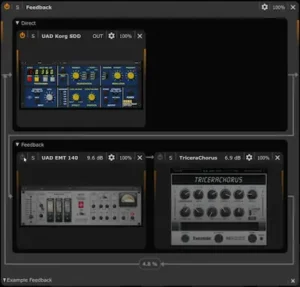 There is not yet enough independent testing of ThirdPartyPluginLoader to support meaningful CPU, latency, or large-session performance claims. The product is too new for reliable third-party benchmarks covering complex plugin combinations, sustained sessions, or offline rendering.
That limitation is worth stating explicitly. CPU load and latency in a modular host are determined by the entire signal path, not simply by the wrapper. A guest plugin with heavy oversampling or lookahead can have a far greater impact than the loader itself, and additional multiband or parallel paths can multiply the processing load.
HOFA SYSTEM provides latency compensation and oversampling, but those features do not make a complex chain latency-free. Guest-plugin processing, lookahead, oversampling, multiband splits, and parallel branches still determine the practical CPU and monitoring cost. That makes the architecture more appropriate for controlled studio processing than for monitoring through complex, oversampled chains at very low buffer sizes.
For mixing and mastering, this is usually manageable because latency can be compensated and processing can be printed or rendered offline. Live tracking is a different case. A chain that combines several external processors, multiband splits, lookahead, and oversampling should not be placed in a low-latency monitoring path without testing the actual configuration.
The sensible approach is to benchmark the chain you intend to use rather than the loader in isolation. Guest-plugin complexity, oversampling rate, crossover processing, latency compensation, and the number of parallel paths all contribute to the real CPU and latency cost.
DAW Compatibility and Supported Formats
HOFA SYSTEM is available as VST3, AU, and AAX, while ThirdPartyPluginLoader accepts VST2, VST3, and AU as guest plugins. This makes the system useful not only as a modular routing environment but also as a practical format bridge between DAWs and plugin formats.
| DAW | Relevant HOFA SYSTEM Format | Example Use |
|---|---|---|
| Pro Tools | AAX | Load compatible VST2, VST3, or AU plugins through SYSTEM |
| Logic Pro | AU | Load compatible VST plugins through SYSTEM |
| Cubase / Nuendo | VST3 | Load compatible AU plugins through SYSTEM |
| Ableton Live | VST3 | Use supported third-party plugins inside SYSTEM |
| Reaper | VST3 | Use third-party plugins inside SYSTEM routing |
| Bitwig | VST3 | Use third-party plugins inside SYSTEM routing |
HOFA currently lists Ableton Live, Apple Logic, Avid Pro Tools, Bitwig, Reaper, FL Studio, Samplitude/Sequoia, Fender Studio Pro, and Steinberg Cubase, Nuendo, and WaveLab among the DAWs it continuously tests. This should not be interpreted as a guarantee that every third-party plugin will work identically in every host. Compatibility still depends on the individual plugin, operating system, plugin format, and routing configuration.
HOFA ThirdPartyPluginLoader Price and Free Version
At the time of this review, HOFA lists ThirdPartyPluginLoader at €39 for the introductory price, with a regular price of €60. The free version is not simply a time-limited demo: it can load one VST2, VST3, or AU plugin and provides the core SYSTEM routing functions around that plugin. The full version removes the one-plugin limitation and allows multiple third-party processors to be combined into larger chains.
A particularly important detail is that the ThirdPartyPluginLoader can also be used with the free version of HOFA SYSTEM. You therefore do not need to purchase the complete SYSTEM bundle simply to test the concept. The free loader supports multiband, parallel, feedback, M/S, L/R, oversampling, sidechain, PDC, automation, modulation, and chain recall, with the main restriction being that only one external plugin can be loaded at a time.
| Version | Third-Party Plugins | Core Routing | Best For |
|---|---|---|---|
| Free | 1 plugin | Multiband, M/S, L/R, parallel, feedback, oversampling, sidechain, PDC, modulation | Testing the workflow |
| Full | Multiple plugins | Same routing and processing architecture | Complex reusable chains |
The economics favor engineers with established plugin collections. If you already own specialized compressors, EQs, saturators, reverbs, and other processors, ThirdPartyPluginLoader can add another layer of functionality without requiring another set of replacement plugins. For a small plugin collection, the benefit is correspondingly limited.
At the introductory price, the full version is easy to justify if you already use HOFA SYSTEM and have a repeatable need for complex third-party routing. For everyone else, the free version is the sensible starting point.
Is HOFA ThirdPartyPluginLoader Worth It?
For an engineer who already owns a large collection of trusted plugins, ThirdPartyPluginLoader can be worth the price because it changes how those processors can be deployed rather than simply adding another processor to the studio. A familiar compressor can become part of a multiband structure, an existing EQ can be used in M/S, and a saturator can be placed inside an oversampled or parallel path.
The strongest case is for engineers who repeatedly encounter the same routing limitation. If you already have a compressor with the sound and envelope behavior you want but need it to work only in a particular frequency range, replacing it with another compressor is not necessarily the best solution. ThirdPartyPluginLoader allows you to keep the processor and change the architecture around it.
The case is weaker if you only need conventional serial plugin inserts. A modern DAW already handles those tasks efficiently, and a dedicated plugin host such as DDMF MetaPlugin or Blue Cat PatchWork may make more sense if plugin hosting itself—not HOFA SYSTEM integration—is the primary requirement.
Our verdict: the free version is easy to justify as a workflow test. The full version becomes worthwhile when the ability to load multiple external plugins into reusable multiband, M/S, parallel, feedback, sidechain, or oversampled structures solves a recurring production problem.
Who Actually Benefits From ThirdPartyPluginLoader?
Mixing engineers are among the best candidates. The ability to place familiar compressors, EQs, saturation processors, and effects inside multiband, M/S, parallel, and modulation structures is useful when a mix calls for a specific processor but not its default signal topology.
Mastering engineers have a narrower but highly practical use case. M/S routing, multiband processing, and oversampling around nonlinear processors are the features most likely to earn a permanent place in a mastering workflow. Feedback and modulation are considerably less relevant unless the studio also handles sound design or experimental work.
Electronic producers and sound designers may get the most creative mileage from the system. Feedback paths, modulation, parallel routing, and unconventional processor combinations can turn familiar plugins into components of more elaborate sound-design structures.
Home-studio professionals should consider it if they maintain complex templates or regularly move projects between DAWs. The free version makes that evaluation relatively low-risk.
Beginners are unlikely to get much immediate benefit. Without a solid understanding of gain staging, crossover behavior, phase relationships, and signal flow, the additional routing options can create more problems than they solve.
My Hands-On Test: What Matters in a Real Mastering Chain
I tested ThirdPartyPluginLoader as a routing tool rather than judging it from the feature list alone. The important part was not getting a third-party plugin to load; that is the easy part. The useful test was whether the same processor became more practical when its signal path was changed around it.
For mastering, the first workflow I checked was a broadband compressor placed inside a multiband structure. The point was not to make the compressor sound different. It was to stop low-frequency energy from controlling the compressor when the processing was intended for another part of the spectrum. That makes the loader useful only when the routing limitation is the actual problem.
I then tested the same concept with M/S routing. Keeping the original EQ while changing whether it processes the Mid or Side signal is a more meaningful use of the loader than simply adding another EQ to the chain. The advantage is operational: the processor remains familiar while the signal topology changes around it.
I also checked the practical consequence of adding another routing layer. Once multiband splits, external plugins, parallel paths, or oversampling are introduced, the chain becomes more complex even when the individual processors remain familiar. That is why I would not treat ThirdPartyPluginLoader as a default insert for every master.
The strongest conclusion from the test was simple: ThirdPartyPluginLoader is useful when the plugin is already right but its native signal path is wrong for the job. When there is no routing problem to solve, the loader adds complexity without providing a compelling reason to use it.
Overall Rating
| Category | Rating |
|---|---|
| Routing Flexibility | 9.5/10 |
| Workflow Integration | 9/10 |
| Processing Control | 9/10 |
| Recall & Repeatability | 9/10 |
| CPU / Latency Practicality | 8/10 |
| Value for Existing HOFA Users | 9/10 |
| Mastering Utility | 9.2/10 |
| Overall | 9.0/10 |
Routing Flexibility — 9.5/10: This is the strongest part of ThirdPartyPluginLoader. Multiband, M/S, L/R, parallel, feedback, oversampling, and modular routing give familiar third-party processors far more control over where and how they operate.
Workflow Integration — 9/10: The loader makes the most sense when HOFA SYSTEM is already part of the studio workflow. External processors become components of the same modular environment instead of requiring a separate routing system.
Processing Control — 9/10: ThirdPartyPluginLoader does not change the DSP inside a third-party processor, but it significantly expands the processing context around it. For mixing and mastering, that distinction is important: the engineer can keep a processor whose sound is already trusted while changing its frequency, stereo, parallel, or oversampled environment.
Recall & Repeatability — 9/10: Saving the loaded plugins together with their routing, modulation, and processing topology is a meaningful advantage for repeatable production work. The benefit increases as chains become more complex.
CPU / Latency Practicality — 8/10: The architecture is practical for studio work, but oversampling, parallel paths, lookahead, guest plugins, and multiband processing can increase CPU load and latency. Plugin Delay Compensation helps maintain timing relationships, but the complete chain still has to be evaluated in the actual DAW session.
Value for Existing HOFA Users — 9/10: For engineers already using SYSTEM, the loader fills a clear workflow gap without requiring them to replace processors they already know. The free version also makes the concept easy to evaluate before purchasing the full version.
Mastering Utility — 9.2/10: ThirdPartyPluginLoader is particularly useful in mastering when a trusted compressor, EQ, saturator, or other processor needs more selective routing than its native interface provides. M/S, multiband, L/R, oversampling, sidechain, and repeatable routing all have legitimate mastering applications. The score is not higher because many mastering chains still work perfectly well without an additional modular routing layer.
HOFA ThirdPartyPluginLoader Review Verdict: Is It Worth It?
HOFA SYSTEM ThirdPartyPluginLoader is best viewed as a professional routing and workflow utility, not a new audio-processing technology. Its value comes from putting VST2, VST3, and AU plugins inside SYSTEM’s existing multiband, M/S, parallel, feedback, modulation, and oversampling architecture.
That is enough to make it genuinely useful for mixing, mastering, and sound design. It is not enough to make it essential for every studio.
If HOFA SYSTEM is already part of your workflow, ThirdPartyPluginLoader is an easy extension to justify: it brings your existing processors into the same routing environment. If you do not use SYSTEM, the decision is less obvious because DDMF MetaPlugin and Blue Cat PatchWork already cover the dedicated plugin-hosting category.
For mastering, I would test multiband routing, M/S processing, and oversampling first. Feedback and modulation are more specialized features for sound design and experimental production.
Is it worth buying? Yes, if you repeatedly run into routing limitations with plugins you already trust. The free version is the sensible way to test that premise before paying for the full version.
Bottom line: ThirdPartyPluginLoader is worth considering when an existing processor already sounds right but its native routing is the limitation. HOFA SYSTEM supplies the missing architecture; the free version provides a low-risk way to determine whether that flexibility is actually useful in your workflow.
More Processing Is Not Always the Better Master
A sophisticated plugin chain can give you more control, but it cannot tell you which problems actually need fixing. Professional mastering is about making those decisions without sacrificing punch, tonal balance, depth, or translation. The goal is not to add processing—it is to make the finished master work reliably beyond the studio monitors.
If you want to hear what an experienced mastering engineer can change in your mix, upload up to 35 seconds and receive a free mastering demo. Compare the processed result with your original before deciding whether the full master is worth doing.
Get your free mastering demo →
FAQ: HOFA ThirdPartyPluginLoader for Mixing, Mastering, and Plugin Hosting
Can HOFA ThirdPartyPluginLoader run VST plugins in Pro Tools?
Yes. HOFA SYSTEM is available as an AAX plugin, while ThirdPartyPluginLoader accepts VST2, VST3, and AU guest plugins. This allows compatible VST or AU processors to be loaded inside SYSTEM when working in Pro Tools.
Can ThirdPartyPluginLoader turn a regular compressor into a multiband compressor?
It can place a third-party compressor inside SYSTEM’s multiband architecture, allowing the processor to operate within defined frequency bands. The compressor’s own DSP does not change; SYSTEM provides the crossover and frequency-dependent routing.
Is ThirdPartyPluginLoader useful for mastering?
Yes, particularly when an engineer already trusts a specific EQ, compressor, saturator, or other processor but needs M/S, multiband, parallel, or oversampled routing around it. The main benefit is greater control over the signal path without replacing the processor.
Can ThirdPartyPluginLoader add oversampling to a plugin that does not have its own oversampling control?
Yes. A compatible third-party processor can be placed inside SYSTEM’s oversampled processing environment, even if the plugin does not provide its own oversampling control. The practical result still depends on the plugin and its supported sample rates, so oversampling should be evaluated rather than treated as an automatic quality improvement.
Does HOFA ThirdPartyPluginLoader support CLAP plugins?
No. HOFA currently lists VST2, VST3, and AU as the supported guest-plugin formats, and CLAP is not listed as a supported guest format. If a plugin is available in both CLAP and VST3, the VST3 version is the appropriate format to test with ThirdPartyPluginLoader.
How does ThirdPartyPluginLoader compare with DDMF MetaPlugin?
MetaPlugin is a mature standalone plugin host with extensive routing, processing, and format support. ThirdPartyPluginLoader has the stronger case for engineers who already use HOFA SYSTEM and want third-party processors to become part of the same modular environment. If plugin hosting itself is the primary requirement, MetaPlugin deserves a direct comparison.
Is ThirdPartyPluginLoader better than Blue Cat PatchWork?
Not across the board. PatchWork is an established plugin host and patchbay designed for complex serial and parallel routing. HOFA’s advantage is its integration with SYSTEM’s existing processing and modulation architecture. The better choice depends largely on which environment fits the studio’s existing workflow.
Can I use the free version of ThirdPartyPluginLoader?
Yes. HOFA offers a free version that can host one external plugin at a time. That is enough to test the core workflow, including multiband, M/S, and oversampling applications, before deciding whether the full version is justified.
Do I need the paid HOFA SYSTEM bundle to use ThirdPartyPluginLoader?
No. ThirdPartyPluginLoader can be used with the free version of HOFA SYSTEM. You do not need to purchase the complete SYSTEM bundle simply to load and route third-party plugins. The free loader allows one external plugin to be loaded at a time while retaining the core routing functions.
How many third-party plugins can I load with ThirdPartyPluginLoader?
The free version allows one external plugin at a time. The full version removes that restriction and allows multiple third-party plugins to be combined into larger chains, parallel structures, multiband setups, and other HOFA SYSTEM configurations.
Does ThirdPartyPluginLoader use more CPU than running a plugin directly in the DAW?
There is no useful universal CPU figure because the cost depends on the entire signal path. Oversampling, multiband processing, parallel branches, latency compensation, and the guest plugin itself can all increase CPU demand. The relevant measurement is the complete chain in the DAW and sample rate you actually use.
Does ThirdPartyPluginLoader support sidechain processing?
Yes. Sidechain inputs can be passed to loaded third-party plugins. This allows compatible compressors, gates, and other processors to receive external trigger signals while remaining inside the HOFA SYSTEM routing environment. The sidechain function is available in both the free and full versions.
Does ThirdPartyPluginLoader support Plugin Delay Compensation?
Yes. Plugin Delay Compensation is supported within the SYSTEM chain. This is important when several third-party processors introduce different amounts of latency through lookahead, oversampling, or other processing stages. PDC helps maintain timing relationships between stages, although the complete chain can still introduce monitoring latency.
Should mastering engineers replace their existing plugins with HOFA SYSTEM modules?
Not by default. ThirdPartyPluginLoader is most useful when an existing processor already has the sound and behavior you want but lacks the routing flexibility required for a particular job. Replacing it with a SYSTEM module only makes sense when the alternative provides a measurable workflow or sonic advantage.

Yurii Ariefiev evaluates audio plugins from a mixing and mastering engineering perspective, with particular attention to signal flow, processing topology, gain staging, latency, and real-world workflow efficiency.
His plugin analysis focuses on what actually changes in a production: whether a processor improves control, preserves audio quality, and solves a problem that matters in a real mix or master—not simply how many features it puts on the screen.
☕ Buy me a coffee