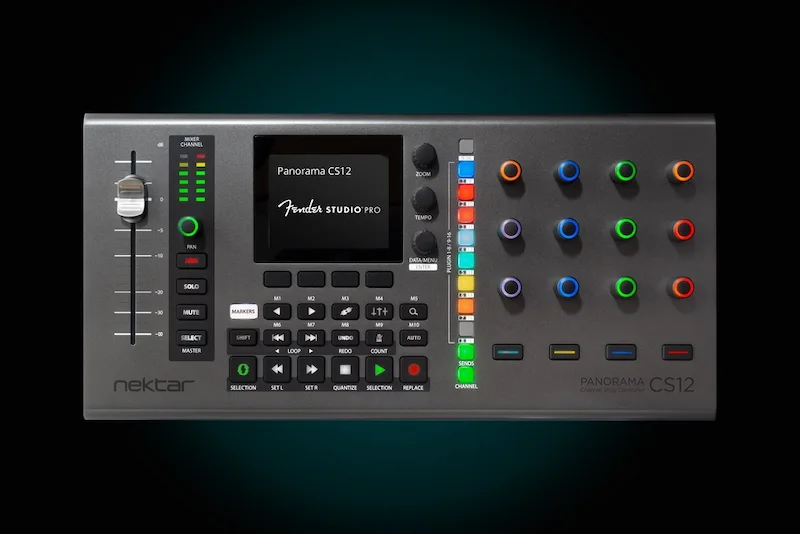
Nektar Panorama CS12 Review: Reaper and Studio One Integration Changes the Workflow
Most DAW controllers fail for the same reason: they solve hardware problems while ignoring workflow problems. A unit can have solid faders, responsive transport controls and decent build quality, then lose relevance the moment a session moves outside its native ecosystem.
That was the main limitation of the Nektar Panorama CS12 at launch. Logic Pro integration was deep, but the hardware existed inside a closed environment. Outside of Logic, the CS12 had little strategic value in a controller market already saturated with MCU-based surfaces, touchscreen workflows and keyboard-driven production setups.
ControlCore 1.2 changes the positioning of the Panorama CS12 considerably. Native integration for Cockos Reaper, PreSonus Studio One and Fender Studio moves the controller beyond the “Logic-only” category and into a more competitive part of the production market: dedicated workflow control for engineers who spend more time managing complex sessions than browsing plugins.
That shift matters because modern mixing and mastering workflows are increasingly defined by operational speed rather than raw processing power. Most professional DAWs already handle large sessions efficiently. The real bottleneck is interruption — switching between routing menus, automation windows, macros, plugin pages and navigation layers thousands of times during a project.
The Panorama CS12 is not trying to replace a large-format console. The more relevant question is whether it reduces enough friction to justify permanent desk space inside a modern production environment. With the latest ControlCore update, the answer is stronger than it was at launch.
Article Navigation
- Why Deep DAW Integration Matters More Than Generic Controller Support
- The Reaper Integration Solves a Real Workflow Problem
- Studio One Integration Makes More Sense Than Reaper Users May Expect
- Where the Panorama CS12 Still Falls Short
- How the Panorama CS12 Fits Into Modern Mixing and Mastering Workflows
- Where the Panorama CS12 Fits in the Current Controller Market
- The More Important Shift Is Strategic, Not Technical
- Verdict
- FAQ
Why Deep DAW Integration Matters More Than Generic Controller Support
Modern audio production has made traditional controller design increasingly obsolete. Smaller studios no longer build around large-format surfaces, and most producers now work inside heavily optimized keyboard-and-mouse environments. At the same time, DAW sessions have become far more demanding operationally — larger routing structures, deeper automation, stem-heavy workflows, clip-level processing and constant plugin management.
The result is less about CPU strain and more about cognitive overload. Engineers spend an increasing amount of time navigating session architecture instead of making mix decisions.
That is why deep DAW integration matters more now than raw hardware specifications. Generic MIDI control is no longer enough. A controller has to reduce operational friction inside real production workflows or it becomes desk clutter.
This is where the Panorama CS12 update becomes more relevant than the feature list itself suggests. Nektar are not trying to compete with large SSL-style production surfaces or modular studio ecosystems. The strategy is narrower: reduce repetitive interaction between the engineer and the DAW.
Logic Pro users already had that advantage when the CS12 launched. Reaper and Studio One users did not. Outside of ecosystem-specific hardware like the PreSonus FaderPort series — or extensive custom scripting — controller support in those DAWs often felt functional rather than genuinely integrated.
ControlCore 1.2 changes that dynamic. The Panorama CS12 now targets a much broader category of engineers who rely on fast routing, automation and session navigation more than traditional tactile mixing.
The Reaper Integration Solves a Real Workflow Problem
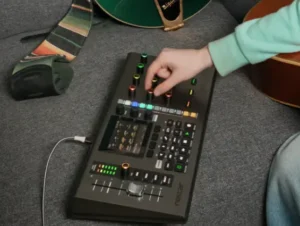 Most controller integrations for Reaper stop at transport control, basic automation and generic MCU behavior. That approach works until sessions become routing-heavy. Then the mouse comes back into the workflow almost immediately.
The Panorama CS12 update matters because it targets one of Reaper’s biggest operational weaknesses: managing complex routing quickly without breaking focus.
Reaper users tend to build more customized production environments than users of almost any other DAW. Large parallel processing trees, stem-based mixing, multi-output virtual instruments, hybrid mastering chains and nested routing structures are common inside professional Reaper sessions. The DAW’s flexibility is its strength, but it also creates significant navigation overhead once projects scale.
Nektar’s new send-management implementation is more important than the marketing language around “deep integration” suggests. Creating sends directly from hardware, assigning destinations on the fly and modifying routing behavior without returning to the screen removes a surprising amount of interruption during long sessions.
The practical advantage is not speed in isolation. It is continuity.
During real mixing work, engineers constantly jump between automation, routing, monitoring and balance decisions. Every forced transition back into menus or routing windows interrupts auditory focus. That becomes particularly noticeable in sessions built around:
- parallel compression networks
- multi-bus vocal processing
- layered reverb environments
- stem-print workflows
- hybrid analog routing chains
In those environments, routing itself becomes part of the creative process rather than background infrastructure.
The Panorama CS12 now handles several tasks directly from hardware that normally force engineers back into screen management:
- creating sends
- assigning track destinations
- adjusting send pan
- switching pre/post routing
- controlling polarity
- toggling mono or stereo behavior
That changes the role of the CS12 substantially. It behaves less like a transport controller and more like a session-management surface.
This distinction is critical because most single-fader controllers fail at scale. Once engineers need to touch the mouse every few seconds to manage routing or navigation, the hardware stops contributing meaningful workflow acceleration.
Reaper also presents a difficult integration target because workflows vary dramatically between users. Many control surfaces rely on simple parameter mirroring or generic MCU implementation. Nektar’s approach is more intelligent because it prioritizes operational control instead of visual duplication of the DAW interface.
The new “Receive from Track” page is particularly useful in dense sessions where routing relationships become difficult to track visually. In parallel-heavy mix environments or stem mastering projects, quickly identifying what feeds the selected channel can eliminate unnecessary navigation through nested routing windows.
For mastering engineers, the benefits are narrower but still legitimate. Most mastering workflows remain keyboard-centric, especially in stereo mastering environments. However, engineers working with stems, album sequencing or multiple print paths may still benefit from faster routing inspection and navigation without constantly shifting visual attention between edit windows and routing matrices.
The distinction matters because mixing and mastering workflows place very different demands on control surfaces. Routing-heavy mix sessions benefit far more from tactile navigation than minimal stereo mastering chains built around critical listening and precision adjustments. We explored those workflow differences further in our Mixing vs Mastering breakdown.
Studio One Integration Makes More Sense Than Reaper Users May Expect
Studio One already has one of the stronger hardware ecosystems in the DAW market. PreSonus built the platform around tight controller integration from the beginning, which means third-party hardware usually struggles to feel fully native inside the environment.
That is why the Panorama CS12 update is more significant than basic compatibility support. Nektar are not relying on generic MIDI mapping or shallow transport integration. The implementation is clearly aimed at macro-driven production workflows, which is where Studio One has become increasingly powerful over the last several versions.
The most useful addition is direct macro access from the hardware layer itself. Assigning knobs 1–8 and buttons 1–4 to Studio One macros sounds simple on paper, but in practical production sessions it changes how engineers interact with complex processing chains.
Modern mixes routinely involve:
- multi-stage vocal processing
- parallel saturation layers
- dynamic bus automation
- macro-controlled FX transitions
- stacked synth modulation chains
Managing those environments with a mouse quickly becomes visually dependent. Macro systems reduce that problem by collapsing multiple parameters into fewer meaningful control movements.
That is where tactile control still matters in modern production.
Mouse automation is accurate, but it also encourages engineers to mix visually. Physical encoders shift attention back toward auditory decision-making, particularly during automation rides, transition shaping and tonal movement across buses or FX returns.
The CS12’s implementation appears designed around exactly that type of interaction rather than simple DAW navigation.
The color synchronization support is less important technically, but still useful operationally. In larger Studio One sessions, maintaining identical channel colors between software and hardware reduces orientation time during navigation-heavy workflows. That sounds minor until projects reach high track counts and engineers begin switching rapidly between buses, stems and automation layers for hours at a time.
Fender Studio integration is more strategically interesting than practically essential — at least for now. Fender are clearly trying to position Studio as a more legitimate recording and production platform rather than an entry-level practice environment. Hardware support from companies like Nektar helps reinforce that perception.
Still, the professional relevance of Fender Studio remains limited compared to Reaper, Logic or Studio One. Most serious mix and mastering engineers are unlikely to move production workflows into that ecosystem anytime soon. The stronger long-term value of this update remains Studio One support, not Fender branding.
Where the Panorama CS12 Still Falls Short
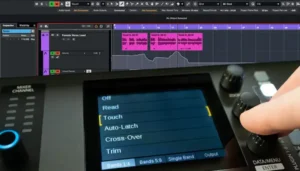 The ControlCore update improves the Panorama CS12 considerably, but it does not change the physical reality of the hardware itself. This is still a compact single-fader controller operating inside workflows that increasingly involve massive session complexity.
That limitation becomes obvious in large-format mixing environments.
One motorized fader works well for navigation and automation, but the limitations become obvious once sessions grow beyond moderate track counts. Constant banking breaks spatial orientation during balancing, particularly in dense mixes where engineers need to compare multiple buses or vocal layers quickly. That fatigue accumulates faster than many controller manufacturers acknowledge. Engineers mixing orchestral sessions, dense rock productions, cinematic arrangements or large hybrid templates still benefit significantly from multi-fader tactile control.
The main compromises remain unchanged:
- limited simultaneous channel visibility
- constant bank switching in larger sessions
- reduced tactile overview during balancing
- slower multi-channel level comparison
Those issues are not flaws in Nektar’s implementation specifically. They are structural limitations of the single-fader controller category itself.
There is also a larger problem affecting nearly every modern control surface: third-party plugin fragmentation.
Deep DAW integration works well until workflows move heavily into external plugin ecosystems. Native DAW parameters can usually be mapped intelligently because the software environment is predictable. Third-party plugins are far less standardized. Parameter layouts, paging behavior and macro structures vary dramatically between developers.
That inconsistency becomes even more noticeable in mastering environments where engineers often rely on highly specialized plugin chains with precise gain staging, metering and dynamic interaction between processors. We discussed that complexity in our Mastering Chain Explained editorial.
As a result, controllers like the CS12 deliver their strongest workflow improvements in operational tasks rather than detailed plugin manipulation.
The real gains come from:
- routing management
- automation writing
- transport control
- macro handling
- session navigation
- track management
Once engineers begin editing deep plugin chains with dozens of exposed parameters, most hardware controllers still become secondary to mouse-and-keyboard workflows.
Plugin paging remains one of the weakest parts of modern controller workflows in general. Even well-integrated systems can become frustrating once parameters are distributed across multiple pages without consistent logical grouping. In practice, many engineers still reach for the mouse faster than navigating layered encoder assignments during time-sensitive sessions.
The Panorama CS12 also occupies a difficult position in the current controller market financially.
At roughly £350, it sits above entry-level desktop controllers but below more complete professional ecosystems. That creates an unusual value proposition. It is sophisticated enough for serious production work, yet still lacks the broader tactile control, channel density and ecosystem depth some professional engineers expect once pricing moves into higher territory.
For producers focused primarily on navigation, automation and routing efficiency, that balance may feel reasonable. For engineers expecting console-style interaction, the CS12 can still feel like an intermediary solution rather than a central production surface.
How the Panorama CS12 Fits Into Modern Mixing and Mastering Workflows
The value of a modern control surface is no longer measured by how much of the DAW it can mirror. What matters now is interruption management.
Current mixing and mastering workflows are built around constant context switching. Engineers move continuously between:
- clip gain editing
- bus automation
- reference track comparison
- streaming loudness verification
- stem management
- codec auditioning
- revision printing
- routing inspection
Streaming normalization has made loudness management part of everyday production workflow rather than a final mastering-only concern. Engineers constantly move between creative decisions and technical verification, particularly when balancing translation against platform loudness targets. We covered that process in more detail in our LUFS mastering guide.
Individually, these are minor actions. Across a 10-hour session, they become the workflow.
This is where the Panorama CS12 makes more sense than many larger controllers. Its purpose is not to recreate analog console mixing inside a DAW. It is to reduce the number of times an engineer has to stop listening in order to manage software.
That distinction is important.
Most modern production environments are already visually overloaded. Multiple plugin windows, layered automation, meter bridges, analyzers and routing pages constantly compete for attention. Every unnecessary interaction with the interface pulls focus away from auditory decision-making.
The irony is that many modern controllers still fail to reduce screen dependency as much as their marketing suggests. Smaller displays, layered menus and banking systems often replace one type of navigation with another instead of genuinely simplifying the workflow.
The CS12 is most effective in the small operational moments that repeatedly interrupt concentration during real-world sessions:
- adjusting send levels during vocal rides
- switching between buses while checking mix translation
- writing automation during FX transitions
- muting alternate mastering chains during revision comparisons
- navigating stem structures without opening additional routing windows
Those actions sound insignificant in isolation. In aggregate, they consume a substantial portion of production time.
CPU performance itself is largely irrelevant here. The controller does not reduce plugin load or improve rendering speed. The benefit is operational efficiency — fewer UI interruptions, less plugin-window management and reduced dependency on constant visual navigation.
That becomes increasingly useful in dense hybrid sessions where engineers may already be balancing high plugin counts, external processing chains and multiple monitoring references simultaneously.
That operational efficiency becomes even more relevant during drum editing and acoustic recording sessions where engineers constantly move between routing, automation and phase-sensitive balance decisions. Similar workflow considerations appear in stereo drum capture setups, particularly when managing overhead coherence and transient detail, as discussed in our Lewitt LCT 440 Pure Stereo Pair review.
There is also a listening component that software-only workflows rarely replicate well.
Physical interaction changes automation behavior in ways that software-only workflows often do not. Long automation passes expose the difference very quickly. Repeated micro-adjustments with a mouse tend to increase visual fixation on automation curves, while physical controls encourage broader movement-based listening decisions.
Engineers tend to make different decisions when shaping movement with tactile controls instead of drawing curves manually with a mouse. Fader rides and encoder movements often produce more natural dynamic transitions because the process becomes performance-oriented rather than visually programmed.
That same shift toward tactile, performance-oriented production is also visible in newer portable hardware ecosystems. Devices built around live manipulation and reduced screen dependency — including compact groovebox platforms — increasingly prioritize workflow immediacy over deep menu architecture. We explored a similar production philosophy in our Sonicware Deconstruct Minimal review, particularly from the perspective of modern electronic production workflows.
That does not automatically create better mixes. Poor decision-making remains poor decision-making regardless of hardware. But for experienced engineers already working efficiently inside complex DAW environments, reducing operational friction can preserve concentration longer and accelerate decision flow during demanding sessions.
Where the Panorama CS12 Fits in the Current Controller Market
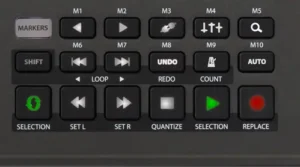 The Panorama CS12 occupies a narrower category than Nektar’s marketing sometimes suggests. It is not competing directly with high-end EuCon systems, large-format SSL environments or dedicated post-production control surfaces. At the same time, it also sits well above entry-level MIDI controllers designed primarily for transport control or plugin triggering.
Its real competition is much more specific:
- PreSonus FaderPort series
- SSL UF1
- Softube Console 1 ecosystem
- tablet-based DAW control setups
- highly optimized keyboard-driven workflows
That last category is increasingly important.
A growing number of experienced engineers no longer use hardware controllers at all. Modern DAWs already support extensive macro systems, custom shortcuts, scripting environments and highly efficient navigation structures. For many producers, keyboard speed now exceeds what smaller control surfaces can realistically improve.
That creates a difficult requirement for modern hardware: it has to provide measurable workflow acceleration, not just tactile novelty.
The Panorama CS12 makes its strongest case in environments centered around automation, routing and session navigation rather than traditional hands-on balancing.
Compact controllers also force a different kind of workflow adaptation. Engineers begin relying more heavily on muscle memory, repetitive navigation patterns and shorter hand movement distances because physical channel overview is limited compared to larger multi-fader surfaces. Over long sessions, that can either improve operational speed or create repetitive navigation fatigue depending on how routing-heavy the project becomes.
Its compact footprint is also a double-edged advantage. Smaller controllers integrate more easily into desktop production environments, but prolonged sessions can still involve excessive encoder switching and repeated navigation gestures that become physically repetitive over time.
Compared to the SSL UF1, the CS12 offers broader DAW-level interaction and deeper operational control across supported platforms. The SSL unit, however, still carries stronger integration credibility inside higher-end commercial studio environments where SSL branding and ecosystem consistency remain influential.
Against Softube Console 1, the distinction is even clearer. Console 1 is fundamentally built around channel-strip processing and plugin-centric mixing. The CS12 is far more DAW-oriented. Its focus is operational control of the session itself rather than tactile interaction with processing chains.
The comparison with PreSonus FaderPort hardware is probably the most relevant commercially. Before the ControlCore update, the Panorama CS12 suffered from ecosystem limitations that made it difficult to justify against more established DAW-specific alternatives. Expanded support for Reaper and Studio One changes that equation substantially.
Even so, the CS12 still depends heavily on user behavior.
Engineers who spend most of their time editing plugins manually or working inside highly visual mouse-driven workflows may not gain enough efficiency to justify permanent desk space. The hardware becomes more valuable as sessions become more automation-heavy, routing-dense and navigation-intensive.
That is ultimately where the Panorama CS12 now fits: not as a universal production controller, but as a workflow-focused surface for engineers who want less interaction with the DAW interface itself.
The More Important Shift Is Strategic, Not Technical
The biggest takeaway from the ControlCore 1.2 update is not Reaper support, Studio One macros or expanded routing control individually. The more important change is what this says about the controller market itself.
Nektar are moving away from ecosystem dependency and toward workflow portability.
That shift matters because the DAW market is no longer concentrated around a few dominant production environments. Modern audio production is increasingly fragmented across highly specialized workflows:
- Logic Pro remains dominant among Mac-based writers and producers
- Reaper continues expanding among engineers, editors and advanced users
- Studio One holds a strong position in hybrid production and mixing workflows
- Cubase and Nuendo still maintain deep roots in composition and post-production
In that environment, hardware tied too tightly to a single DAW becomes commercially vulnerable very quickly.
That was the original problem with the Panorama CS12. The hardware itself was capable, but its Logic-centric positioning limited its relevance outside a relatively narrow production segment. Engineers investing in long-term studio infrastructure are increasingly cautious about ecosystem lock-in, particularly when production workflows now move fluidly between multiple DAWs depending on the project.
By expanding ControlCore aggressively across major platforms, Nektar are repositioning the CS12 from a DAW-specific controller into something closer to a workflow-management surface.
That distinction is important because workflow continuity has become more valuable than strict platform loyalty. Many engineers now compose in one DAW, edit in another and mix or master somewhere else entirely. Controllers that only function effectively inside a single ecosystem become harder to justify financially over time.
The long-term success of this strategy will depend less on hardware quality and more on software maintenance discipline. Controller ecosystems fail quickly when integration updates lag behind DAW revisions, operating system changes or evolving plugin standards.
For now, though, the Panorama CS12 finally feels positioned as a legitimate cross-platform production tool instead of a niche controller designed primarily around Logic Pro users.
Verdict
The ControlCore 1.2 update fixes the Panorama CS12’s biggest weakness: ecosystem limitation.
At launch, the hardware felt narrowly tied to Logic Pro workflows. With Reaper, Studio One and expanded Cubase/Nuendo support now in place, the CS12 makes far more sense as a long-term production tool rather than a DAW-specific accessory.
The Reaper implementation is the strongest part of the update because it addresses actual operational friction instead of surface-level feature parity. Routing management, send control and faster navigation solve real problems inside modern mix sessions where session complexity often slows engineers down more than processing power does.
Studio One support is also more intelligently executed than generic MIDI integration typically found on mid-tier controllers. The macro-focused workflow gives the hardware practical value during automation, bus processing and transition-heavy production work instead of reducing it to transport control.
At the same time, the Panorama CS12 still operates inside the limitations of the single-fader category.
It does not replace multi-channel tactile mixing systems. It does not fundamentally improve deep plugin editing workflows. And for engineers already operating at high speed with keyboard-driven setups, the productivity gains may not justify adding another permanent device to the desk.
And like most compact control surfaces, the CS12 still struggles whenever workflows become heavily dependent on rapid plugin-page navigation rather than DAW-level session management.
Where the CS12 works best is in routing-heavy, automation-dense environments where engineers constantly move between navigation, balancing and session management tasks. In those workflows, reducing interruption matters more than adding another screen or another bank of generic controls.
The Panorama CS12 does not redefine DAW controllers. What the latest update does accomplish is more important commercially: it finally makes the hardware feel relevant outside a single ecosystem.
About the Author
 Yurii Ariefiev is a mixing and mastering engineer specializing in modern hybrid production workflows, streaming-focused mastering and complex DAW-based session environments. His work focuses on mix translation, routing efficiency, automation-heavy production and practical engineering decisions used in real-world music production rather than marketing-driven audio trends.
FAQ
Is the Nektar Panorama CS12 suitable for professional mixing workflows?
Yes, particularly in automation-heavy and routing-intensive sessions. Its strongest advantage is reducing navigation friction inside complex DAW environments. Engineers mixing large orchestral or high-track-count sessions may still prefer multi-fader systems for faster comparative balancing.
How does the Panorama CS12 compare to the PreSonus FaderPort?
The FaderPort remains more tightly integrated inside the PreSonus ecosystem, especially for Studio One-centric users. The Panorama CS12 becomes more flexible once multiple DAWs enter the workflow, particularly with Reaper, Cubase and Logic support now expanded through ControlCore 1.2.
Does the Panorama CS12 work well with third-party plugins?
For basic parameter control, yes. For deep plugin editing, limitations still exist. Third-party plugin ecosystems remain inconsistent in parameter structure, paging and macro behavior, which affects nearly all modern control surfaces.
Can the Panorama CS12 improve mastering workflows?
In stereo mastering environments, the impact is moderate. In stem mastering, album sequencing or routing-heavy mastering chains, the controller becomes more useful for navigation, automation passes and rapid send management.
Does the Panorama CS12 reduce CPU load or improve DAW performance?
No. The hardware does not affect DSP performance, plugin efficiency or rendering speed. The benefit is operational: fewer interruptions, faster navigation and reduced dependency on screen interaction during production.
Why is Reaper integration important for professional engineers?
Reaper users often build highly customized routing and automation environments. Efficient hardware integration matters because large Reaper sessions can become navigation-heavy very quickly. The CS12’s send management and routing control directly target that problem.
Is a single-fader controller enough for serious mixing work?
For editing, automation and session management, often yes. For large-scale balancing across dozens of channels simultaneously, no. Single-fader controllers prioritize navigation efficiency over full tactile mixing.
Does the Panorama CS12 support hybrid analog and digital workflows?
Yes. Its routing-focused design works well in hybrid environments involving stem printing, external hardware inserts, parallel buses and multiple monitoring paths.
Which DAWs currently support the Panorama CS12?
ControlCore 1.2 currently supports Logic Pro, Cubase, Nuendo, Reaper, Studio One 6–7 and Fender Studio on macOS and Windows systems.
Is the Panorama CS12 overpriced compared to other DAW controllers?
That depends entirely on workflow dependence. Engineers heavily reliant on automation, routing and macro-driven production may see clear efficiency gains. Users already operating quickly through keyboard shortcuts alone may find less practical value.