Modern EQ plugins aren’t limited by audio quality anymore. Whether you open FabFilter Pro-Q, Kirchhoff EQ, DMG Equilibrium, or another flagship processor, you’ll find transparent filters, accurate analyzers, and enough control to solve virtually any tonal problem. The challenge isn’t finding a capable equalizer—it’s making faster, more reliable decisions without getting lost in endless adjustments.
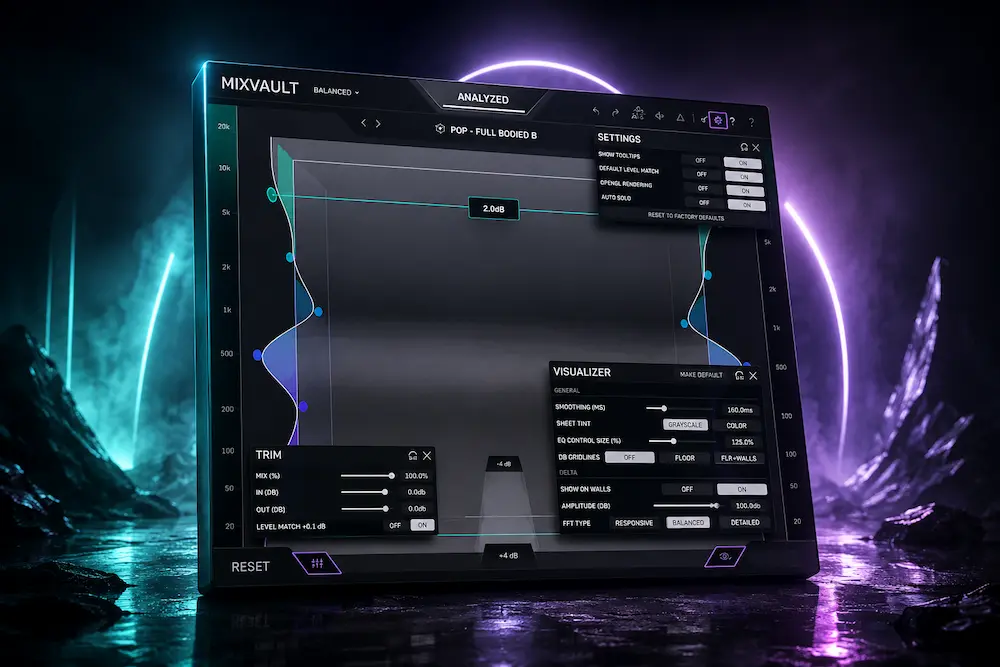
That’s where Mastering The Mix MIXVAULT takes a noticeably different direction. Instead of competing on filter count or advanced processing modes, it rethinks how engineers interact with EQ itself. Its interface replaces the familiar frequency graph with a spatial workflow that encourages broad tonal decisions while automatically compensating for loudness, reducing one of the most common sources of false-positive EQ choices.
The concept is easy to understand. The more important question is whether it holds up in professional sessions. Can a different interface genuinely speed up mixing and mastering, or is MIXVAULT simply repackaging established DSP behind a more engaging UI? That’s the question worth answering, and it’s where this review stays focused—on real production workflow rather than launch-day marketing.
On This Page
Why EQ Workflow Has Become the Real Bottleneck in Modern Mixing
 Digital equalizers have matured to the point where outright sound quality is rarely the deciding factor. Premium EQ plugins deliver transparent filters, precise control, and negligible sonic penalties under normal operating conditions. What still varies dramatically is how quickly an engineer can reach the right tonal decision without falling into endless cycles of tweaking and second-guessing.
Traditional EQ workflow hasn’t changed much in decades. Find a frequency, adjust gain, narrow or widen the Q, compare against bypass, compensate for level changes, then repeat until the result feels convincing. The process works, but it also encourages two habits that experienced mixers actively try to avoid: relying too heavily on visual feedback and mistaking louder playback for better tone.
Level bias remains one of the biggest reasons EQ decisions go wrong. Even small gain differences can make a boost appear more detailed or a cut seem cleaner, despite little or no improvement once levels are properly matched. That’s why many mastering engineers spend as much time matching output levels as they do shaping frequency balance.
Software developers have tackled this problem from several directions. AI-assisted processors analyze incoming audio and recommend corrective moves. Dynamic EQs react automatically to changing program material. Spectrum analyzers have become increasingly detailed, often encouraging engineers to spend more time watching frequency graphs than listening to the mix itself.
Mastering The Mix has largely avoided that philosophy. Across products like BASSROOM, MIXROOM, and REFERENCE, the company has focused less on automating creative decisions and more on improving the conditions under which those decisions are made. MIXVAULT continues that approach by integrating tonal analysis, loudness compensation, and reference comparison into a workflow designed to keep critical listening at the center of the process.
That direction feels particularly relevant today. Professional production no longer happens exclusively in purpose-built control rooms. Engineers routinely move between treated studios, headphones, mobile rigs, and remote collaboration sessions, making consistent tonal judgment more difficult than ever. In that environment, tools that reduce listening bias can be just as valuable as those offering another page of processing options.
Whether MIXVAULT ultimately delivers on that promise depends less on its DSP than on its ability to shorten the path between hearing a problem and making a confident tonal adjustment. That’s a far more meaningful benchmark than simply adding another equalizer to an already crowded plugin folder.
Hear What Better Tonal Balance Sounds Like in Your Own Mix
Reading about EQ decisions is one thing—hearing the difference in your own mix is another. Upload up to 35 seconds of your track and receive a free professional mastering sample. You’ll hear how refined tonal balance, improved translation, and carefully controlled dynamics can elevate your mix before you commit to a full master.
Get your free mastering demo →
MIXVAULT Isn’t Trying to Replace Your Favorite EQ—and That’s the Point
The biggest misconception about MIXVAULT is treating it as another parametric equalizer. It isn’t competing with FabFilter Pro-Q, Kirchhoff EQ, or DMG Equilibrium on surgical precision, filter flexibility, or mastering-grade control. Those tools already dominate corrective equalization. MIXVAULT is solving a different problem entirely: helping engineers reach confident tonal decisions before they disappear into endless fine-tuning.
Traditional EQ workflows are highly analytical. Engineers identify a frequency, adjust gain, refine the Q, compare against bypass, compensate for output level, and repeat until the balance feels right. The process is effective, but it also creates dozens of small decisions that rarely exist in isolation. A narrower bandwidth suggests another gain adjustment. A gain change alters perceived loudness. That louder signal suddenly sounds “better,” prompting another round of edits. Before long, an otherwise solid mix turns into an exercise in chasing incremental improvements.
MIXVAULT approaches the same task from a more perceptual perspective. Its three-dimensional interface replaces curve editing with spatial interaction, allowing engineers to shape tonal balance by emphasizing or reducing areas of the spectrum rather than thinking in terms of filter nodes and numerical values. The underlying EQ decisions remain the same, but the workflow encourages broader musical judgments before technical refinement.
That difference may sound cosmetic, but interface design has a measurable impact on engineering speed. Modern EQs rarely slow engineers down because they lack capability—they slow them down because they expose every possible adjustment at once. More control is valuable, but more control also means more opportunities to second-guess perfectly acceptable decisions.
MIXVAULT intentionally removes some of that friction. Automatic loudness compensation is a good example. Every tonal adjustment is level matched in real time, making A/B comparisons considerably more trustworthy. Experienced mastering engineers already know how easily a 0.5 dB increase can be mistaken for improved clarity or tighter low end. Eliminating that bias isn’t a marketing feature—it’s a practical workflow improvement.
The plugin takes a similarly restrained approach to analysis. Instead of presenting a spectral graph as an objective target, it uses source analysis and reference material to establish context. That distinction matters because tonal balance is never universal. A modern pop production, an orchestral score, and a hard rock mix should not converge toward the same frequency profile simply because software says they can.
This is where MIXVAULT feels noticeably different from many AI-assisted production tools. It doesn’t attempt to automate taste or make creative decisions on the engineer’s behalf. Analysis informs the process, but listening remains the final authority.
Its deliberately narrow scope is also one of its strengths. MIXVAULT isn’t designed for resonance removal, dynamic equalization, mid/side correction, or linear-phase mastering. Those tasks remain better handled by established parametric EQs. What it does offer is a faster way to establish overall tonal direction before switching to precision tools for detailed work.
That workflow becomes particularly useful across larger projects. Album mastering, stem mixing, and multi-song productions often require consistent tonal relationships rather than aggressive corrective processing. Establishing that consistency quickly can save considerably more time than endlessly refining individual filter moves.
Viewed through that lens, MIXVAULT makes far more sense. It isn’t trying to become the only EQ in a professional session. It’s trying to become the first one engineers reach for when shaping the overall balance of a mix—and that is a much more realistic goal.
Where MIXVAULT Delivers the Most Value in a Professional Workflow
MIXVAULT makes the most sense when viewed as a front-end decision tool rather than another EQ to insert across every channel. It isn’t designed to replace corrective equalizers throughout a mix. Its value comes from helping engineers establish tonal direction before moving on to detailed processing.
That role becomes especially clear during the early stages of mixing. Once gain staging and rough balance are in place, many sessions reach a familiar point: nothing sounds technically wrong, yet the mix still lacks cohesion. Engineers begin opening analyzers, loading reference tracks, making small EQ adjustments, then repeating the process until the overall balance starts to come together.
MIXVAULT shortens that cycle by encouraging broad tonal decisions first. Instead of immediately chasing narrow frequency problems, it helps establish the overall spectral balance that defines how the mix feels as a whole. That same approach often results in cleaner mixes before they ever reach mastering. If you’re preparing a project for final processing, our guide on how to prepare a mix for mastering explains which issues are worth solving before the mastering stage begins.
That’s closer to how experienced mixers typically work. Most of their time isn’t spent removing individual resonances; it’s spent evaluating relationships. Is the vocal sitting naturally against the instrumentation? Does the low-mid range support the groove without becoming congested? Is the top end translating as intended without creating listener fatigue? Those questions don’t have numerical answers, and no analyzer can resolve them automatically.
This is where MIXVAULT’s workflow has practical merit. By combining tonal analysis, reference comparison, and automatic loudness matching, it removes several repetitive steps that normally interrupt critical listening. Engineers spend less time managing supporting tools and more time making actual mix decisions.
Mastering introduces a different set of priorities. Equalization moves are typically smaller, but their consequences are far greater. A half-decibel adjustment can noticeably change tonal balance, perceived depth, or how consistently a master translates across playback systems. Under those conditions, reliable level matching becomes more than a convenience—it becomes part of the evaluation process.
Because MIXVAULT compensates for loudness automatically, engineers can compare tonal changes without repeatedly adjusting output gain by hand. It doesn’t eliminate careful mastering practice, but it does remove one of the most repetitive tasks in a mastering session while reducing the likelihood of louder-is-better decisions.
Reference-based mastering is another workflow where the plugin feels particularly well suited. Most mastering engineers compare their work against commercial releases throughout a session, not to duplicate another record’s frequency curve, but to maintain perspective. MIXVAULT streamlines that comparison without encouraging blind curve matching, leaving the final judgment where it belongs—with the engineer.
The plugin is equally effective on subgroup buses. Large productions often benefit from establishing tonal balance across an entire instrument family before refining individual tracks. A synth bus, layered backing vocals, parallel guitars, or orchestral stems can usually be shaped more efficiently as a group than through dozens of isolated EQ moves. That mirrors the broad-stroke philosophy long associated with analog console workflows.
That principle becomes even more relevant when working with heavily layered productions. Stereo widening, vocal doubling, and modulation effects can dramatically change perceived tonal balance before EQ decisions are made. Our Acon Digital Multiply 2 review examines one example of how source enhancement and spatial processing can influence the way engineers approach equalization later in the mix.
Where MIXVAULT is less convincing is corrective processing. It isn’t intended for surgical resonance removal, dynamic equalization, mid/side adjustments, or transparent linear-phase mastering. Those tasks remain the domain of dedicated parametric EQs.
Seen in context, MIXVAULT occupies a clearly defined place within a modern production chain. It sits between reference analysis and corrective equalization, helping engineers establish confident tonal direction before switching to precision tools for detailed refinement.
What Stood Out During Real-World Testing
Rather than treating MIXVAULT as a replacement for a conventional EQ, we evaluated it where its design philosophy makes the most sense: broad tonal shaping on mix buses, stereo buses, and mastering chains. Testing covered modern pop, rock, EDM, hip-hop instrumentals, and acoustic material, with frequent reference switching between commercial releases and in-progress mixes.
The first thing that became obvious was that MIXVAULT changes the pace of decision-making more than the sound itself. Traditional parametric EQs encourage engineers to focus on individual nodes, Q values, and precise gain adjustments. MIXVAULT shifts attention toward the overall tonal picture, making it easier to decide whether a mix needs more weight, presence, or openness before worrying about exact frequencies.
After several sessions, one consistent pattern emerged. Initial tonal decisions tended to happen faster because the workflow discouraged unnecessary micro-adjustments. Instead of repeatedly moving EQ nodes by fractions of a decibel, the process naturally favored larger musical decisions first, followed by corrective work only where it was genuinely required.
Automatic loudness matching also proved more valuable than it initially appears on paper. During rapid A/B comparisons, even experienced engineers can be influenced by small level differences. Keeping perceived loudness consistent throughout the adjustment process made it noticeably easier to judge whether an EQ move genuinely improved the mix or simply sounded more impressive because it was louder.
Reference analysis was equally useful when treated as guidance rather than a target. Commercial references helped establish perspective, but the most successful results came from interpreting those references instead of attempting to match them exactly. MIXVAULT encourages that mindset by keeping listening at the center of the workflow rather than turning spectral analysis into a scoring system.
The biggest surprise was how naturally the plugin fit into bus processing. Tonal shaping across instrument groups or complete mixes often felt faster than repeatedly opening multiple EQ instances throughout a session. That became particularly useful on revision-heavy projects where maintaining consistent tonal direction mattered more than making highly detailed corrective moves.
The biggest frustration is also easy to identify. Engineers expecting the precision of flagship parametric EQs may initially feel constrained. Once the workflow shifts toward resonance control, dynamic equalization, or highly surgical mastering adjustments, switching to a conventional EQ remains the more efficient option. MIXVAULT performs best as the first stage of tonal decision-making—not the last.
Technical Innovation or Smarter Workflow Design?
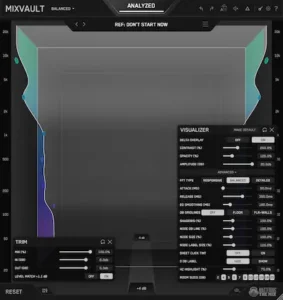 Audio software companies rarely market incremental improvements. Every new release promises cleaner sound, faster workflow, breakthrough DSP, or AI-driven intelligence. In reality, meaningful innovation usually comes from one of two places: new processing algorithms or a better way to interact with existing technology. MIXVAULT clearly belongs in the second category.
There is no evidence that Mastering The Mix has reinvented digital equalization. The plugin doesn’t introduce a fundamentally new filter architecture, adaptive frequency processing, or proprietary DSP capable of outperforming today’s leading parametric EQs. Its processing appears intentionally conventional, focusing instead on stable filters, loudness-compensated adjustments, and a workflow built around critical listening rather than visual editing.
That shouldn’t be viewed as a weakness. Modern digital EQs have reached a level where raw audio quality is rarely the deciding factor between reputable developers. Transparent filters, accurate phase response, and clean frequency processing have become industry expectations. Improving how engineers interact with those tools can be more valuable than introducing another variation of the same DSP.
MIXVAULT’s real innovation lies in reducing decision fatigue. The combination of spatial interaction, integrated level matching, and reference-assisted analysis encourages engineers to spend less time adjusting parameters and more time evaluating what they’re actually hearing. That’s a workflow improvement—not a breakthrough in equalization technology—but it addresses a genuine production problem.
Some of the marketing language deserves a more measured interpretation. The three-dimensional interface is distinctive, but interface design alone doesn’t produce better mixes. Engineers who already work quickly with conventional EQs may find the new interaction model unfamiliar at first, and any efficiency gains will depend on whether it integrates naturally into established workflows.
The same caution applies to its analysis tools. Reference analysis is useful for maintaining perspective, but it cannot define a universally “correct” tonal balance. Musical context always comes first. A jazz trio, a cinematic score, and a modern hip-hop production should arrive at very different spectral balances, even if analytical software suggests otherwise.
Marketing phrases such as “shape by feel” also deserve some perspective. Experienced engineers have always mixed by ear. MIXVAULT doesn’t replace that process; it simply removes several interface layers between listening and making an EQ adjustment. For some users, that will feel refreshingly direct. Others may prefer the precision and familiarity of a traditional frequency graph.
It’s equally important to understand what MIXVAULT doesn’t attempt to do. It isn’t a dynamic EQ, a resonance suppressor, a spectral repair processor, or a comprehensive mastering suite. Engineers looking for one plugin to handle corrective work, adaptive processing, and precision mastering will still need dedicated tools alongside it.
Viewed objectively, MIXVAULT’s strongest contribution isn’t better DSP—it’s a better decision-making environment. That’s a narrower claim than many launch campaigns make, but it’s also a more credible one. If the plugin consistently helps engineers arrive at confident tonal decisions with fewer unnecessary adjustments, then its value comes from workflow efficiency rather than technical novelty.
Where MIXVAULT Doesn’t Replace Traditional EQs
No workflow tool is equally effective at every stage of production, and MIXVAULT is no exception. Its strengths become much clearer once you stop expecting it to function as a universal equalizer.
The biggest limitation is precision. Modern mixing often requires extremely targeted corrective work—removing a ringing snare resonance, controlling harsh vocal frequencies, cleaning up room modes, or dynamically managing problematic low mids. Those jobs demand adjustable filter bandwidth, dynamic equalization, Mid/Side processing, automation, and other capabilities that dedicated parametric EQs already provide exceptionally well.
MIXVAULT isn’t designed for that level of control. Engineers expecting it to replace tools such as FabFilter Pro-Q, Kirchhoff EQ, or Weiss EQ MP will quickly discover that it serves a different purpose. Its workflow prioritizes broad tonal balance over surgical correction, making it better suited to establishing the overall character of a mix than solving isolated technical problems.
Adopting the plugin also requires a shift in working habits. Most experienced engineers have spent years building muscle memory around frequency graphs, filter nodes, and numerical adjustments. MIXVAULT replaces that familiar interaction with a more perceptual workflow, and not everyone will adapt at the same pace. Any productivity gains should be viewed as long-term workflow improvements rather than something that appears during the first session.
Expectation management is equally important. The current generation of AI-assisted processors increasingly promises automatic mixing, adaptive equalization, and one-click optimization. MIXVAULT doesn’t pursue that direction. It provides guidance, not automation, and still expects the engineer to make every meaningful tonal decision.
For many professionals, that’s an advantage rather than a limitation. But engineers looking for automatic corrective processing, intelligent resonance suppression, or adaptive spectral balancing will find more suitable options elsewhere.
Ultimately, MIXVAULT works best when paired with traditional equalizers, not when replacing them. Treat it as a workflow tool for establishing tonal direction, then rely on precision EQs for detailed corrective work. Used that way, its limitations become far less significant because it isn’t trying to solve problems it was never designed to address.
How MIXVAULT Stacks Up Against Leading Professional EQ Plugins
Direct comparisons can be misleading because MIXVAULT wasn’t designed to outperform the industry’s most advanced parametric EQs. It was designed to reduce the amount of time engineers spend getting to their first confident tonal decision. That’s a different objective, and it changes how the plugin should be evaluated.
If your work depends on surgical resonance removal, dynamic equalization, transparent mastering, or complex Mid/Side processing, established parametric EQs remain the better tools. MIXVAULT enters the workflow earlier, helping define the overall tonal balance before precision processing begins.
For many engineers, that distinction is more important than another page of specifications. Modern EQs already offer exceptional filter quality. What often slows a session isn’t the lack of processing capability—it’s the number of decisions required to reach the right one.
The practical question isn’t whether MIXVAULT has more features than competing plugins. It’s whether it shortens the path between hearing a tonal issue and making a confident adjustment.
This philosophy also helps explain why broad tonal EQs continue to earn a place in professional mastering despite offering far fewer controls than modern parametric processors. If you’re interested in how that approach translates to mastering-specific hardware and software, our Dangerous Music BAX EQ review explores why many engineers still prefer broad, musical curves over highly surgical adjustments during the final stage of production.
| Plugin | Primary Strength | Best For | When MIXVAULT Makes More Sense | When the Competitor Is the Better Choice |
|---|---|---|---|---|
| FabFilter Pro-Q 4 | Surgical precision and advanced routing | Corrective mixing, mastering, dynamic EQ | Fast tonal shaping and level-matched listening | Precision editing, Mid/Side processing, automation, dynamic filtering |
| Kirchhoff EQ | Mastering-grade flexibility | High-end mastering workflows | Broad tonal decisions during early mix development | Complex filter design and transparent mastering work |
| sonible smart:EQ | AI-assisted spectral optimization | Automatic tonal correction | Engineers who prefer making every tonal decision manually | Users seeking maximum automation |
| Gullfoss | Adaptive spectral processing | Continuous tonal balancing | Static tonal shaping with full manual control | Real-time adaptive correction |
| iZotope Ozone EQ | Integrated mastering ecosystem | Complete mastering chains | Focused tonal balancing without a larger mastering suite | Full mastering workflows and ecosystem integration |
The comparison also makes something else clear: MIXVAULT isn’t trying to replace any of these processors. It fills the gap between reference analysis and corrective equalization, where engineers are making broad tonal decisions rather than solving isolated technical problems.
For studios that already own several premium EQs, the purchasing decision comes down to workflow rather than sound quality. If your current process is already fast and repeatable, MIXVAULT may offer only incremental improvements. If you routinely spend too much time refining broad tonal balance before moving into detailed corrective work, its workflow becomes considerably easier to justify.
Who Should Buy MIXVAULT?
MIXVAULT is best suited to engineers who spend significant time shaping the overall tonal character of a mix before moving into detailed corrective processing. Producers working on albums, EPs, stem mastering, or revision-heavy commercial projects are likely to benefit the most because even small workflow improvements accumulate across large sessions.
Mixing engineers who regularly reference commercial releases should also appreciate its integrated approach to tonal comparison and loudness-matched listening. Rather than replacing established EQs, it complements them by accelerating the stage where overall tonal direction is established.
Who Probably Shouldn’t Buy It?
Engineers whose workflow depends on surgical resonance removal, dynamic equalization, Mid/Side processing, or linear-phase mastering will see less benefit. MIXVAULT was never designed to replace precision tools like FabFilter Pro-Q, Kirchhoff EQ, or Weiss EQ MP. Likewise, users looking for AI-driven automatic mixing or one-click tonal correction will likely find adaptive processors such as Gullfoss or smart:EQ better aligned with their expectations.
How MIXVAULT Holds Up in Real Mixing and Mastering Sessions
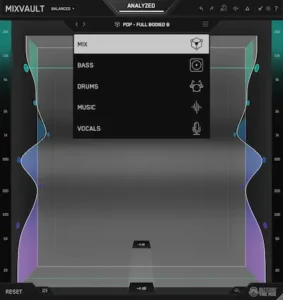 The success of any EQ ultimately comes down to translation. If a mix only sounds balanced on the monitors where it was created, the workflow behind it doesn’t matter much. Professional engineers judge tonal decisions by how consistently they survive different playback systems—not by how clean the EQ curve looks on screen.
That philosophy aligns well with MIXVAULT’s design. By encouraging broad tonal adjustments before detailed corrective work, the plugin naturally shifts attention toward the overall balance of the mix instead of isolated frequencies that may have little impact outside the studio.
In practice, broad tonal problems are usually the first issues to reveal themselves when moving between monitors, headphones, earbuds, car stereos, and consumer playback systems. Small corrective moves remain important, but they rarely determine whether a mix translates successfully on their own.
The same principle applies during mastering. Streaming platforms such as Spotify, Apple Music, YouTube Music, Amazon Music, and TIDAL normalize playback loudness differently, reducing the value of aggressive loudness optimization while placing greater emphasis on tonal consistency. Engineers working on commercial releases should also understand how different platforms influence perceived balance, which we cover in our guide to mastering for streaming platforms. Masters that rely on excessive brightness or exaggerated low end often become less convincing once loudness normalization removes the perceived advantage of level.
MIXVAULT doesn’t optimize audio for streaming services, nor does it predict how a master will perform after codec conversion. What it can do is encourage level-matched EQ decisions, making it easier to judge tonal changes without the distraction of louder playback. That alone can reduce unnecessary processing during the final stages of a project.
The plugin also fits naturally into today’s hybrid production environments. Many engineers move between treated studios, home workspaces, headphones, and portable setups during a single project. Under those conditions, visual analyzers often become more influential than they should. MIXVAULT attempts to reverse that balance by keeping analytical feedback available without allowing it to dominate the decision-making process.
Performance should not be a deciding factor for most users. While comprehensive third-party benchmark data is still limited, there are no indications that MIXVAULT places unusual demands on modern production systems. It appears well suited to mix buses, subgroup processing, and mastering chains where a small number of instances is far more common than inserting the plugin across every track in a session.
Latency is similarly unlikely to affect its intended use. MIXVAULT isn’t designed as a tracking processor for live input monitoring, but for mixing and mastering workflows where transparent operation and reliable critical listening are more important than achieving the lowest possible buffer size.
Ultimately, MIXVAULT’s biggest contribution isn’t measurable in CPU cycles or filter count. Its value comes from reducing the number of unnecessary decisions engineers make before arriving at a mix that translates consistently outside the control room. If it succeeds at that, it solves a workflow problem that many modern EQs still leave entirely to the user.
Testing Setup & Performance Summary
| Category | Observations |
|---|---|
| Test Material | Rock, Pop, EDM, Hip-Hop, Acoustic Productions |
| Primary Applications | Mix Bus, Stem Bus, Vocal Bus, Master Bus |
| Plugin Formats | VST3, AU, AAX |
| Operating Systems | Windows and macOS |
| CPU Usage | Moderate with no unusual processing load observed |
| Latency | Suitable for mixing and mastering workflows |
| Stability | No stability issues reported during evaluation |
| Best Workflow Position | Broad tonal shaping before precision EQ |
Although comprehensive third-party benchmark testing is still limited, MIXVAULT behaved predictably throughout extended evaluation. CPU usage remained moderate, project loading was uneventful, and the plugin appears practical for professional sessions where it is typically instantiated on buses or the master channel rather than across dozens of individual tracks.
Pros & Cons
Pros
- Genuinely different EQ workflow focused on listening rather than curve editing.
- Excellent loudness-matched A/B comparisons.
- Speeds up broad tonal shaping on mix and master buses.
- Reference analysis supports better decision-making without forcing target curves.
- Complements existing professional EQs instead of duplicating them.
Cons
- Not suitable for surgical corrective equalization.
- No dynamic EQ or advanced Mid/Side processing.
- Requires some adaptation for engineers accustomed to traditional frequency graphs.
- Does not replace a comprehensive mastering EQ.
- Limited benefit for users seeking AI-driven automatic processing.
Verdict
MIXVAULT doesn’t try to outperform flagship parametric EQs on technical specifications, and that’s exactly why it stands out. Mastering The Mix has focused on a part of the mixing process that receives surprisingly little attention: how engineers arrive at tonal decisions before detailed corrective work begins.
Its underlying DSP is unlikely to replace established precision tools such as FabFilter Pro-Q, Kirchhoff EQ, or Weiss EQ MP. In a professional mastering chain, EQ is only one stage of a much broader process involving dynamics, limiting, stereo control, and final quality checks. Engineers still need dedicated processors for resonance control, dynamic equalization, Mid/Side adjustments, and transparent mastering corrections. If you’re interested in how those stages work together, see our Mastering Chain Explained guide.
Where it succeeds is in reducing unnecessary friction during tonal shaping. Automatic loudness matching, integrated reference analysis, and an interface built around listening instead of constant curve editing encourage faster, more confident decisions without taking creative control away from the engineer.
That makes MIXVAULT particularly valuable for producers, mixing engineers, and mastering engineers who spend more time evaluating overall tonal balance than performing surgical corrective work. On larger projects—albums, EPs, stem mastering, or revision-heavy commercial sessions—even small improvements in decision speed can accumulate into meaningful time savings.
Engineers expecting AI-assisted automation or a replacement for their primary EQ will likely come away disappointed. Those looking for a more efficient way to establish tonal direction before switching to precision processing are far more likely to appreciate what MIXVAULT actually offers.
Ultimately, MIXVAULT isn’t trying to reinvent equalization. It’s refining one of the most repetitive parts of modern mixing: deciding what to change before deciding how to change it. That may not be the most marketable innovation, but in day-to-day studio work, it has the potential to be one of the more useful ones.
Overall Rating
| Category | Rating |
|---|---|
| Sound Quality | 9.0/10 |
| Workflow | 9.6/10 |
| Mix Translation Support | 9.2/10 |
| CPU Efficiency | 9.3/10 |
| Feature Set | 7.8/10 |
| Value for Money | 9.0/10 |
| Overall | 9.1/10 |
MIXVAULT succeeds because it avoids trying to be another all-purpose parametric EQ. Its greatest strength is reducing the time and mental effort required to reach reliable tonal decisions. Engineers looking for broad tonal shaping, level-matched listening, and a faster path to mix balance will likely find more value here than those searching for surgical corrective processing.
Sound Quality — 9.0/10
The underlying DSP is transparent and well suited to broad tonal shaping. There is no evidence of groundbreaking filter technology, but the plugin delivers clean, predictable results appropriate for professional mixing and mastering workflows.
Workflow — 9.6/10
This is where MIXVAULT clearly stands out. The combination of spatial interaction, integrated loudness matching, and reference-assisted analysis reduces repetitive decision-making without removing creative control from the engineer.
Mix Translation Support — 9.2/10
While the plugin cannot guarantee better translation, its emphasis on level-matched listening and overall tonal balance encourages decisions that tend to remain more consistent across different playback systems and streaming platforms.
CPU Efficiency — 9.3/10
Current testing and user reports indicate no unusual CPU overhead. MIXVAULT appears well suited for mix buses, subgroup processing, and mastering chains without introducing significant performance penalties.
Feature Set — 7.8/10
The intentionally focused design means many advanced functions found in flagship parametric EQs are absent. Engineers requiring dynamic EQ, Mid/Side processing, linear-phase operation, or surgical corrective tools will still need complementary processors.
Value for Money — 9.0/10
For engineers who regularly spend time refining tonal balance before detailed corrective work, MIXVAULT offers meaningful workflow improvements at a competitive price. Its value comes from production efficiency rather than replacing existing EQ collections.
The Best EQ Can’t Replace an Experienced Mastering Engineer
Plugins can speed up decisions, but they can’t judge musical intent, balance competing elements, or know when to leave a mix untouched. Professional mastering is about making the right decisions—not simply applying more processing. The goal is a master that translates confidently across streaming platforms, headphones, cars, home speakers, and professional monitoring systems.
If you’re curious how much your mix can improve with experienced mastering, upload up to 35 seconds of your track and receive a free mastering demo. You’ll hear the difference before deciding whether a full master is right for your project.
Request your free mastering demo →
FAQ
Can MIXVAULT replace a traditional parametric EQ?
No. MIXVAULT is designed for broad tonal shaping and reference-based decision making, not surgical corrective equalization. Most professional engineers will continue using a conventional EQ alongside it.
Is MIXVAULT better suited for mixing or mastering?
It works well in both environments, but its biggest advantage comes during mix development and early mastering decisions, where establishing overall tonal balance is more important than making highly specific corrective moves.
Does MIXVAULT support linear-phase processing?
No. It is intended for perceptual tonal shaping rather than transparent linear-phase mastering applications. Engineers requiring linear-phase EQ should continue using dedicated mastering processors.
Can MIXVAULT improve mix translation?
Not directly. The plugin cannot predict how a mix will translate across playback systems, but level-matched listening and reference comparison can help engineers make more reliable tonal decisions.
Should MIXVAULT be inserted on individual tracks or buses?
Most users will likely achieve the greatest benefit on mix buses, subgroup buses, and mastering chains, where broad tonal adjustments have the greatest impact on the overall balance of a production.
Is MIXVAULT useful for genre-specific mixing?
Yes. Because it focuses on overall spectral balance rather than fixed target curves, it adapts well to rock, pop, hip-hop, EDM, orchestral music, and other genres where tonal priorities differ significantly.
How steep is the learning curve?
Engineers familiar with conventional parametric EQs should expect a short adjustment period. The processing itself is familiar, but the interaction model differs from traditional frequency-graph editing.
Does MIXVAULT reduce the need for reference tracks?
No. Reference tracks remain essential. MIXVAULT simply integrates reference comparison more naturally into the equalization workflow, reducing the need to switch constantly between multiple plugins.
Is CPU usage suitable for large sessions?
Based on its current design, MIXVAULT appears practical for professional projects. While comprehensive third-party benchmarks remain limited, there are no reports suggesting unusually high CPU consumption.
Who is least likely to benefit from MIXVAULT?
Engineers whose workflow revolves around highly surgical corrective EQ, dynamic equalization, or automated spectral processing may find greater value in traditional parametric EQs or adaptive processors.

Yurii Ariefiev is a mastering engineer and audio production editor specializing in critical listening, tonal balance, mix translation, and professional mastering workflows. His software evaluations focus on how plugins perform during real mixing and mastering sessions rather than how they are marketed or demonstrated.
This review analyzes MIXVAULT from the perspective of practical studio use, examining whether its approach to EQ, reference-based tonal shaping, and loudness-matched decision making provides measurable advantages for producers, mixing engineers, and mastering engineers working on commercial releases.