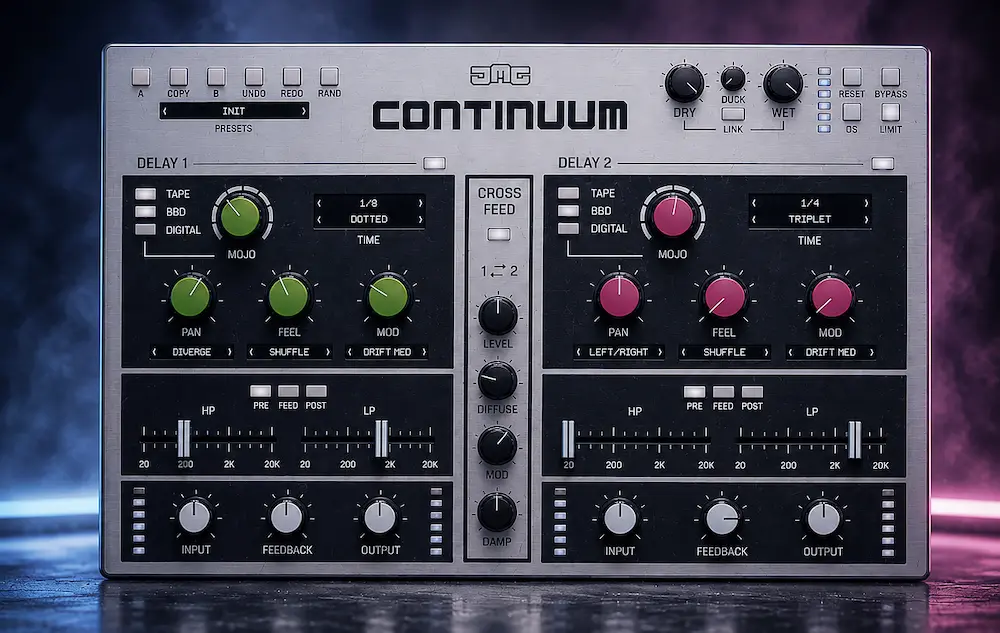
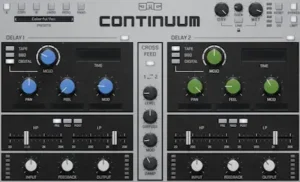
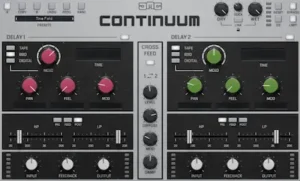
Most delay plugins give you variations on the same basic workflow: set the time, shape the feedback, filter the repeats, and place them in the stereo field. United Plugins Continuum takes a more involved approach, pairing two independent delay engines with reciprocal cross-feed, diffusion, spatial movement, rhythmic timing controls, and modulation.
That architecture is the reason to look beyond the feature list. Continuum is designed to let one delay engine become part of the other engine’s feedback path, so repeats can change in character, position, and density as they build. The result can move from clearly defined echoes to wider, more diffuse textures without assembling the entire effect from separate delay, modulation, stereo, and reverb processors.
It is not a new class of delay DSP, and the individual techniques are hardly unprecedented. What matters here is whether the two-engine feedback system produces a result that is more useful in practice than building the same effect from a conventional delay chain.
United Plugins Continuum Review: The Short Verdict
United Plugins Continuum is a specialist creative delay built around two independent delay engines and reciprocal cross-feed. Its main advantage is not that it introduces fundamentally new delay DSP, but that it combines delay character, feedback interaction, diffusion, stereo movement, rhythmic variation, and modulation in one workflow.
In practical mixing work, Continuum is strongest on vocals, synths, guitars, electronic production, and creative effects buses where the delay needs to evolve instead of repeating the same pattern. It is less compelling as a basic utility delay and is not designed to replace dedicated mastering processors.
Our rating: 8.9/10. The strongest parts are the workflow, creative control, and dual-engine signal flow. The main limitations are unnecessary complexity for simple delay tasks, potentially unstable stereo behavior in some modes, and the lack of independent CPU and latency benchmarks at launch.
United Plugins Continuum at a Glance
| Specification | Details |
|---|---|
| Plugin Type | Creative dual-engine delay |
| Developer | JMG Sound |
| Manufacturer | United Plugins |
| Delay Engines | 2 independent engines |
| Delay Characters | Tape, BBD, Digital |
| Cross-Feed | Yes, reciprocal Delay 1 ↔ Delay 2 routing |
| Diffusion | All-pass diffusion inside the feedback path |
| Spatial Modes | 12 |
| Modulation | Sine, Drift, Random |
| Filter Routing | PRE, FEED, POST |
| Plugin Formats | VST, VST3, AU, AAX |
| Platforms | Windows and macOS |
| Launch Price | Approximately €15 / $15 until September 30, 2026 |
| Regular Price | €79 |
In this review
The Dual-Engine Feedback Architecture Is What Sets Continuum Apart
 The delay market is already crowded with tape emulations, BBD models, multi-tap designs, stereo delays, and delay/reverb hybrids. Another set of delay flavors would not be enough to make Continuum particularly interesting. Its stronger argument is the way the two engines are connected.
Each engine can run its own delay settings and processing character, but the signal can also be fed from one engine into the other. That changes the behavior of the feedback loop. Instead of sending each repeat back through essentially the same processing path, successive echoes can pass through a different delay environment before returning to the loop. The repeats can therefore change in timing, tone, stereo position, and density as the feedback builds.
Continuum adds all-pass diffusion to that cross-feed network. Rather than applying a conventional reverb after the delay, the diffusion progressively smears the individual echoes inside the feedback path. At lower settings, the repeats remain clearly audible; pushed further, the distinction between individual taps starts to disappear and the effect develops a more continuous, reverb-like tail.
That is the useful part of the design. The plugin is not replacing a dedicated reverb algorithm. It is turning the delay feedback itself into a more complex sound-generating process.
Why Two Different Delay Characters Matter in the Feedback Loop
Continuum gives each engine a choice of Tape, BBD, or Digital behavior, with the MOJO control pushing the selected character further. Tape adds saturation and pitch variation, BBD moves toward darker, degraded repeats, while the Digital mode can produce deliberately reduced-resolution textures.
None of those concepts is new on its own. The useful part is being able to give the two engines different sonic identities and let those identities interact as the feedback develops.
For example, one engine can keep the initial repeat relatively defined while the second adds darker filtering, modulation, or degradation. With successive feedback passes, the sound is no longer simply repeating the original delay character. Each return can acquire more of the second engine’s coloration before being sent back through the network.
That makes the choice of delay model more consequential than it would be in a conventional stereo delay. You are not simply choosing the sound of the repeats; you are choosing how the feedback path will evolve as the effect builds.
Where Continuum Saves Time in a Real Mixing Session
Continuum’s strongest practical advantage is not that it can perform processing unavailable anywhere else. A skilled engineer can recreate most of its individual functions with separate plugins and routing. The advantage is how quickly those functions can be combined and adjusted without building a dedicated effects chain.
Take a vocal throw. A typical setup might use a delay send followed by filtering, modulation, stereo movement, and a reverb. That works, but every additional processor adds another set of parameters to manage and another point where the effect can become difficult to automate. Continuum can keep those relationships inside one delay environment, which makes it faster to move from a conventional repeat to something much more animated.
The difference becomes more obvious when the effect has to evolve across the feedback cycle. A standard ping-pong delay is straightforward. Making the repeats progressively wider, shifting their position, altering their timing, and gradually reducing their definition normally requires additional routing or automation. Continuum exposes those behaviors directly through its spatial and rhythmic controls. This kind of workflow efficiency matters even more when several frequency and dynamics problems have to be handled alongside creative effects; our Parish Audio Parametric Compressor review looks at a different approach to keeping targeted processing inside a single flexible plugin.
The 12 spatial modes cover approaches including Mid/Side positioning, Haas offsets, orbiting movement, convergence and divergence, and several ping-pong behaviors. Its Feel controls add timing and level variations such as Shuffle, Odd/Even accents, Groove, and Early/Late shifts.
None of this represents a new class of DSP. The workflow benefit is that these relationships are immediately available inside the same effect, so an engineer can audition complex delay behavior without turning a simple vocal or instrument send into a small effects project.
Hear What Your Mix Still Leaves on the Table
Creative delay can add width, movement, and depth, but the finished mix still has to translate as a complete record. If you’re unsure whether your track is already balanced or still needs more clarity, punch, depth, or control, upload up to 35 seconds of your mix and hear a free mastering demo before committing to a full project.
Request your free mastering demo →
Where Continuum Earns a Place in a Production Session
Continuum makes the most sense when the delay is part of the arrangement rather than just a way to add depth. Its combination of feedback, diffusion, stereo movement, and timing variation is particularly useful on sources where the effect needs to evolve after the initial repeat.
Vocals are an obvious application. A vocal throw can start with a clearly defined repeat and then become wider, more modulated, and less discrete as the feedback develops. That works well for ad-libs, phrase endings, transitions, and isolated words that need to leave the mix without creating the long, static tail of a conventional reverb.
Synths and electronic production benefit from the same behavior. A short synth stab can generate rhythmic repeats that move through the stereo field, while sustained material can be pushed toward a more diffuse and unstable texture. Because the timing and spatial behavior are handled inside the effect, the movement can remain tied to the delay rather than relying on separate automation lanes.
Guitars are another useful target. One engine can retain a recognizable slap or tempo-synced repeat while the other adds darker coloration and movement. This is useful when a conventional delay feels too clean but a reverb obscures the attack and rhythmic definition of the part.
Sound design is where Continuum becomes most flexible. High feedback, diffusion, modulation, and contrasting delay characters can push the processor well beyond conventional echo duties. The RAND function is useful in this context because it can generate starting points for exploration, although the resulting settings still need to be judged against the source and arrangement.
For most of these applications, Continuum makes more sense on an effects send or dedicated creative bus than as a default insert. That keeps the dry signal stable while giving the engineer independent control over how much of the evolving delay enters the mix.
Is United Plugins Continuum Good for Vocal Mixing?
Yes, but mainly when the vocal delay is intended to become part of the arrangement rather than simply provide a conventional echo. Continuum is particularly useful for vocal throws, ad-libs, phrase endings, transitions, and isolated words where the first repeat needs to remain intelligible before the later repeats spread out, darken, or dissolve into ambience.
An effects-send workflow is usually the best starting point. Keep the dry vocal unchanged, then use Continuum to shape the wet signal with cross-feed, filtering, diffusion and spatial movement. This makes it possible to create a delay that begins as a recognizable rhythmic repeat and gradually becomes part of the background without manually automating every stage of the effect.
The automatic ducking is also useful here because the delay can remain less intrusive while the singer is delivering the phrase and become more apparent between phrases. For dense pop, electronic and modern vocal production, that can be more useful than simply increasing the feedback of a conventional delay.
For a clean, predictable eighth-note or quarter-note vocal delay, however, Continuum is probably more processor than the job requires. A simpler delay will usually get there faster.
Tape, BBD and Digital: Useful Colors, Not the Core Innovation
Continuum’s Tape, BBD, and Digital modes give the two delay engines distinctly different starting points, but the models themselves are not what makes the plugin unusual. Tape-style saturation and pitch variation, BBD-style degradation, and deliberately lo-fi digital processing are all established approaches in delay design.
The more useful distinction is what happens when those characters are placed inside Continuum’s feedback network. Because the two engines can use different modes, the tonal character of the effect can change as successive repeats move through the system rather than remaining tied to a single delay model.
The MOJO control pushes the character of the selected model further. In practical terms, that makes it a useful sound-design control, particularly when the goal is to make later repeats more unstable, degraded, or pronounced. It should not, however, be treated as evidence of a particular level of hardware emulation.
United Plugins does not publish enough technical detail to independently assess whether these models reproduce the component-level behavior of specific historical delay units. The sensible way to judge them is therefore by their behavior in the mix: how much coloration they introduce, how the repeats change as feedback increases, and whether that character remains useful once the effect is placed against a dense arrangement.
The Filter Routing Is More Important Than It Looks
Continuum’s HP and LP filters are not simply output tone controls. Each delay engine can place its filters at different points in the signal path: PRE, FEED, or POST. That distinction matters because the same cutoff behaves very differently depending on whether it affects the incoming signal, the feedback loop, or only the final output.
With the filters in PRE, the incoming material is shaped before it enters the delay engine. This is useful when the source itself contains information that does not need to be repeated. Low frequencies can be reduced before they enter the feedback network, preventing the delay from accumulating unnecessary low-end energy.
The FEED position is more interesting in a mix because the tonal change accumulates with every repeat rather than affecting the delay output uniformly. In practice, this makes it possible to keep the first echo relatively present while letting the feedback tail move backwards in the mix without automating the filter. That creates a natural tonal decay without requiring automation of the filter itself and fits particularly well with vocal throws, guitars, and rhythmic effects that should move into the background as they repeat.
The POST position works more like a conventional output filter, allowing the final effect to be shaped after the delay processing. This is useful when the feedback character itself should remain intact but the finished wet signal needs to occupy less space in the mix.
For an engineer, the important point is that these are not three cosmetic filter locations. They change the behaviour of the feedback system. That makes the filter routing one of Continuum’s more practical features for controlling how an effect evolves over time.
How Cross-Feed Turns Delay Into an Evolving Ambience
The most useful consequence of Continuum’s cross-feed is that the effect does not have to remain identifiable as a series of repeats. As the signal circulates between the two engines, each pass can accumulate more coloration, timing variation, modulation, and diffusion.
That gives the engineer a useful middle ground between a conventional delay and a reverb. The initial repeats can retain enough definition to support the rhythm of the source, while later returns become softer and more diffuse. The effect therefore follows the musical timing of the delay instead of behaving like a separate wash placed behind it.
This is particularly effective when the ambience needs to retain some connection to the source. A vocal throw can remain rhythmically recognizable before dissolving into the background. A synth hit can retain its initial attack while generating a wider tail. A guitar repeat can become progressively less discrete without disappearing into a conventional reverb decay.
It is still not a replacement for a dedicated reverb. A purpose-built reverb provides much more control over room response, early reflections, decay behavior, density, and spectral shaping. Continuum’s strength is narrower: it creates an ambience whose character remains tied to the timing and feedback behavior of the delay itself.
What Is New in Continuum, and What Is Established DSP?
| Feature | What It Actually Represents | Why It Matters |
|---|---|---|
| Two independent delay engines | A meaningful multi-engine processing architecture | Allows different delay behaviors to interact within the same effect |
| Reciprocal cross-feed | A more complex feedback topology than a conventional stereo delay | Changes the tone, timing, and density of successive repeats |
| All-pass diffusion | Established DSP used inside the feedback network | Lets discrete echoes become progressively more diffuse |
| Tape / BBD / Digital models | Established delay-processing approaches | Provide different tonal behaviors for the two engines |
| 12 spatial modes | Established stereo and timing techniques packaged as dedicated modes | Reduces the routing and automation normally required to create movement |
| Shuffle / Groove / Early / Late | Timing and repeat-level manipulation | Adds controlled rhythmic variation without manual editing |
| Sine / Drift / Random modulation | Conventional modulation with different movement behaviors | Useful for creating pitch and timing instability in the feedback path |
| RAND function | Preset-generation and experimentation feature | Speeds up sound exploration but does not automate engineering decisions |
The distinction is therefore architectural rather than algorithmic. Continuum combines established delay, modulation, filtering and spatial techniques in a feedback topology where the two engines can continually reprocess each other’s output. That signal flow is the part that changes the workflow; the individual DSP building blocks are familiar.
Where Continuum Is Less Convincing
 Continuum’s flexibility comes with a trade-off: once several feedback, spatial, rhythmic, modulation, and diffusion controls are interacting, the result becomes less predictable. That is useful when the goal is to explore a sound, but it is not always an advantage in a mix that needs a repeatable effect with a specific job.
If the requirement is simply a clean eighth-note or quarter-note delay behind a vocal, Continuum is arguably more processor than the task requires. A conventional delay can get to the same musical result with fewer controls and less opportunity for the effect to drift away from the original intention.
The same limitation is more pronounced in mastering. Continuum is built to introduce movement, coloration, spatial variation, and evolving feedback. Those characteristics can be valuable in creative production, but they are poorly aligned with the usual mastering priorities of predictable tonal balance, controlled dynamics, stable imaging, and reliable translation. A mastering engineer looking for transparent depth or precise stereo control has more appropriate tools.
There is also an evidence gap around technical performance. At launch, there are no sufficiently detailed independent measurements establishing CPU consumption, plugin latency, aliasing, oversampling behavior, or phase response across different modes and settings. That does not indicate a problem with the DSP; it simply means those aspects cannot be rated responsibly from the currently available evidence.
For professional use, the practical approach is straightforward: judge Continuum by what it does to the signal in the context of a real mix, and do not confuse the number of controls with technical superiority.
United Plugins Continuum vs. EchoBoy, Valhalla Delay and Eventide UltraTap
Continuum overlaps with established delays such as EchoBoy, Valhalla Delay and UltraTap, but it is not trying to solve exactly the same problem. The useful distinction is how much of the delay’s feedback, timing and spatial behaviour you want to control inside one processor. Continuum is a specialist tool built around interaction between two delay engines, while EchoBoy, Valhalla Delay and UltraTap approach the delay category from different directions.
| Plugin | Where It Fits Best | Why Choose It | Why Choose Something Else |
|---|---|---|---|
| United Plugins Continuum | Evolving spatial delay, feedback textures, creative sound design | Two delay engines can interact through cross-feed, diffusion, and independent processing | More specialized than a conventional utility or general-purpose delay |
| Soundtoys EchoBoy | General-purpose delay and classic studio delay sounds | Broad range of established delay characters and a mature professional workflow | Less focused on Continuum’s two-engine spatial feedback concept |
| Valhalla Delay | Flexible creative delay, modulation, and feedback processing | Extensive delay behavior with a relatively direct workflow and strong value | Continuum offers a more dedicated dual-engine approach to spatial interaction |
| Eventide UltraTap | Multi-tap rhythms, layered repeats, and experimental delay effects | Strong control over multiple taps and rhythmic delay structures | Its workflow is built around multi-tap processing rather than Continuum’s reciprocal dual-delay feedback |
The useful comparison is not which plugin sounds “best.” These processors overlap in category but differ in the problems they are designed to solve.
EchoBoy is the safer choice when one delay needs to cover a wide range of conventional studio duties. Valhalla Delay is a strong option when flexibility, modulation, and creative feedback matter without requiring a complex routing concept. UltraTap makes more sense when the effect is built around multiple rhythmic taps and layered repeats.
Continuum earns its place when the interaction between two delay engines is itself part of the sound. If that cross-feed behavior is not something you expect to use, its additional architecture is less compelling and a simpler delay may be the better tool.
Is Continuum a Mixing Tool or a Mastering Tool?
Continuum is much more convincing as a mixing and production processor than as a mastering tool. Its strengths—feedback interaction, modulation, spatial movement, diffusion, and deliberate coloration—are useful when an engineer wants an effect to become part of the arrangement. They are less useful when the objective is controlled, repeatable processing across an entire stereo master.
In a mix, Continuum fits naturally on an auxiliary send or creative effects bus. A vocal throw can start with a defined rhythmic repeat and develop into a diffuse tail; a synth can acquire movement without a separate automation pass for every repeat; guitars and percussion can be pushed further back in the arrangement without relying entirely on conventional reverb.
That send-based approach also gives the engineer a useful level of control. The dry source remains intact while the amount of the evolving effect can be balanced against the arrangement. This is generally more practical than inserting a heavily modulated feedback processor directly on the source.
Mastering presents a different set of priorities. Processing on a finished stereo mix needs to remain predictable in level, tonal balance, stereo image, and translation across monitoring systems. That is particularly important when dynamics processing is used to control the final peak structure rather than to create an audible effect; our SSG Audio Loudness Pro review examines this problem from the perspective of adaptive clipping and limiting at the final stage of a mastering chain.
There are narrower exceptions. Creative stem mastering, alternate versions, intros, transitions, and effect-heavy releases can justify using a processor like Continuum late in the production chain. But it should be treated as a creative effect, not as a mastering utility or a substitute for dedicated mastering processors. If the effect is printed into the mix, the important question is whether the finished balance and stereo image remain stable before the file reaches the mastering stage; preparing a mix for mastering starts with that kind of stability, not with a target peak level.
Stereo Width, Mono Compatibility, and Streaming Translation
Continuum’s spatial processing is useful, but it is also where an engineer needs to pay attention to translation. Some of its stereo modes rely on inter-channel timing and movement, so an effect that sounds exceptionally wide in headphones can behave very differently when reproduced on speakers or summed toward mono.
Haas-based widening is the clearest example. The perceived width comes partly from timing differences between the channels rather than from a fundamentally wider source. When those channels are combined, some of that separation can collapse. The same applies to heavily modulated or rapidly moving stereo effects: the apparent size of the effect is not necessarily the same as the amount of stable, correlated information reaching both channels.
For a commercial mix, the useful test is not whether Continuum sounds impressive in solo. Check the effect at the level it will actually sit in the arrangement, then listen in mono and on a normal stereo monitoring system. If the delay loses most of its identity when summed, the width may be contributing less to the mix than it appears to during headphone playback. Stereo instability is one of the mix problems that can become more obvious during mastering, so it is better to catch it while the effect is still under control.
Streaming does not make Continuum inherently problematic. The bigger concern is what the processing does to the signal before encoding: dense modulation, excessive high-frequency energy, unstable stereo information, and long feedback tails can all become less convincing when the mix is reproduced through different playback systems and listening conditions. The answer is not to avoid wide delay effects, but to keep their contribution proportional to the musical role they are playing.
For mastering, this is another reason to avoid using Continuum as a corrective stereo processor. If a mix has unstable imaging or an effect that collapses badly in mono, it is usually better to address the source or stem before the final master rather than trying to repair the problem after the entire production has been summed.
CPU, Latency, and Session Efficiency
Independent CPU and latency measurements for Continuum are not yet available at a level that supports a meaningful benchmark. That makes it impossible to assign a reliable percentage or compare its processing load directly with specific competing delays.
For session management, the more useful question is how many separate processors Continuum can eliminate from a particular effects chain. A single instance can combine two delay paths, modulation, spatial movement, and diffusion that might otherwise require several plugins and additional routing. Even if that instance is more demanding than a basic delay, the overall session can still become easier to manage.
That trade-off matters most in larger projects. A few Continuum instances on vocal, synth, guitar, or effects buses are a sensible use of the plugin’s architecture. Running it across dozens of tracks that only need a straightforward tempo-synced repeat is harder to justify. In that situation, a lighter conventional delay does the same job with less processing overhead and less session complexity.
Latency should be evaluated in the same context. Until independent measurements are available, Continuum is better treated as a mix and sound-design processor than assumed to be suitable for latency-critical live work. For a studio session, the practical test is simple: check the plugin at the intended buffer size and project load before committing it to a large number of instances.
Who Will Get the Most Out of Continuum?
Continuum makes the most sense for producers and mixing engineers who use delay as an active part of the arrangement rather than as a background depth effect. If you regularly build vocal throws, moving synth effects, evolving guitar delays, or feedback-based textures, its dual-engine architecture can save enough routing and automation to justify keeping it in the toolkit.
Electronic producers and sound designers are particularly well matched to the plugin. The combination of rhythmic variation, modulation, spatial movement, and diffusion makes it useful for creating effects that change as they repeat rather than simply reproducing the same delay pattern.
Mixing engineers are likely to get the most practical value from using Continuum on auxiliary sends and creative effects buses. It is less compelling as a default delay for routine tasks, where a simpler processor can often reach the required result faster.
Mastering engineers have much less reason to buy it. Unless the workflow includes creative stem processing, alternate mixes, transitions, or intentionally effect-heavy mastering, Continuum does not address the core requirements of conventional mastering.
Beginners can certainly find useful sounds in it, particularly at the introductory price, but it is not a foundational delay that needs to be in every new producer’s first plugin collection. Its value increases with the engineer’s ability to control feedback, stereo information, and effects density deliberately.
The simplest buying rule is this: if you want a conventional delay, buy a conventional delay; if you want the delay itself to become an evolving sound-design system, Continuum is much easier to justify.
Is United Plugins Continuum Worth Buying?
 Price changes the argument considerably. United Plugins launched Continuum at an introductory price of approximately €15 / $15, with retailer pricing varying by store and region, through September 30, 2026. The regular price is €79.
At the introductory price, Continuum is an inexpensive specialist addition for producers who regularly use creative delay. The relevant question is not whether it offers enough features for the money; it clearly does. The better question is whether its particular feedback and spatial workflow is useful enough to earn a permanent place in the session.
At the regular €79 price, the decision requires more scrutiny. The delay market already contains mature processors that cover conventional delay, modulation, tape coloration, multi-tap effects, and creative feedback. Continuum does not need to beat all of them. It needs to offer something the engineer will actually use that is faster or more effective than building the same effect from existing tools.
For a producer who wants a reliable general-purpose delay, €79 buys access to several proven alternatives. For an engineer specifically interested in dual-engine feedback, spatial movement, and delay-to-ambience effects, Continuum’s architecture provides a clearer reason to spend the money.
How We Evaluated United Plugins Continuum
This review is based on hands-on use of Continuum in a mixing workflow, with the plugin tested as an effects send and creative bus rather than evaluated only from its feature list. The focus was on what happens when the two delay engines interact under feedback, how quickly the effect can be shaped into a usable mix element, and where its spatial processing stops being predictable enough for a production mix.
The main areas considered were delay character, feedback behaviour, cross-feed interaction, stereo movement, mono compatibility, rhythmic variation, diffusion, filter placement, wet/dry control, and workflow efficiency. Particular attention was given to whether the additional processing options produce a useful result faster than building a comparable chain from separate delay, modulation, stereo, filtering, and ambience processors.
Continuum was also evaluated according to where it makes sense in a professional production: vocal effects, synths, guitars, creative buses, sound-design applications, and late-stage processing. CPU and latency were not scored as measured performance characteristics because sufficiently detailed independent benchmark data was not available at launch.
The final rating therefore gives more weight to how quickly Continuum produces a usable result in a mix than to the number of controls or features it provides.
United Plugins Continuum: Pros and Cons
Pros
- Two independent delay engines with reciprocal cross-feed.
- Strong combination of delay, modulation, spatial movement, rhythm and diffusion in one workflow.
- 12 spatial modes provide more movement options than a conventional stereo delay.
- Tape, BBD and Digital characters can be combined rather than used in isolation.
- Filter routing inside the feedback path gives useful control over how repeats evolve.
- Very effective for vocal throws, synths, guitars and creative effects buses.
- Introductory pricing makes the plugin inexpensive for producers who need this type of effect.
Cons
- More complex than necessary for straightforward tempo-synced delay duties.
- Some spatial modes require careful mono and stereo-translation checking.
- The large number of interacting controls can make results less predictable.
- It is not a substitute for a conventional mastering delay or transparent mastering processor.
- Independent CPU, latency and deeper DSP measurements are not yet available.
United Plugins Continuum: Independent Rating
| Category | Rating |
|---|---|
| Sound Quality | 9/10 |
| Workflow | 9.5/10 |
| Creative Control | 9.2/10 |
| Mix Usability | 8.8/10 |
| Stereo Translation | 8/10 |
| Session Efficiency | 8.5/10 |
| Value for Money | 9/10 |
| Overall | 8.9/10 |
Sound Quality — 9/10. Continuum produces convincing delay textures across its Tape, BBD, and Digital modes, but its strongest sonic advantage comes from how those characters interact inside the dual-engine feedback path. The sound is more distinctive when the processing is allowed to evolve rather than being used as a conventional static delay.
Workflow — 9.5/10. This is the plugin’s strongest category. Cross-feed, diffusion, spatial movement, rhythmic variation, and modulation can be shaped inside one environment instead of being assembled through several processors and additional routing. That does not make the DSP fundamentally new, but it makes complex delay behavior considerably faster to build.
Creative Control — 9.2/10. The combination of two delay engines, different delay characters, spatial modes, Feel controls, modulation, diffusion, and RAND gives Continuum a broad creative range. The score is not higher because the same flexibility can make the result less predictable when several feedback and spatial parameters interact.
Mix Usability — 8.8/10. Continuum is highly effective on vocal throws, synths, guitars, effects buses, and other sources where the delay needs to evolve as part of the arrangement. It is less efficient for routine quarter-note or eighth-note delay duties, where a simpler processor can often reach the target faster.
Stereo Translation — 8/10. The spatial section is powerful, but Haas offsets, aggressive stereo movement, and other timing-based effects require deliberate monitoring in mono and on different playback systems. Continuum can create impressive width, but that width is not automatically stable or equally useful across listening conditions.
Session Efficiency — 8.5/10. A single instance can replace a chain involving delay, modulation, stereo processing, and diffusion, reducing routing and automation requirements. The score is deliberately below the workflow rating because independent CPU and latency measurements are not yet sufficient to claim that the plugin is computationally efficient in every session.
Value for Money — 9/10. At the introductory price, Continuum is easy to justify for producers and engineers who regularly use creative delay. The regular €79 price requires a more specific reason to buy: its value comes from the dual-engine feedback architecture and integrated spatial workflow, not from simply offering another collection of delay models.
In practice, the most noticeable change is not simply that the repeats become wider. With contrasting settings on the two engines, the first repeat can remain relatively recognizable while the later feedback returns progressively lose that identity. This makes the effect feel less like a delay with added modulation and more like a signal that is being reprocessed on every pass through the feedback network.
An 8.9/10 reflects Continuum’s position as a specialist creative delay rather than a universal studio utility. Its strongest contribution is the combination of two interacting delay engines with spatial, rhythmic, modulation, and diffusion processing in one workflow. It is an excellent tool when that architecture solves a real mixing problem, but unnecessary complexity when a conventional delay is all the production requires.
Final Verdict: A Strong Specialist Delay, Not a New Studio Standard
Continuum does not replace a general-purpose delay, and its individual processing techniques are not a breakthrough in DSP. Tape, BBD, digital degradation, modulation, stereo movement, and rhythmic delay are all established tools.
What gives the plugin a legitimate reason to exist is the way those tools are organized around two interacting delay engines. Cross-feed and diffusion allow the effect to change as the feedback develops, moving from defined rhythmic repeats toward wider, more diffuse textures without requiring a separate chain of delays, modulation, stereo processing, and reverb.
That makes Continuum a useful addition to a mixing and production toolkit, particularly for vocal effects, synths, guitars, electronic production, and sound design. It is much less compelling when the job is simply to provide a predictable utility delay.
At the introductory price, it offers enough specialized functionality to make the purchase easy to justify for the right user. At the regular price, the decision depends on whether the dual-engine feedback workflow solves a problem you actually encounter. Continuum is worth buying for its architecture, not simply because it is another delay plugin.
A Great Mix Still Has to Survive Outside the Studio
A creative mix can sound impressive in the studio and still lose impact when it reaches headphones, cars, small speakers, or streaming playback. Mastering is where those translation problems, tonal imbalances, stereo issues, and level decisions are evaluated as part of the finished record—not simply pushed louder.
If you want to know what your mix can realistically gain before committing to a full session, upload up to 35 seconds and receive a free mastering demo prepared by a real mastering engineer.
Hear your mix mastered →
United Plugins Continuum FAQ
Does United Plugins Continuum work in Pro Tools?
Yes. Continuum is available in AAX as well as VST, VST3, and AU formats, covering Pro Tools and the major modern DAW platforms on macOS and Windows.
Is Continuum better on an effects send or as an insert?
An effects send is usually the more flexible approach for mixing. It keeps the dry source stable while letting you control the amount of the evolving delay independently. Inserts make more sense when the effect is intended to become part of the source’s sound.
Will Continuum cause mono-compatibility problems?
It can, depending on the spatial mode and settings. Haas-based widening and aggressive stereo movement can lose some of their apparent width when summed toward mono, so important effects should be checked in both stereo and mono.
Can Continuum create a reverb-like sound?
Yes. Its diffusion and cross-feed can progressively smear discrete repeats into a dense tail. The result is better described as delay-derived ambience than as a replacement for a dedicated reverb.
Is Continuum useful for vocal mixing?
Yes. Vocal throws, ad-libs, phrase endings, and transitions are strong applications because the repeats can remain rhythmic at first and become more diffuse as the feedback develops.
Is United Plugins Continuum good for mastering?
Not for conventional mastering. Its strongest features are coloration, modulation, feedback, and spatial movement, while mastering usually demands predictable tonal and stereo behavior. Creative stem processing is a more appropriate late-stage use.
How much CPU does Continuum use?
There is not enough independent benchmark data to give a reliable CPU figure. Actual load should be checked in the intended DAW and project because usage will depend on the number of instances and the processing modes being used.
Can Continuum replace EchoBoy or Valhalla Delay?
Not as a general replacement. EchoBoy and Valhalla Delay remain strong choices for conventional and broadly configurable delay work. Continuum makes more sense when its dual-engine cross-feed and spatial feedback behavior is specifically useful.
What is United Plugins Continuum?
United Plugins Continuum is a dual-engine creative delay developed by JMG Sound. It combines two independent delay engines with cross-feed, diffusion, spatial processing, rhythmic variation and modulation.
Does Continuum have Tape, BBD and Digital delay modes?
Yes. Each of the two delay engines can use Tape, BBD or Digital behaviour, allowing different delay characters to interact within the same feedback system.
Does Continuum have a ducking function?
Yes. Its automatic ducking can reduce the prominence of the delay while the dry source is active, making the effect easier to place behind vocals and other foreground elements.
Can Continuum filter the feedback loop?
Yes. The HP and LP filters can be positioned PRE, FEED or POST, allowing the engineer to shape the incoming signal, the feedback evolution, or the final wet output.
Is Continuum better than EchoBoy?
Not universally. EchoBoy is the more broadly established choice for general-purpose delay duties, while Continuum is more compelling when two interacting delay engines, spatial movement and evolving feedback are central to the effect.
What DAWs support United Plugins Continuum?
Continuum is available in VST, VST3, AU and AAX formats for modern Windows and macOS DAWs. The exact format available depends on the host.
Is Continuum suitable for live use?
It may be, but live deployment should be tested at the actual buffer size, sample rate, DAW, and computer configuration. There is currently not enough independent latency and large-session benchmark data to recommend it blindly for critical live work.
Is United Plugins Continuum worth buying at the launch price?
For producers who regularly use creative delay, the introductory price makes it a low-risk specialist purchase. At the regular €79 price, it makes more sense to buy it specifically for the dual-engine feedback workflow rather than simply to add another delay to an existing collection.

Yurii Ariefiev is a mastering engineer and audio production editor who evaluates plugins from an engineering perspective, with particular attention to signal flow, dynamics, frequency balance, stereo behaviour, translation and workflow in real mixes rather than feature count alone.
For plugin reviews, the focus is practical: whether a processor solves a real production problem, how reliably it behaves when placed in a dense mix, where its limitations become audible, and whether its workflow justifies keeping it in a professional toolkit.
☕ Buy me a coffee