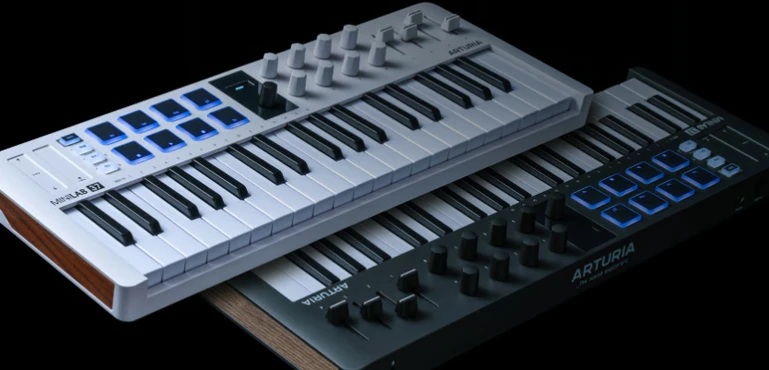
Arturia MiniLab 37 Review: Is 37 Keys the New Sweet Spot for Modern Music Production?
The Arturia MiniLab 37 enters a category that has become increasingly difficult to differentiate. Most compact MIDI controllers offer similar software bundles, similar DAW integration, and similar feature sets. The real question is no longer which controller has the most knobs or pads. It is whether the hardware removes friction from the production process.
That is where the MiniLab 37 becomes interesting. Rather than chasing additional features, Arturia expanded the keyboard itself. The jump from 25 to 37 keys may appear minor on a specification sheet, but it changes how producers interact with instruments, build arrangements, and develop ideas inside a DAW. The limitation of many compact controllers is not functionality. It is range.
For producers working with complex chord voicings, bass-and-melody interplay, orchestral libraries, or modern software instruments, 25 keys often feel like a compromise. Thirty-seven keys occupy a different space. Large enough to support serious production work, yet compact enough for desktop studios where every inch matters.
This review focuses on a more important question than whether the Arturia MiniLab 37 is a good MIDI controller. The real issue is whether the expanded layout delivers measurable workflow advantages that justify its place in modern audio production, mixing preparation, and long-term studio use.
Why MIDI Controllers Are Becoming Workflow Devices Instead of Performance Accessories
 The role of the MIDI controller has changed significantly over the past decade. As software instruments became more capable, producers began spending less time recording external hardware and more time working entirely inside DAWs. For many studios, the controller is no longer a secondary accessory sitting next to the keyboard. It is the primary point of interaction between the producer and the session.
That shift has changed what buyers prioritize. Features that once dominated marketing campaigns—extra pads, transport controls, or endless encoder counts—often matter less in daily use than basic workflow efficiency. The ability to sketch ideas quickly, navigate virtual instruments without interruption, and move naturally between writing, editing, and arranging has become a more important purchasing factor than feature density.
This explains the growing popularity of controllers that prioritize usable key range without requiring the footprint of a traditional keyboard. Products such as the Launchkey 37, KeyStep 37, MPK Mini Plus, and Komplete Kontrol A-series reflect the same market reality: many producers eventually reach the limitations of 25-key controllers, yet have little interest in dedicating desk space to a full-size keyboard.
The market increasingly rewards controllers that reduce workflow interruptions rather than simply adding more controls. Every octave switch, menu navigation step, or workflow detour slows the process of turning ideas into arrangements. Viewed through that lens, the Arturia MiniLab 37 is less about adding another octave and more about reducing the compromises that define most compact MIDI controllers.
Arturia MiniLab 37: What Actually Changed?
On paper, the MiniLab 37 looks like a simple expansion of the MiniLab formula. The most obvious change is the move from 25 to 37 keys, but the practical impact extends beyond an additional octave.
Compared to the MiniLab 3, the most meaningful change is not a new feature set but a different working experience. The software ecosystem, integration philosophy, and overall workflow remain familiar. What changes is the amount of keyboard range available before creative decisions become constrained by the hardware itself.
For existing MiniLab 3 owners, the upgrade decision is unusually straightforward. The software ecosystem remains largely unchanged, which means the value proposition depends almost entirely on whether the additional octave solves a recurring workflow limitation. Producers who rarely touch the octave buttons may notice little difference. Producers who constantly do will notice it immediately.
The larger format changes how the controller is used during real production work. With 25 keys, many tasks involve constant range management. Bass parts, chord voicings, lead melodies, and instrument auditions often require repeated octave switching, particularly when working with piano libraries, orchestral instruments, cinematic patches, or layered synthesizers. The process is manageable, but rarely efficient.
The extra key range reduces those interruptions. Musical ideas can be explored across a wider register without breaking concentration to reposition the keyboard range every few seconds. That may sound like a minor improvement until viewed across hundreds of production sessions, where small workflow inefficiencies accumulate into creative friction.
The physical redesign also gives the control surface more breathing room. Encoders, pads, and transport functions feel less compressed than on smaller controllers, making day-to-day operation more comfortable during longer sessions. This is not a dramatic redesign, but it is a practical one.
More importantly, Arturia appears to have identified the actual limitation of the original MiniLab concept. Software integration was never the problem. DAW control, plugin navigation, and ecosystem support were already competitive. The bottleneck was the keyboard itself. As projects became more complex, the restricted playing range increasingly felt like the component that producers outgrew first.
Viewed from a workflow perspective, the MiniLab 37 is not primarily an upgrade in features. It is an attempt to remove one of the most common compromises associated with compact MIDI controllers without abandoning the desktop-friendly footprint that made the MiniLab series successful in the first place.
Build Quality, Keybed and Daily Use
Workflow discussions often overshadow a simpler question: how does the controller actually feel during daily use? The MiniLab 37 retains the lightweight, compact philosophy of the MiniLab series, but the larger chassis creates a noticeably more comfortable working environment.
The keybed is designed for production rather than piano performance. Velocity response is sufficiently consistent for programming virtual instruments, sketching arrangements, and controlling synthesizers, though players accustomed to semi-weighted or fully weighted keyboards will immediately recognize the difference.
The pads, encoders, and transport controls feel purpose-built for software-centric workflows. The controller is clearly designed around DAW interaction rather than live performance, with quick access to transport functions, macro assignments, and software navigation. Users working in Ableton Live, FL Studio, Logic Pro, Cubase, or Studio One are likely to spend more time interacting with the session and less time reaching for a mouse.
Velocity response is configurable enough for most production scenarios, although advanced keyboard players may still prefer the deeper customization available on larger controllers. For programming synthesizers, sketching arrangements, and controlling virtual instruments, the implementation feels practical rather than limiting. For desktop producers working primarily inside a DAW, the balance between size, functionality, and accessibility remains one of the controller’s strongest attributes.
Arturia has clearly prioritized practicality over premium hardware aesthetics. The chassis remains lightweight and portable, while the encoders, pads, and transport controls feel sufficiently robust for daily studio use. The controller is not attempting to compete with premium semi-weighted keyboards, but it avoids the fragile feel that often affects entry-level desktop controllers.
Workflow Implications for Producers
Specifications help sell MIDI controllers. Workflow determines whether they remain part of a studio setup long after the initial purchase.
That distinction is particularly relevant in modern production environments, where producers move rapidly between writing, sound selection, editing, and arrangement. A controller that interrupts that process—even in small ways—can become surprisingly limiting over time.
For electronic music producers, the expanded key range creates more room for experimentation before ideas are committed to the arrangement. Bass movement, chord progressions, lead parts, and supporting melodies can be developed within a single playing range rather than across multiple octave shifts. The benefit is not speed alone. It is the ability to evaluate musical relationships without constantly managing the keyboard itself.
The advantage becomes more pronounced when working with instruments that naturally occupy a wider register. Piano libraries, orchestral patches, cinematic textures, and multi-layered synthesizers often expose the limitations of smaller controllers quickly. With 37 keys, producers spend less time adapting to the controller and more time evaluating the musical material.
For beatmakers, the value is less dramatic but still practical. Modern trap, hip-hop, and R&B production may not require large keyboard ranges, yet melodic development frequently extends beyond simple one-handed parts. Testing alternate voicings, building countermelodies, or exploring harmonic variations becomes more fluid when the available range is not constantly forcing compromises.
This ultimately defines the MiniLab 37’s position in the market. It does not attempt to compete with full-size studio keyboards, nor does it remain constrained by the limitations that affect many ultra-compact controllers. Instead, it targets a middle ground that aligns closely with how many producers actually work: laptop-based, software-centric, and increasingly dependent on efficient creative workflows.
The Relationship Between MIDI Controllers and Better Mixes
 A MIDI controller has no direct impact on mix quality. It cannot improve monitoring accuracy, solve frequency masking, fix balance issues, or replace good engineering decisions. Yet some of the most persistent mixing problems begin long before a mix engineer opens the session.
Arrangement density remains one of the most common examples. Producers often respond to weak musical ideas by adding layers rather than improving the underlying composition. Additional synths, doubled parts, competing melodies, and unnecessary textures may create the impression of complexity, but they frequently reduce clarity once the project reaches the mixing stage.
This is where workflow becomes relevant. When a controller restricts musical exploration, producers tend to compensate through editing, copying, transposing, and layering. Those workarounds may complete the arrangement, but they do not necessarily lead to stronger musical decisions. In many cases, they simply add more material that must later compete for space in the mix.
A controller with a more usable playing range encourages evaluation before commitment. Chord voicings can be tested more naturally. Bass movement can be developed against harmonic content in real time. Countermelodies can be explored without repeatedly interrupting the creative process to manage octave switching. The result is not a better mix by default, but often a stronger arrangement entering the mix stage.
Experienced mix engineers regularly encounter projects where the largest obstacles are structural rather than technical. Frequency conflicts, instrument masking, and stereo congestion are often symptoms of arrangement decisions made during production. As discussed in our Mixing vs Mastering guide, neither stage can fully compensate for parts that were competing from the moment they were written.
Viewed through that lens, the value of the MiniLab 37 is not that it improves mixing. Its value is that it removes a layer of workflow friction at a stage where better musical decisions can still be made.
DAW Integration and Real Production Efficiency
Hardware specifications tend to dominate controller comparisons, but for many producers the more important question is how efficiently a controller interacts with the software environment used every day. A well-integrated controller can eliminate hundreds of small interruptions across a project. A poorly integrated one becomes another device that requires constant manual configuration.
Arturia has spent years building an ecosystem around this idea. Products such as Analog Lab, Pigments, and the V Collection are designed to work alongside the company’s hardware rather than exist as separate purchases with limited interaction. That ecosystem extends beyond hardware integration.
For many buyers, the bundled software is part of the appeal. The controller arrives with immediate access to a usable production environment rather than requiring additional software purchases before meaningful work can begin.
The practical advantage becomes more apparent during sound selection and arrangement development. Modern productions frequently involve hundreds of presets, multiple virtual instruments, and constant iteration. Reducing the number of steps required to audition sounds or adjust parameters helps maintain creative momentum during stages where decisions are being made rapidly. In practice, maintaining momentum during sound selection often matters more than adding another layer of functionality. Many production bottlenecks emerge not from a lack of features, but from the number of steps required to access them.
This is where ecosystem strength becomes more relevant than raw hardware specifications. Competing controllers may offer similar key counts, pad layouts, or encoder configurations. What often separates long-term studio tools from short-term purchases is how seamlessly they fit into the software workflows producers rely on every day.
The MiniLab 37 does not redefine controller integration, but it reinforces one of Arturia’s strongest advantages. The hardware feels designed to support the software experience rather than simply provide physical controls for it.
Marketing Claims Versus Studio Reality
Most controller launches are framed around the same promises: faster creativity, better workflow, and a more intuitive production experience. Those claims are difficult to evaluate because they often describe outcomes rather than measurable improvements.
In the case of the MiniLab 37, some of the marketing aligns with practical studio use. The expanded key range addresses a real limitation found in many compact controllers. The larger layout reduces some of the compromises associated with working on a restricted keyboard. Neither change is revolutionary, but both have a tangible impact on day-to-day production.
From a production standpoint, the most noticeable improvement is not the additional octave itself. It is the reduction in interruptions. After spending time moving between software instruments, testing voicings, and building arrangements, the controller feels less like a compact compromise and more like a practical studio tool.
Where expectations should remain realistic is in the scope of those improvements. The MiniLab 37 does not fundamentally change how music is produced, nor does it eliminate the need for a larger keyboard in workflows that depend heavily on performance, advanced piano technique, or two-handed playing.
That distinction matters because compact controllers and full-size studio keyboards solve different problems. A compact controller is optimized around space efficiency, portability, and software interaction. A dedicated keyboard is optimized around playing experience. Expanding from 25 to 37 keys narrows the gap between those categories, but it does not erase it.
Producers working primarily with software instruments, sample-based production, electronic music, or hybrid desktop studios are likely to benefit most from the MiniLab 37’s design choices. Players who approach the keyboard as a performance instrument first and a production tool second may find the limitations of a compact format easier to notice.
The strongest argument for the MiniLab 37 is not that it competes directly with larger keyboards. It is that it makes fewer compromises than most controllers occupying the same amount of desk space.
Where the MiniLab 37 May Be Overrated
 The most questionable assumption surrounding the MiniLab 37 is that more keys automatically translate into a better production experience. In practice, the value of the additional range depends entirely on how the controller is used.
For producers whose workflow revolves around drum programming, sample chopping, step sequencing, or occasional MIDI input, the difference between 25 and 37 keys may be less significant than marketing materials suggest. Many modern productions are built through editing, automation, and arrangement rather than extensive keyboard performance.
The upgrade proposition becomes even less compelling for users who already own a larger MIDI keyboard. In those setups, a compact controller often serves as a secondary device for sound design, quick editing, transport control, or desktop convenience. The expanded key range offers additional flexibility, but it may not fundamentally change how the studio operates.
This highlights an important reality: the MiniLab 37 is not a universal upgrade. It is a solution for a specific category of producer—someone who wants a primary controller that remains compact enough for a desktop workspace while avoiding the limitations commonly associated with 25-key designs.
Market positioning presents another challenge. The 37-key controller segment is no longer underserved. Producers evaluating the MiniLab 37 are likely comparing it against established alternatives from Novation, Akai, Native Instruments, and Arturia’s own KeyStep lineup. Many of those products already have mature workflows, loyal user bases, and clearly defined strengths.
As a result, the MiniLab 37 is unlikely to dominate the category through hardware specifications alone. Its appeal depends largely on whether a producer values the combination of Arturia’s software ecosystem, compact footprint, and expanded playing range more than the specialized strengths offered by competing controllers.
Arturia MiniLab 37 vs Key Alternatives
The MiniLab 37 competes in one of the most crowded segments of the MIDI controller market. Most buyers are not deciding whether to purchase a controller. They are deciding which workflow philosophy fits their production environment.
That distinction matters because competing products often prioritize different use cases despite appearing similar on a specification sheet.
| Controller | Primary Focus | Best Fit | Potential Drawback |
|---|---|---|---|
| Arturia MiniLab 37 | Balanced production workflow | Software-centric producers seeking a compact primary controller | Not designed for advanced keyboard performance |
| Arturia KeyStep 37 | Sequencing and hardware integration | Synthesizer users and hybrid hardware setups | Less focused on deep DAW workflow |
| Novation Launchkey 37 | Ableton-centric production | Ableton Live users prioritizing session control | Most valuable inside the Ableton ecosystem |
| Akai MPK Mini Plus | Beat production and portability | Beatmakers and mobile creators | Workflow integration varies more between DAWs |
| Komplete Kontrol A49 | Native Instruments ecosystem | Kontakt-heavy composers and instrument users | Requires significantly more desk space |
The most direct comparison is arguably the Launchkey 37. Both products target producers working primarily inside software environments, and both aim to balance portability with enough key range for serious production work. The difference is largely ecosystem-driven. Producers heavily invested in Ableton Live may gravitate toward Novation’s approach, while users working extensively with Arturia instruments may find the MiniLab ecosystem more cohesive.
The KeyStep 37 occupies a different category despite sharing the same key count. Its strengths revolve around sequencing, hardware control, and external synthesizer workflows rather than deep software-centric production. For producers building tracks almost entirely inside a DAW, the MiniLab 37 generally aligns more closely with everyday workflow requirements.
The Komplete Kontrol A49 takes the opposite approach. Rather than preserving a compact footprint, it prioritizes playing space and integration within the Native Instruments ecosystem. Producers working extensively with Kontakt libraries may appreciate the larger format, while desktop-focused studios may view the increased size as a drawback.
Ultimately, the MiniLab 37’s competitive advantage is not that it outperforms every alternative in a specific category. Its strength lies in avoiding major compromises across multiple categories at once. Few controllers in this segment combine a compact footprint, usable key range, established software ecosystem, and broad DAW compatibility with the same level of balance.
Real-World Production Perspective
MIDI controllers are typically evaluated in isolation. Reviews focus on key counts, pads, encoders, software bundles, and integration features. What rarely gets discussed is how those tools influence the quality of decisions made during production—and how those decisions affect everything that follows.
By the time a project reaches mixing or mastering, most of the important creative choices have already been made. Many of the issues engineers encounter at that stage originate much earlier in the production process, long before a track is considered ready to prepare a mix for mastering. Arrangement structure, harmonic content, instrument selection, layering strategy, and frequency distribution are largely determined during the writing and production stages. Engineers can refine those decisions, but they cannot completely rewrite them.
This is why workflow deserves more attention than specifications. A controller that encourages faster experimentation can lead to stronger musical outcomes long before technical processing becomes relevant. Chord voicings can be evaluated more thoroughly. Bass movement can be developed against melodic content in real time. Layering decisions can be challenged before they become permanent parts of the arrangement.
The result is not better loudness, improved mastering translation, or superior streaming performance. Those outcomes depend on many other factors. What can improve is the quality of the source material entering the mix stage. Stronger arrangements often create fewer frequency conflicts. Better instrument selection reduces the need for corrective processing. More deliberate harmonic decisions can improve clarity without requiring additional technical intervention later.
This relationship is easy to underestimate because it operates indirectly. Producers often evaluate controllers based on features, while mix and mastering engineers evaluate projects based on consequences. A similar distinction emerged in our Lindell LiN76 mkII review, where the discussion ultimately centered on production decisions and source material rather than compressor settings alone. This is one reason why professional pre-mastering feedback frequently identifies arrangement and production issues that cannot be solved with processing alone. Many of the issues that appear during final production stages can be traced back to decisions made months earlier during composition and arrangement.
Viewed from that perspective, the MiniLab 37 is not particularly interesting because it offers more keys. It is interesting because it reduces friction at a point in the workflow where creative decisions still have the power to influence the final record.
Who Should Buy the Arturia MiniLab 37?
The MiniLab 37 makes the most sense for producers who want a primary desktop controller without committing to a larger keyboard. Electronic musicians, songwriters, home studio owners, and producers working primarily with software instruments are likely to benefit most from the expanded key range.
It is particularly well suited to desktop studios where space is limited but 25-key controllers have started to feel restrictive during composition, arrangement, and sound design work.
Who Should Skip the MiniLab 37?
Producers already working with a 49-key or 61-key controller may see relatively small gains. The same applies to pianists and performance-focused musicians who prioritize key action, extended range, and two-handed playing. In those situations, the MiniLab 37 solves a problem that may no longer exist.
Verdict
The Arturia MiniLab 37 addresses a genuine weakness found in many compact MIDI controllers: limited playing range. Rather than adding another layer of features, Arturia focused on a constraint that affects daily production workflow, particularly for users who rely on software instruments as the center of their creative process.
The additional octave does not transform the controller into a replacement for a full-size studio keyboard, nor does it fundamentally change how music is produced. What it does is reduce one of the most common sources of friction associated with compact controllers. For producers who regularly move between bass lines, chord work, melodies, and arrangement development, that improvement is more meaningful than another set of pads or encoders.
The MiniLab 37 succeeds not because it introduces a radically new concept, but because it solves a practical workflow problem that many compact controllers still leave unresolved. The controller occupies a space between ultra-compact devices that often feel restrictive and larger keyboards that demand more studio space than many producers are willing to dedicate.
That positioning will not make it the right choice for everyone. Existing MiniLab users should evaluate whether keyboard range is actually limiting their workflow before considering an upgrade. Producers who already own larger controllers may discover that the practical benefits are relatively modest.
For producers seeking a primary desktop controller, however, the MiniLab 37 makes a compelling case. It combines a usable playing range, mature software integration, and a compact footprint without leaning too heavily toward any single workflow category.
In a market crowded with products competing through feature lists, the MiniLab 37 stands out for a different reason. It focuses on removing a common production bottleneck rather than adding another specification to a comparison chart.

Yurii Ariefiev is a mastering engineer and audio production editor whose work focuses on how production decisions affect mix translation, mastering outcomes, and listener perception across real-world playback systems. His editorial research covers music production workflows, monitoring accuracy, streaming delivery, and release preparation.
This review evaluates the Arturia MiniLab 37 from a production workflow perspective rather than a feature checklist, with particular attention to arrangement development, creative decision-making, mix preparation, and the downstream impact those choices have on the final master.
FAQ
Is Arturia MiniLab 37 worth buying over a 25-key MIDI controller?
That depends on how often keyboard range limits your workflow. Producers working with chord progressions, layered instruments, orchestral libraries, or more complex arrangements are likely to benefit from the additional octave. For basic beat programming or occasional MIDI input, the difference may be less substantial.
Does Arturia MiniLab 37 work well with Ableton Live?
Yes. The controller is designed for DAW-centric workflows and integrates smoothly with Ableton Live. Its value is less about basic compatibility and more about reducing reliance on the mouse during production and sound design tasks.
Can the MiniLab 37 function as a primary MIDI controller?
For many producers, yes. The 37-key format provides enough range for daily composition, sound design, and arrangement work while maintaining a compact footprint suitable for desktop studios.
How does Arturia MiniLab 37 compare to Novation Launchkey 37?
The comparison is largely ecosystem-driven. Launchkey is particularly attractive for dedicated Ableton users, while MiniLab 37 becomes more compelling for producers already working with Analog Lab, Pigments, or the wider Arturia software ecosystem.
Is MiniLab 37 a good choice for film scoring and orchestral production?
It can work well as a portable writing controller, but composers working extensively with orchestral libraries may eventually prefer larger keyboards that provide additional range for two-handed performance and template-based workflows.
Does the MiniLab 37 improve mixing or mastering results?
Not directly. Its potential value comes earlier in the production process, where arrangement, harmonic structure, and instrument choices are still being developed. Stronger production decisions often create fewer problems later in mixing and mastering, including many of the issues covered in our mastering problems guide.
Does Arturia MiniLab 37 affect CPU performance?
No. MIDI controllers generate negligible system load. CPU usage is determined by the virtual instruments, plugins, sample libraries, and DAW sessions being controlled.
Is upgrading from MiniLab 3 to MiniLab 37 worthwhile?
The decision depends less on features than workflow. Producers who frequently encounter the limits of a 25-key layout are likely to notice an immediate improvement. Users primarily programming drums, entering occasional MIDI notes, or working alongside a larger keyboard may find that the MiniLab 3 already covers their needs.
Can MiniLab 37 replace a full-size keyboard controller?
For many producers, it can. For advanced pianists, performers, and composers who rely heavily on two-handed playing, a larger keyboard will still provide a more comfortable experience.
Who is the MiniLab 37 designed for?
The controller is best suited to software-focused producers, home studio users, electronic musicians, and creators looking for a compact primary controller rather than a secondary performance keyboard.
Does Arturia MiniLab 37 work well with FL Studio and Logic Pro?
Yes. While many discussions focus on Ableton Live, the MiniLab 37 integrates effectively with FL Studio, Logic Pro, Cubase, Studio One, and other major DAWs. The experience varies by template and mapping configuration, but the controller is not limited to a single production ecosystem.
What software comes with Arturia MiniLab 37?
The software bundle varies slightly by region and promotion, but typically includes Analog Lab and additional creative tools designed to integrate directly with the controller. For many users, the included software represents a significant part of the overall value proposition rather than a secondary bonus.